Weekly marketing reports: How to create client-ready updates that prove ROI


Table of Contents
- Key takeaways
- What are weekly marketing reports?
- The benefits of weekly reporting
- Weekly vs. monthly reporting: which cadence makes sense?
- What to include in weekly marketing reports
- What not to include in weekly marketing reports
- Common types of weekly marketing reports
- 6 weekly marketing report templates
- Weekly reporting best practices
- How to write weekly marketing reports in 5 steps
- How to automate weekly marketing reports for clients
- Streamline weekly marketing reporting with AgencyAnalytics
- Frequently asked questions about weekly marketing reports
7,000+ agencies have ditched manual reports. You can too.
Free 14-Day TrialTable of Contents
- Key takeaways
- What are weekly marketing reports?
- The benefits of weekly reporting
- Weekly vs. monthly reporting: which cadence makes sense?
- What to include in weekly marketing reports
- What not to include in weekly marketing reports
- Common types of weekly marketing reports
- 6 weekly marketing report templates
- Weekly reporting best practices
- How to write weekly marketing reports in 5 steps
- How to automate weekly marketing reports for clients
- Streamline weekly marketing reporting with AgencyAnalytics
- Frequently asked questions about weekly marketing reports
7,000+ agencies have ditched manual reports. You can too.
Free 14-Day TrialWeekly marketing reports are how agencies turn raw data into a story that builds trust, proves ROI, and keeps clients engaged. A strong weekly report summarizes the marketing metrics that matter most — campaign performance, website traffic, lead generation, and business goals — in a format that’s easy to act on.
Why weekly? While monthly reports are often the standard, some marketing activities demand a closer eye.
Weekly reporting allows agencies to course correct quickly, celebrate wins, and keep campaigns aligned with client expectations. But how do you create a report that goes beyond surface-level insights to really wow your clients?
This guide walks you through everything you need to know, from what to include in weekly marketing reports, to ready-to-use templates your agency can deploy right away.
Key takeaways
Weekly marketing reports work best for fast-moving campaigns like paid ads, product launches, and Google Ads where performance data shifts quickly and requires rapid optimization.
Every weekly marketing report includes KPIs, a summary of activities and deliverables, highlights and wins, challenges with solutions, project updates, and actionable next steps.
Automating weekly reports with a marketing dashboard eliminates manual data entry, reduces errors, and ensures clients receive consistent, professional updates on schedule.
Weekly reporting builds client trust through transparency, enables faster campaign pivots, and creates more frequent opportunities to demonstrate ROI and prove marketing value.
What are weekly marketing reports?
A weekly marketing report is a concise summary of progress, performance, and activities over a seven-day period. It gives clients timely updates on their marketing efforts, ensuring transparency and promoting collaboration between your team and theirs.
According to our AgencyAnalytics Marketing Agency Benchmarks Survey, most agencies prefer monthly client reports to avoid overwhelming their clients with too much data.

That said, there are instances where weekly updates are warranted, such as during high-priority campaigns or when tracking fast-changing metrics like ad spend, click-through rates, or conversion rates.
The purpose of a weekly marketing report
Agencies use weekly marketing reports for four core reasons:
Transparency: Weekly reports keep clients informed about campaign performance and the team’s efforts without requiring them to ask for updates.
Faster pivots: Reviewing marketing data every seven days means you can spot trends, identify areas of concern, and course correct before small issues become bigger problems.
Accountability: A weekly activity report shows exactly what was done during the past week, connecting completed tasks to business performance.
ROI communication: Frequent reporting gives your agency more opportunities to draw attention to wins, show progress toward sales goals and marketing goals, and prove that every dollar spent is working.
Agencies tailor weekly marketing reports to their clients’ needs. For example, a weekly activity report for a project might focus on completed tasks and upcoming milestones, while a weekly marketing report might emphasize overall campaign results and audience engagement.
No matter the focus, a well-structured weekly report format ensures your data is clear, actionable, and easy to interpret.
The benefits of weekly reporting
Weekly reporting creates a rhythm of accountability and momentum that’s hard to replicate with less frequent updates.
For your agency, weekly marketing reports mean fewer surprises, faster pivots, and more consistent opportunities to demonstrate value. You’ll spot trends and outliers early. Your marketing team can optimize sooner and catch technical issues before they impact overall performance.
For your clients, weekly updates mean they stay informed about their campaign performance as it unfolds. This kind of agency-client transparency builds trust and positions your agency as a reliable partner, one that’s always one step ahead. Clients with sales goals or active paid ads campaigns especially value the ability to see how their marketing strategy is performing on a weekly basis.
Weekly reports also give your agency more chances to prove ROI. Whether it’s a small win or a breakthrough week for organic search, frequent reporting keeps the impact of your work front and center. That ongoing reinforcement builds long-term confidence in your strategy.
Finally, weekly reports make it easier to plan ahead with clients. Instead of reconstructing a month of activity, you’re stacking clear, timely updates that tell a stronger story over time. This keeps everyone aligned and focused on the next right move.
Weekly vs. monthly reporting: which cadence makes sense?
There’s no one-size-fits-all answer when it comes to reporting frequency. The right cadence depends on your client’s goals, campaign complexity, and how hands-on they want to be. Some clients need fast feedback to coursecorrect. Others want high-level marketing trends. Your reporting cadence should reflect that.
Use the comparison below to decide which approach fits each client best.
Weekly reporting | Monthly reporting | |
|---|---|---|
Best for | Fast-moving campaigns, paid ads, paid social, launches | Long-term campaigns, SEO, brand lift, content engagement |
Client goals | Real-time visibility, fast pivots, hands-on collaboration | Big-picture trends, strategic review, high-level overview |
Data pace | Metrics shift day to day (ad spend, click-through rates, Google Ads) | Changes take weeks to show in results (keyword rankings, organic search) |
Audience | Data-savvy clients who want to stay closely involved | Less technical clients who prefer simplified summaries |
Report type | Performance reports, weekly activity reports, weekly KPI reports | Monthly marketing reports, executive summaries |
When weekly reporting is the better choice
Go weekly when your client wants hands-on visibility and faster feedback. Weekly reporting works best for campaigns that:
Involve paid media budgets that shift frequently
Require rapid A/B testing or agile optimization
Are tied to short-term goals, promotions, or product launches
Demand regular collaboration or strategy sessions
It also helps if your client is data-savvy and wants to stay closely involved. Weekly reports let them feel plugged in without needing to ask for updates.

Agency Tip: Give your clients custom access to their marketing dashboard so they can monitor all of their marketing data without asking you. Try it out free for 14 days!
When monthly reporting makes more sense
Monthly reporting is a great complement to weekly reporting for clients whose priorities are broader or more strategic. It’s a practical fit when:
Campaigns are long-term, and changes take time to impact results
Your client prefers big-picture insights over week-to-week changes
Resources are limited, and frequent reporting would add unnecessary overhead
You’re focused on long-term growth metrics like organic SEO, brand lift, or content engagement
Monthly reporting gives room for trends to develop and simplifies the narrative. It’s also easier to digest, especially for less technical clients who want a high-level overview of their overall performance.
Impress clients and save hours with custom, automated reporting.
Join 7,000+ agencies that create reports in under 30 minutes per client using AgencyAnalytics. Get started for free. No credit card required.

Already have an account?
Log inWhat to include in weekly marketing reports
Every weekly marketing report should answer one question for your client: how are our marketing efforts performing, and what happens next? The six components below give your report structure, clarity, and purpose.
Here’s what to include in every weekly marketing report:
1. Key performance indicators (KPIs)
Start with the most relevant KPIs for that client’s goals, not simply whatever data your marketing dashboard happens to surface. Choose KPIs based on what the client actually needs to make decisions.
A weekly KPI report for social media might track engagement rates, follower growth, and reach across social media channels.
For SEO-focused campaigns, a weekly SEO report could cover keyword rankings, backlinks, and organic traffic from organic search.
For paid campaigns, key metrics might include ad spend, click-through rates, conversion rates, and revenue generated per dollar spent.
KPIs give clients a fast way to assess whether their campaigns are on track with their business goals.
2. Summary of activities and deliverables
Provide a snapshot of what your team accomplished during the past week. This section should connect completed work to business outcomes, not just list tasks. If your team published landing pages to support a paid ads campaign, say so. If they completed a technical SEO audit that addressed crawl errors, connect that to expected improvements in organic search.
Tying the team’s efforts to results helps clients see the full picture and builds confidence in your marketing strategy.
3. Highlights, wins, and progress toward goals
Draw attention to significant achievements from the previous week. A weekly performance report should surface moments worth celebrating — improved conversion rates, a campaign that exceeded its target, or a week with unusually strong website traffic or website visitors.
Translate wins into client-friendly language. Instead of “CTR improved by 18%,” try “Your Google Ads click-through rate jumped 18% this week, which means more qualified leads are reaching your landing pages for the same ad spend.”

Agency Tip: Use the Ask AI feature to highlight a win! AgencyAnalytics makes it easy to surface the good news. Simply choose the “celebrate a win” prompt and add the summary to your weekly report.
4. Challenges, risks, and solutions
Addressing challenges shows clients that your agency is on top of the work. Highlight obstacles encountered during the week and outline the steps your team is taking to resolve them.
When a bad week happens, frame it constructively. Lead with context, then the problem, then the solution. For example: “Website traffic dipped 12% this week following a Google algorithm update. We’ve identified the affected pages and are prioritizing content updates to recover rankings over the next two to three weeks.” This approach keeps clients informed without eroding trust.
Being transparent about challenges — alongside the steps to fix them — is one of the fastest ways to deepen client confidence in your team.
Read More: Should Your Agency Charge for Client Reports?
5. Project updates and current priorities
Clients want to understand the project progress driving their campaign results. A strong weekly report sequences this clearly: what shipped, what’s currently in motion, and what comes next.
For example, if your team is building a new landing page, launching a content campaign, or executing a technical SEO site audit, outline what has been completed, what is currently in motion, and what comes next. For agencies managing multiple services across multiple platforms, organizing updates by objective makes the report easier to follow.
Agency Tip: Managing multiple clients means juggling a lot of data. And translating it into something clients actually understand takes time. The AI summary feature in AgencyAnalytics does the heavy lifting for you. With one click, it turns complex metrics into clear, client-friendly summaries. Check out all of the AI reporting tools here.
6. Insights and next steps
Conclude with actionable insights and a roadmap for the upcoming week. This section shows clients that your marketing team is thinking ahead, not just reporting on what already happened.
Strong insight sections include a hypothesis or recommendation based on the week’s data. For example: “Engagement on Instagram Reels outperformed static posts by 3x this week. We’re planning to shift 20% of social content toward short-form video next week to test whether that trend holds.” That’s the difference between presenting data and providing context.
Marketing agency tools like a marketing dashboard simplify this process, allowing your team to focus on analysis rather than manual data entry.
AgencyAnalytics makes it easy for us to share campaign performance with our clients on a weekly and monthly cadence. We normally create a dashboard that features the primary KPIs for each channel we are managing on behalf of our clients and we share “client access” with them. They love that they are able to dive deep into the analytics on their own without needing our input each time.
Bryan Lozano, Vice President of Operations, Ad-Apt
What not to include in weekly marketing reports
Knowing what to leave out is just as important as knowing what to include. Overloaded weekly reports slow clients down and bury the insights that actually matter.
Vanity metrics without context: Impressions and follower counts look impressive, but they don’t tell your client whether their marketing strategy is working. Always pair metrics with what they mean for business goals.
Channel-by-channel KPI dumps: Listing every performance metric from Google Analytics, Google Ads, and every social media platform creates noise. Stick to the important metrics that support decisions, not a complete audit of every data source.
Excessive screenshots: Screenshots of every marketing platform make reports feel like evidence files. Use visual reports and charts instead — they present data more clearly and take up less space.
Redundant commentary: If the chart already shows that website traffic went up, don’t write a paragraph restating the same thing. Use the space to explain why it happened and what to do next.
More granular data than the client needs: Some clients want a brief summary and high-level results. Others want to dig into granular data. Know your audience and match the depth of the report to what they’ll actually read and use.
Common types of weekly marketing reports
Weekly marketing reports aren’t one-size-fits-all. The format you choose should reflect the client’s goals and how they measure success. Each type brings a different focus, so the key is matching the right report to the right audience.
Performance reports
When clients want to see what results their marketing efforts are driving, a performance report delivers. It highlights KPIs, campaign performance, and key wins for the week, making it easy to connect the team’s efforts to measurable impact.
This is where tools like automated KPI dashboards, visual reports, and AI-powered insights in AgencyAnalytics really come in handy. They pull marketing data from multiple platforms into one place and help busy marketers tell the story behind the numbers.
Performance reports are also useful for marketing leaders who want a quick view of both campaign outcomes and employee performance. By linking completed tasks and results to specific goals, these reports make it easier to identify what’s working and where to focus next.

Agency Tip: Want to highlight the true impact of your work? Use the Benchmarks Insight feature in AgencyAnalytics to show clients how they compare to others in their industry. Filter by their exact niche and spotlight how your team is keeping them ahead in areas like PPC, SEO, and more.
Benchmark Insights are a powerful way to turn performance data into competitive proof. Try AgencyAnalytics FREE for 14 days.
Project status reports
This report tracks the progress of ongoing projects and is especially useful for clients who want visibility into deliverables, timelines, and blockers. It outlines completed tasks, work in progress, and what’s up next.
A good project status report flags any delays or risks and shows how your team is addressing them. With AgencyAnalytics, it’s easy to automate these updates and keep clients informed without chasing down spreadsheets or internal updates.

No more last-minute scrambling! Schedule weekly reports in AgencyAnalytics so they’re delivered automatically. Want a final review before it goes out? Turn on approval mode to check everything first, so your client only sees what you’ve signed off on. Get started with your 14-day free trial today!
Executive or management reports
Clients with internal stakeholders often need a simplified version of your weekly marketing report to share with their leadership teams.
This type of report focuses on high-level metrics, trends, and strategic insights. It’s not about every data point. These stakeholders want to know what the data means for their business, not a breakdown of every marketing channel. With AgencyAnalytics, marketers can clone a client’s main report, trim it down, and tailor the view for management in just a few clicks.

Weekly activity reports
This report zeroes in on what your agency actually did during the week. It’s about transparency, helping clients see the time and energy that goes into their campaigns.
Since the frequency is higher than a monthly marketing report, these activity reports are typically used for time-based retainers or project-based contracts where clients want to track weekly tasks and hours against deliverables.
Use them to list completed tasks, highlight time spent, and link those activities back to results. AgencyAnalytics makes this easy to scale as you retain or take on more clients.
6 weekly marketing report templates
The right template saves hours. Each format below is built around a specific reporting need, so you can match the template to the client rather than forcing every client into the same mold.
Weekly marketing report template

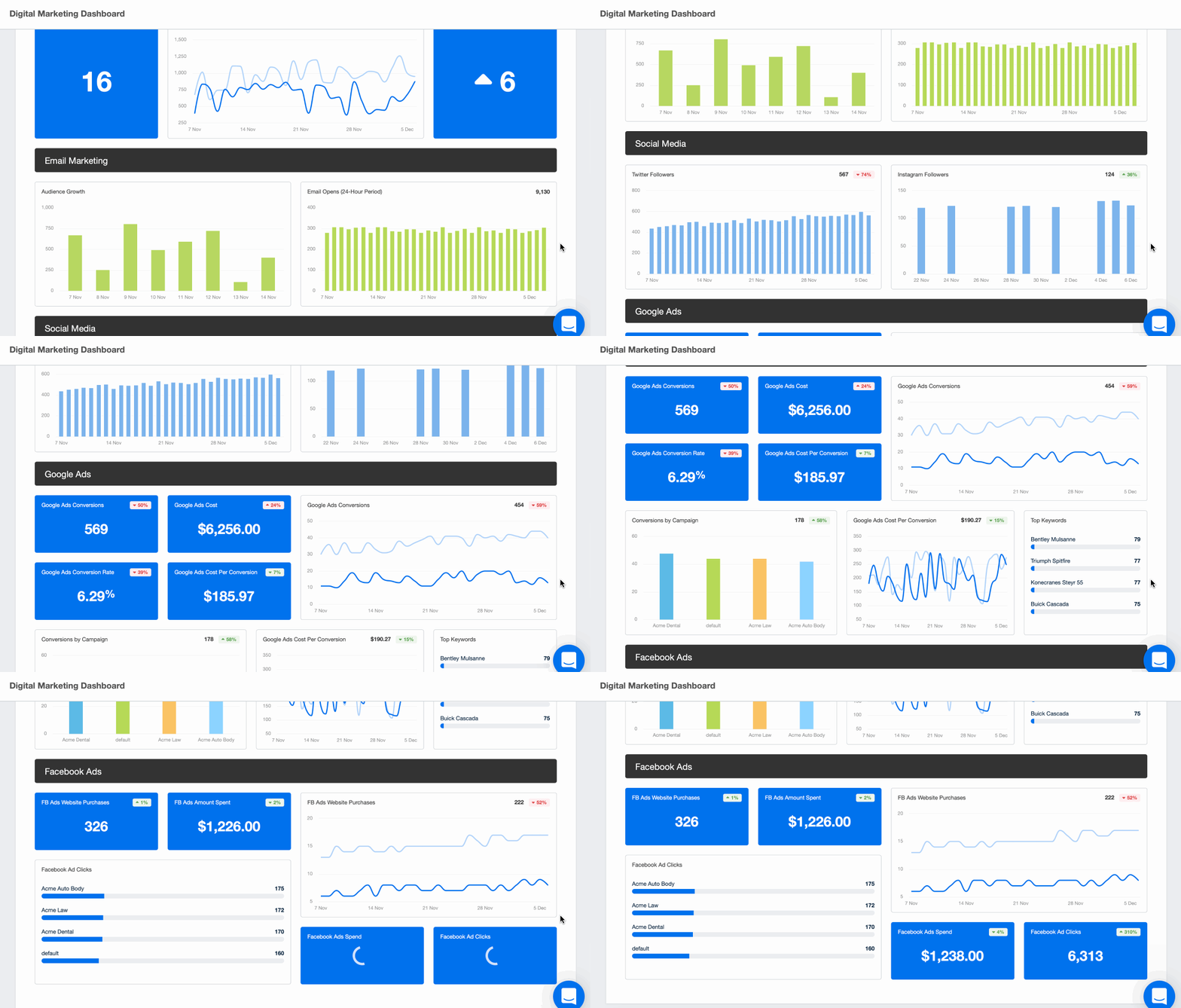
A broader view of marketing performance, this template combines marketing metrics from multiple channels, including paid advertising, email marketing, SEO, and social media platforms. A marketing report template ensures all relevant data points are included for a complete snapshot of overall performance.
Weekly social media report template

This template tracks marketing metrics like engagement, reach, impressions, follower growth, and top-performing content across social media channels. It’s ideal for showcasing the impact of social strategies and identifying trends across social media platforms. A weekly social media report template helps streamline the process and ensures consistent presentation of key metrics week over week.
Need to see an example of a social media report template before you get started? We’ve got one ready-to-go for you here!
Weekly SEO report template

A weekly SEO report focuses on performance metrics including keyword rankings, organic search traffic, backlink acquisition, and search visibility. For ongoing SEO campaigns, an SEO weekly report template simplifies data collection and keeps clients informed about the progress driving their organic results.
Preview our SEO report template here.
Weekly project status report template

When managing multiple marketing projects for a client, this template keeps all stakeholders informed about project progress, completed milestones, blockers, and upcoming tasks. It’s best for multi-deliverable campaigns where stakeholder visibility matters. A weekly report template provides clarity and ensures accountability across the full scope of work.
Weekly KPI report template

For clients who prioritize business outcomes over channel-by-channel detail, a weekly KPI report template highlights the critical indicators tied directly to their business goals. Key metrics might include conversion rates, return on ad spend (ROAS), qualified leads, or customer acquisition costs (CAC).
Weekly summary report template

A weekly summary report is particularly useful for executives who need quick insights without diving into granular data. Every digital marketing report template should include a high-level overview that summarizes key activities, project progress, and overall performance results in a brief summary format.
Build a custom digital marketing report in minutes! Preview the template here!
Executives aren’t the only ones struggling to make sense of marketing data. It’s time-consuming for everyone. Use the AI Summary widget from AgencyAnalytics to generate report summaries in no time. Make sense of all that granular data and give clients a snapshot of the metrics they care most about. 👇

By tailoring your report type to the client’s specific goals, you demonstrate a deeper understanding of their priorities while providing meaningful updates.
Weekly reporting best practices
Creating a weekly marketing report that resonates with clients involves more than just compiling marketing data. Follow these best practices and your reports will stand out as insightful, actionable, and easy to understand.
Know your audience: Tailor the report to your client’s specific needs and priorities. A weekly activity report format may work well for project managers focused on weekly tasks, while executives might prefer a concise summary highlighting high-level results.
Keep it visual: A picture is worth a thousand data points. Use visual reports, graphs, charts, and tables to highlight trends and insights. A marketing dashboard makes it easier to present data in a digestible format.
When selecting a reporting tool, it was paramount for our team at seoplus+ to find a solution that would generate visually appealing, professional reports that effectively conveyed the results and insights to our clients.
Alexa Rees, SEO Manager, seoplus+
Focus on what matters: Don’t overwhelm your clients with every available performance metric. Highlight the important metrics that support decisions, and provide context to explain their significance.
Emphasize automation: Automating your reporting process saves hours, reduces human error, and ensures clients receive consistent updates. Platforms like AgencyAnalytics let you create reports that pull from multiple data sources automatically, eliminating manual data entry entirely.
Be transparent: Address both wins and challenges. Showing areas for improvement builds trust and demonstrates your proactive approach to resolving issues. A weekly progress report that includes a solution alongside the problem tells a much better story than one that only shows the good news.
Use templates: Report templates ensure consistency and save time. Starting with a structured format lets you focus on the analysis rather than rebuilding the report from scratch every week.
We create reports and templates very quickly for clients so that when it comes time for the meeting, everything is ready and will be ready for each meeting moving forward. We’re able to integrate so many other things that help the client get excited about certain results that we were not able to report on in the past because it was too time-consuming to do so!
Janeene High, CEO, Results Driven Marketing
Provide actionable insights: Don’t just report on what happened. Explain why it happened and what your marketing team plans to do next. A well-structured weekly marketing report includes specific recommendations for optimizing the marketing campaign going forward.
Add week-over-week context: Single-week numbers can be misleading. A dip in website visitors one week might reflect a seasonal pattern rather than a real problem. Always frame performance metrics against the previous week or a comparable period so clients don’t overreact to short-term volatility.

Under a time crunch? The Smart Reports and Smart Dashboards feature from AgencyAnalytics builds exactly what you need in 11 seconds or less. Try it out for yourself with a 14-day free trial.
How to write weekly marketing reports in 5 steps
A strong weekly marketing report is a strategic tool that demonstrates your agency’s value and keeps clients engaged with the work that’s moving their business forward.
Follow these five steps to create reports that inform and impress:
Define the goal of the report
Start by understanding the purpose of the report. Every weekly marketing report should be built around what the client needs to decide or know this week, not around what data happens to be available.
A weekly marketing report for a paid ads client might focus on ad spend, conversion rates, and lead generation. A report for a content-focused client might center on website traffic, organic search performance, and content engagement. Let the client’s decision-making needs drive the structure.
Choose the right metrics for the audience
Align the report’s content with your client’s business goals. Metrics should directly relate to what they’re trying to achieve.
A weekly progress report for an internal marketing team might highlight weekly tasks completed and next steps. An SEO weekly report for a client focused on growth might include keyword rankings, organic traffic, and search visibility. An executive report for a CMO might focus on revenue generated, qualified leads, and overall business performance.
We report on the basic KPIs such as clicks, impressions, spend, leads etc., however we also take that one step further report on qualified leads, offers made and deals closed. Ultimately, we know our clients hire us to help them close more deals so the most important KPI we can track for them is how many deals we are helping them close. Everything else is secondary to that.
Jacob Hicks, Owner, Freedom Leads (formerly Magnyfi)
Organize the data in a consistent format
Maintain a consistent structure across all reports to improve readability and save time. When clients know where to find each section, they spend less time navigating and more time acting on the insights.
A brief summary at the top of the report is a good starting point, followed by key metrics, a summary of activities, highlights, and next steps. Use the same marketing report template each week so the format becomes familiar to both your team and your clients.
Make the report visual and easy to scan
Visual reports help clients quickly grasp performance data. Charts, graphs, summary widgets, and whitespace all make complex marketing metrics easier to digest. Most clients won’t read every line, so use formatting to guide their eyes toward what matters most.
Read More: 7 Best Dashboard Tools for Visualizing Data
Add context, recommendations, and next actions
Numbers alone don’t tell the full story. Add context to the marketing data and include actionable recommendations based on what happened this week. For example:
If a drop in revenue generated aligns with reduced ad spend, explain the connection and recommend a budget adjustment.
If a spike in engagement on social media channels came from a specific post, identify why it worked and suggest repeating the approach.
By following these steps, you’ll create reports that highlight your agency’s expertise and give clients genuine confidence in your marketing strategy.

Streamline your reporting process with scheduled, automated marketing reports. Set a specific date and time, review for final approval, and let the platform do the rest. Start your 14-day free trial with AgencyAnalytics today!
How to automate weekly marketing reports for clients
Manual weekly reports take time your agency doesn’t have. Pulling marketing data from Google Analytics, Google Ads, social media platforms, and other data sources by hand is slow, and it introduces human error. Automation solves both problems.
Here’s how to set up a repeatable, automated weekly marketing reporting workflow with AgencyAnalytics:
Connect your data sources: Link all client marketing platforms, including Google Analytics, Google Ads, social media channels, email marketing tools, and any other marketing platforms, directly to AgencyAnalytics. Data flows in automatically so you’re never chasing screenshots or copying numbers by hand.
Build once, reuse often: Create a weekly report template for each client type (paid ads, SEO, social media, local marketing reports) and clone it for new clients. This means your team can create reports in just a few clicks rather than starting from scratch every week.
Schedule automated delivery: Set a specific send day and time for each client’s weekly report. AgencyAnalytics delivers it automatically on a weekly basis, keeping your agency consistent without adding to the workload.
Use approval mode: Before a report goes out, turn on approval mode to give it a final review. Your marketing team can check that the insights and context are right before the client sees it, so you maintain quality control without slowing down delivery.
Add AI-generated summaries: Use the AI reporting tools in AgencyAnalytics to generate a brief summary of each report. This turns granular data into clear, client-friendly language in seconds, saving hours across your full client roster.
Give clients dashboard access: Between reports, clients can log into their own marketing dashboard to check campaign performance, website traffic, and key metrics on their own. This reduces the number of one-off requests your team receives and keeps clients engaged with their data.
When weekly reporting works this smoothly, it stops feeling like overhead and starts feeling like a competitive advantage. Your agency saves hours each week, your clients stay informed, and every report goes out on time.
Streamline weekly marketing reporting with AgencyAnalytics
Weekly marketing reports are one of the most effective ways to build client trust, prove the value of your marketing efforts, and keep everyone aligned on business goals. Whether you need a focused weekly KPI report, a project status update, or a full-channel marketing report template, the key is a consistent format that’s easy to read and built around what your client actually needs to know.
The challenge is time. Manually pulling marketing data from multiple platforms, formatting reports, writing summaries, and sending them on a weekly basis is expensive in hours — and prone to human error. Automating the process with AgencyAnalytics means your team can create reports in just a few clicks, schedule delivery, review with approval mode, and let the platform handle the rest.
Your clients get professional, branded weekly marketing reports delivered consistently. Your team gets time back to focus on strategy and the marketing campaign work that actually moves the needle.
Ready to get started? Try AgencyAnalytics today!
Frequently asked questions about weekly marketing reports
It depends on campaign activity and client expectations. Most agencies send weekly reports during active paid ads campaigns, product launches, or any period where marketing data changes fast enough to require quick decisions. For steadier campaigns like SEO or content marketing, a weekly progress report every other week or a monthly cadence may be enough. The key is to match reporting frequency to how often actionable decisions need to be made.
A marketing dashboard shows live data. It’s always on, always updating, and useful for monitoring marketing metrics in real time. A weekly marketing report is a packaged narrative. It takes a specific window of data from the past week and wraps it in context, analysis, and recommendations. Dashboards are great for clients who want to check in on their own. Weekly reports are structured updates that ensure nothing important is missed and that the client understands what the numbers mean for their business goals.
Most weekly marketing reports should be brief and focused. A well-structured report can cover everything a client needs in two to four pages or a single scrollable dashboard view. The goal is to surface the most actionable insights from the past week without overwhelming clients with more granular data than they need. If a report takes more than 10 minutes to read, it’s probably too long.
Be transparent and lead with context. If campaign performance dropped, explain what happened and why. Was it a seasonal shift in website traffic? A technical issue? A change in the paid ads auction landscape? Then show the plan to course correct. Clients can handle bad news. What erodes trust is finding out about problems later or receiving a report that glosses over them. A weekly marketing report that honestly addresses challenges with a clear path forward actually strengthens the client relationship.
Richelle Peace is a writer with a degree in Journalism who focuses on web content, blog posts, and social media. She enjoys learning about different topics and sharing that knowledge with others. When she isn’t writing, Richelle spends time teaching yoga, where she combines mindfulness, movement, and her passion for wellness.
Read more posts by Richelle PeaceWhat other agency experts are reading

Local marketing reports: How to create client-ready reports that prove ROI
Learn how to create local marketing reports, choose the right KPIs, and build client-ready reports with templates, automation, and clear ROI insights.

20 agency client reporting tips that prove value & improve retention
Access 20 simple, real-world tactics to improve client engagement with reports—so the work behind them drives action instead of getting skipped.

The TL;DR weekly summary report: How to win clients over with shorter, smarter updates
Tired of sending reports that go unread? This guide shows you how to create clear, concise weekly summary reports that highlight key insights, build trust, and keep clients engaged.