Pay-per-click (PPC) ads remain one of the fastest ways to get results. But today's PPC campaigns are more complex, blending search, social, and AI-driven bidding strategies across multiple platforms. Without a clear PPC reporting process that connects ad spend to business outcomes, it's tough to show clients why your work matters.
Today's clients expect more than vanity metrics. They want PPC reports for clients that connect campaign data to revenue across Google Ads, Microsoft Ads, Meta Ads, LinkedIn Ads, and Facebook Ads. They want to track performance across multiple channels, compare business goals to results, and see keyword performance over any reporting period. And they want it all in one place.
A good PPC report doesn't come from juggling Google Sheets or manually pulling PPC metrics from multiple data sources. It comes from using a PPC reporting tool that simplifies the data, automates delivery, and highlights the actionable insights that matter most.
Discover eight marketing report examples with the KPIs, sections, and best practices agencies use to show ROI, explain results, and automate client reporting.
An overview of the 31 most important digital marketing analytics that your agency should track to create relevant and actionable client reports & dashboards.
May 10, 2024
That's where PPC reporting software makes the difference. It helps performance marketers showcase ROI, identify trends, and deliver recurring reports using the same key metrics their clients care about. Whether you're focused on ad spend efficiency, reaching the right target audience, or campaign-level optimization, a reliable automated reporting tool supports your PPC strategy and delivers the insights clients expect. It's how agencies turn PPC reporting into long-term client retention.
Let's start with the foundation: what exactly does a PPC client report include, and why does it matter for your agency?
Key takeaways
A PPC client report connects ad spend to business outcomes so clients see value instead of raw data.
The best reports focus on the metrics clients care about: conversions, cost per acquisition (CPA), return on ad spend (ROAS), and revenue.
Structuring reports with an executive summary, goal pacing, and clear next steps keeps clients confident and reduces reactive conversations.
Automating your PPC reporting with AgencyAnalytics saves your team hours per client and lets them focus on strategy instead of manual reporting.
What is a PPC client report?
A PPC client report is a structured summary of pay-per-click campaign performance, built specifically to help clients understand results, evaluate ROI, and make informed decisions about their ad spend. It pulls PPC data from multiple ad platforms into one clear view and pairs it with strategic insights and recommendations.
At its core, a PPC report for clients shows how paid media campaigns are driving business outcomes. Whether you're running Google Ads campaigns, Facebook Ads, or LinkedIn retargeting, the report brings those efforts into one place so your client sees the full picture.
These elements come together to deliver a performance narrative that helps the client stay confident in your agency's work and continue the partnership.
Why PPC reporting matters for agencies
PPC reporting is how you prove your value. If your clients don't see what your team is doing and how it connects to their bottom line, they'll start wondering whether your agency is worth keeping.
When a PPC report is done well, it builds trust, improves communication, and helps clients understand the value of their investment. It also creates a consistent framework for reviewing progress and making strategic decisions.
Builds trust through transparency
Clients want to know where their budget is going. A well-crafted report shows what was spent, what was achieved, and what steps are next. This level of clarity makes it easier to retain clients because they see results backed by data.
Reduces reactive client conversations
Without consistent updates, every client meeting becomes a performance review. Regular PPC reporting helps your team stay aligned with the client and prevents last-minute surprises. It sets the tone for ongoing strategic collaboration.
Creates a record of strategic wins
Each report adds to a running timeline of performance. Clients can look back and see how campaigns evolved, what strategies worked, and how key decisions contributed to long-term success. This is especially helpful when evaluating new tactics or adjusting budget allocations.
Makes campaign decisions easier
Reports help clients make informed choices. With clear data and thoughtful analysis, your team can guide next steps, whether that's increasing spend, refining ad copy, or shifting focus to higher-performing campaigns.
Your clients expect clarity. Your team needs efficiency.
Automate reporting with AgencyAnalytics and deliver more impact with less effort.
Clients don't log into their reporting platform to admire your data tables. They want to know one thing: is this working?
Business outcomes over vanity metrics
Impressions and clicks are useful context, but they're not what keeps clients around. What clients actually want to see is how PPC campaigns connect to revenue, leads, and their specific business goals.
Your clients want to know their ad dollars are well-spent. Focusing prominently on conversion metrics will immediately demonstrate your agency's value. PPC reporting lets you filter out noise from your live dashboards and condense them to suit each client's needs.
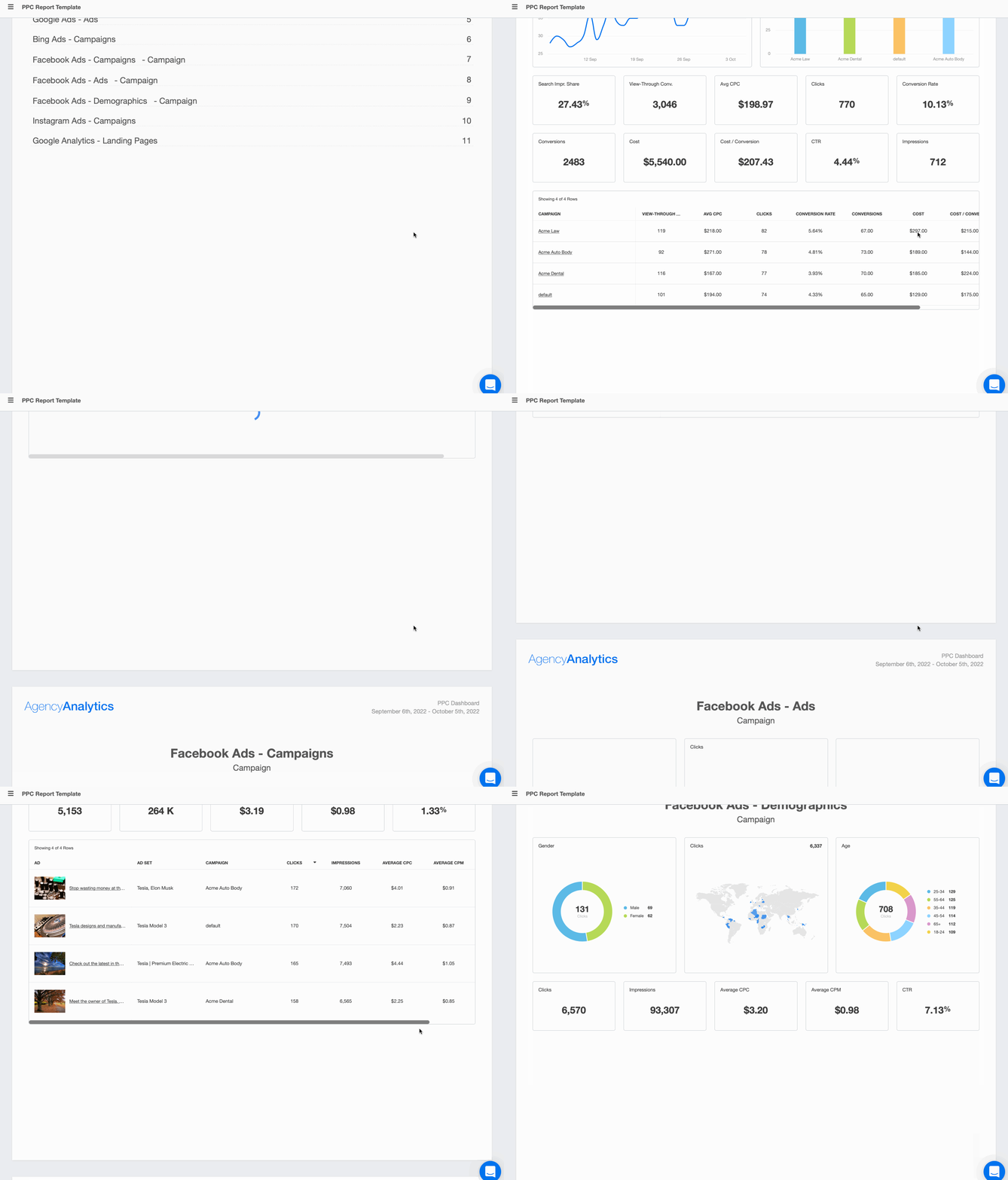
Put ROI at the forefront of your PPC reports. Display the conversion rate, cost per acquisition (CPA), and ROAS metrics they care about most. The custom PPC report template from AgencyAnalytics has 8 sections that help marketers immediately highlight key insights for client reports.
Show the bigger picture, too. PPC marketing is only a piece of a typical marketing strategy. If you need to show how other marketing channels are performing, create reports that pull metrics from Google Analytics, social media platforms, and other data sources. PPC affects channels across the board. Show it in your reporting.
AgencyAnalytics has helped us to recoup time that was previously spent doing our reporting via Google Data Studio (formerly Google Data Studio). We are now able to update reports much more seamlessly and it is one of the few reporting softwares out there that allows API connections to so many different social media and ad platforms, as well as incorporating SEO tracking.
The difference between a PPC dashboard and a client report
This is a common confusion point, and it's worth getting right.
A PPC dashboard is a real-time view of campaign performance. It's great for internal teams who need to monitor PPC performance throughout the day and react quickly to changes. Dashboards pull live data from ad platforms and show performance trends as they happen.
A PPC client report, on the other hand, is a curated summary for a specific reporting period. It filters the raw data, adds context and analysis, and frames performance around the client's business goals. Think of the dashboard as your internal tool and the report as your client-facing deliverable.
Both are valuable. The best agencies use dashboards to monitor PPC performance daily and use visual reports to communicate results during weekly or monthly reporting.
Clearly communicate your agency’s success in driving ROI with a customizable Amazon Ads Report Template or a professional Google Ads Report Template. Try AgencyAnalytics free for 14 days!
Key metrics to include in a PPC report
The best PPC client reports don't overload clients with numbers. They spotlight the key metrics that show progress and support smart decision-making. Here are the KPIs that give clients a real sense of what's working and why it matters.
Leads and conversions
This is the outcome your clients care about most.
A conversion could be anything from a lead form submission to an ecommerce purchase, depending on the business model. Your report should highlight both the total number of conversions and the cost per conversion, giving clients a direct link between spend and results.
Why it matters: It answers the fundamental question: "Are we getting what we paid for?"
Example: If a local HVAC client sees 57 form fills from $1,200 in ad spend, your report should call out that each new lead costs roughly $21, well below their $40 target.
Cost per acquisition (CPA) and cost per lead (CPL)
CPA and CPL measure how much it costs to acquire a customer or generate a qualified lead. These are the metrics that connect ad performance to real business outcomes.
Why it matters: CPA tells you if PPC campaigns are efficient at turning clicks into customers. It accounts for the full conversion path, including landing pages and follow-up. If your CPA is climbing, it's a signal to investigate campaign structure, audience targeting, or the post-click experience.
Example: A SaaS client running Google Ads and LinkedIn Ads might see a CPA of $85 on search campaigns and $140 on LinkedIn. Your report should break that down by channel so the client understands where their budget allocation is most efficient and where offline conversion tracking or CRM integration may reveal a different picture.
Return on ad spend (ROAS)
ROAS measures how much revenue was generated for every dollar spent on ads. It's one of the clearest indicators of profitability, especially for ecommerce and direct-to-consumer campaigns. For many clients, ROAS is their north-star metric.
Why it matters: It connects campaign performance to revenue and justifies the ad budget.
Example: If you have an ecommerce client that spent $5,000 on ads that generated $20,000 in sales… that means they see a ROAS of 4.0. Your report should highlight that this campaign is generating four dollars for every one spent.
Show clients the connection from their PPC campaigns to their sales. Build ecommerce reports and surface actionable insights (fast) with AgencyAnalytics.Start your free 14-day trial today.
Click-through rate (CTR) and cost per click (CPC)
Click-through rate (CTR) tells you how often people click on your client's ads after seeing them. It reflects the relevance of your targeting and the effectiveness of your creative assets.
Cost per click (CPC) helps clients understand how competitive and efficient their campaigns are. It's not a final outcome metric, but it provides valuable context for spend and budget planning.
Why they matter: A high CTR signals strong audience engagement and contributes to better Quality Scores in Google Ads, which can lower CPCs. Together, CTR and CPC show whether your ad creative is resonating and whether you're paying a fair price for attention.
Example: If a law firm is paying $15 per click in a high-competition market but only $4 for branded keywords, your report should explain how campaign segmentation keeps acquisition costs manageable. Learn how to optimize client spend with these Google Ads budget and bidding strategies.
Agency Tip: Want to drive stronger engagement for a client’s campaign? Manually calculating engagement rates across multiple Instagram accounts is time-consuming.Try our free Instagram engagement rate calculator.
Quality Score and impression share
Quality Score is specific to Google Ads. It's a composite score based on ad relevance, expected CTR, and landing page experience. A high Quality Score lowers CPCs and boosts ad visibility without increasing spend.
Impression share measures how often a client's ads are shown compared to the total available impressions for their target keywords and audience. It reveals missed opportunities and helps guide budget decisions.
Example: If a client has a 20% impression share on a top-performing campaign, your report should highlight the potential to capture more market share by increasing budget or improving ad rank. If a campaign with a Quality Score of 9 consistently outperforms others at 5, use your report to show how copy tweaks and landing page optimization are improving results.
Top campaigns, ad groups, keywords, and creatives
Clients want clarity on what's driving performance. Highlighting top-performing elements, whether by campaign, ad group, keyword, or creative, helps validate your strategy and shows clients exactly where their investment is paying off.
Why it matters: It shows clients where to double down and which areas are worth expanding.
Example: If one keyword campaign generates 65% of conversions at half the average CPC, your report should identify it as a prime candidate for budget reallocation. Including creative performance data helps clients see which ad formats and messaging resonate with their target audience.
Agency Tip: See how your clients stack up against others in their exact industry. With benchmark Insights from AgencyAnalytics, your team will compare marketing data across platforms and uncover performance gaps you can turn into wins. Try it out with your 14-day free trial!
How to structure a PPC client report
The metrics you include matter. But how you present them matters just as much. A well-structured PPC report tells a story that's easy to follow, even for clients who aren't Google Ads specialists.
Start with an executive summary
Open every report with a brief executive summary. This should be 3 to 5 sentences that cover what happened during the reporting period, what's improving, and what your team plans to do next. Think of it as the "if you read nothing else, read this" section.
Busy clients (and their internal teams) often only read the first section. Make it count by leading with the most important business outcomes.
Show goal pacing and month-over-month performance
Clients want to see progress over time. Include performance trends that show month-over-month movement on key metrics like conversions, CPA, and ROAS. Goal and budget tracking makes it easy to visualize whether campaigns are on pace to hit targets.
When your client sees a clear visual showing they're 80% of the way to their monthly lead goal by the third week, that builds confidence. It also reduces those mid-month check-in calls.
Break down results by channel and campaign
If you're running PPC campaigns across multiple platforms (Google Ads, Facebook Ads, LinkedIn Ads, Microsoft Ads), break down results by channel. Then go one level deeper to show campaign or ad group performance.
This helps clients understand how each platform contributes to the bigger picture. It also makes budget allocation conversations much easier, because the data does the talking.
End with insights, recommendations, and next steps
Every good PPC report ends with a "so what?" section. What do the numbers mean? What should change? What's the plan for future campaigns?
This is where your strategic insights live. Call out winning campaigns worth scaling. Flag underperformers and explain your optimization plan. Recommend budget shifts based on performance data. This section is what separates a data dump from a report that retains clients.
Example PPC report table: metrics, definitions, and examples
Here's a quick-reference table your team can use as a sample PPC report framework. Each metric is paired with its definition and a real-world PPC report example.
Metric
Why it matters
Example
Conversions
Tracks the actions (leads, purchases, signups) that matter to the client's business.
57 leads from $1,200 spend = $21 cost per lead, well below $40 target.
Cost per acquisition (CPA)
Measures how much it costs to acquire a customer across the full conversion path.
Google Ads CPA of $85 vs. LinkedIn Ads CPA of $140, guiding channel budget allocation.
Return on ad spend (ROAS)
Connects revenue to ad spend. Often the client's primary success metric.
$5,000 ad spend generated $20,000 revenue = 4.0 ROAS.
Click-through rate (CTR)
Reflects ad relevance and creative effectiveness. Impacts Quality Score.
Seasonal promo CTR of 7.2% vs. 2.8% account average signals strong messaging.
Cost per click (CPC)
Evaluates bidding efficiency and competitive landscape.
$15 CPC on competitor terms vs. $4 CPC on branded keywords.
Quality Score
Google Ads composite score that directly influences ad rank and CPC.
Campaigns with Quality Score 9 outperform those at 5, lowering cost per click.
Impression share
Shows what percentage of available impressions your ads capture. Reveals growth opportunities.
20% impression share on top campaign = opportunity to capture more market share.
Top campaigns/keywords
Identifies what's driving results and where to increase investment.
One keyword generates 65% of conversions at half the average CPC.
8 strategies to create client PPC reports with minimal effort
Reporting doesn't need to drain your team's time or energy. With the right systems in place, you'll create client PPC reports that look great, highlight real results, and take a fraction of the effort. These strategies help PPC agencies streamline their reporting process, so your team spends less time formatting and more time optimizing.
Many agencies ignore these other channels because managing and reporting across multiple PPC campaigns takes time. Smart agencies tap into channels that may offer lower CPCs and reach their clients' target audience where they're already spending time.
We needed a platform which could integrate with several marketing channels. This included offering data on Google Business, SEO rankings & a range of PPC reports. Before we had to use several different platforms rather than just one.
Cross-channel PPC reporting software allows your agency to monitor all your clients' ad networks closely while giving you the ability to branch out and try newer channels where competition might be lower. Monitoring and optimizing Google Ads campaigns along with other PPC channels is crucial for improving performance and targeting across multiple accounts.
AgencyAnalytics integrates with 85+ marketing platforms, including TikTok Ads and Pinterest Ads. Agencies have complete flexibility to test emerging channels while keeping all campaign data synchronized automatically.
2. Use internal dashboards to keep your team aligned
Forget the dozens of open tabs, spreadsheets, and screenshots to constantly update your clients' PPC metrics. Marketing dashboards built for PPC automatically pull in your clients' campaign data from every ad platform, so your team doesn't need to spend time collecting it manually. That means faster optimization and fewer manual check-ins.
PPC dashboards make it easy to create graphs in a few seconds to visualize campaign performance better. Keep your entire marketing team in the loop on all of your agency clients' PPC data in real time, avoiding the back-and-forth messaging.
Marketing agency tools from AgencyAnalytics make staff management easy. Give your marketing team their own logins and use your meeting time for strategizing and improving ad content instead.
Scratching your head when it comes to Google Ads? We've got you covered. Check out this article to better understand whichGoogle Ads metrics to track.
3. Give clients access to live dashboards when needed
Some clients really like to be in the loop. If they're always reaching out between reports, create a separate login where they can access a simplified PPC dashboard.
Select what information you want them to see without overwhelming them with too much data until your next PPC report gets sent out. Your more hands-on clients will be happy to check on campaign performance any time of day, and your agency will get bonus points for transparency.
4. Use custom metrics to summarize cross-channel performance
There comes a time when your agency needs to provide a deeper level of analytics to truly understand your client's campaign performance, especially for clients with larger businesses. Custom metrics make it easy to combine data from various marketing sources into one single metric.
Want to combine data from several PPC platforms to understand the true return on ad spend (ROAS) of your cross-platform advertising campaigns? Done.
Boiling it down to a single metric gives deeper insight into business performance and makes it easier for clients to understand, no matter their level of marketing expertise. This is especially powerful when presenting data to clients managing multiple PPC campaigns across multiple channels.
When your agency clearly communicates progress to clients (in one single image) it spells transparency. And clear communication is what keeps client relationships strong.
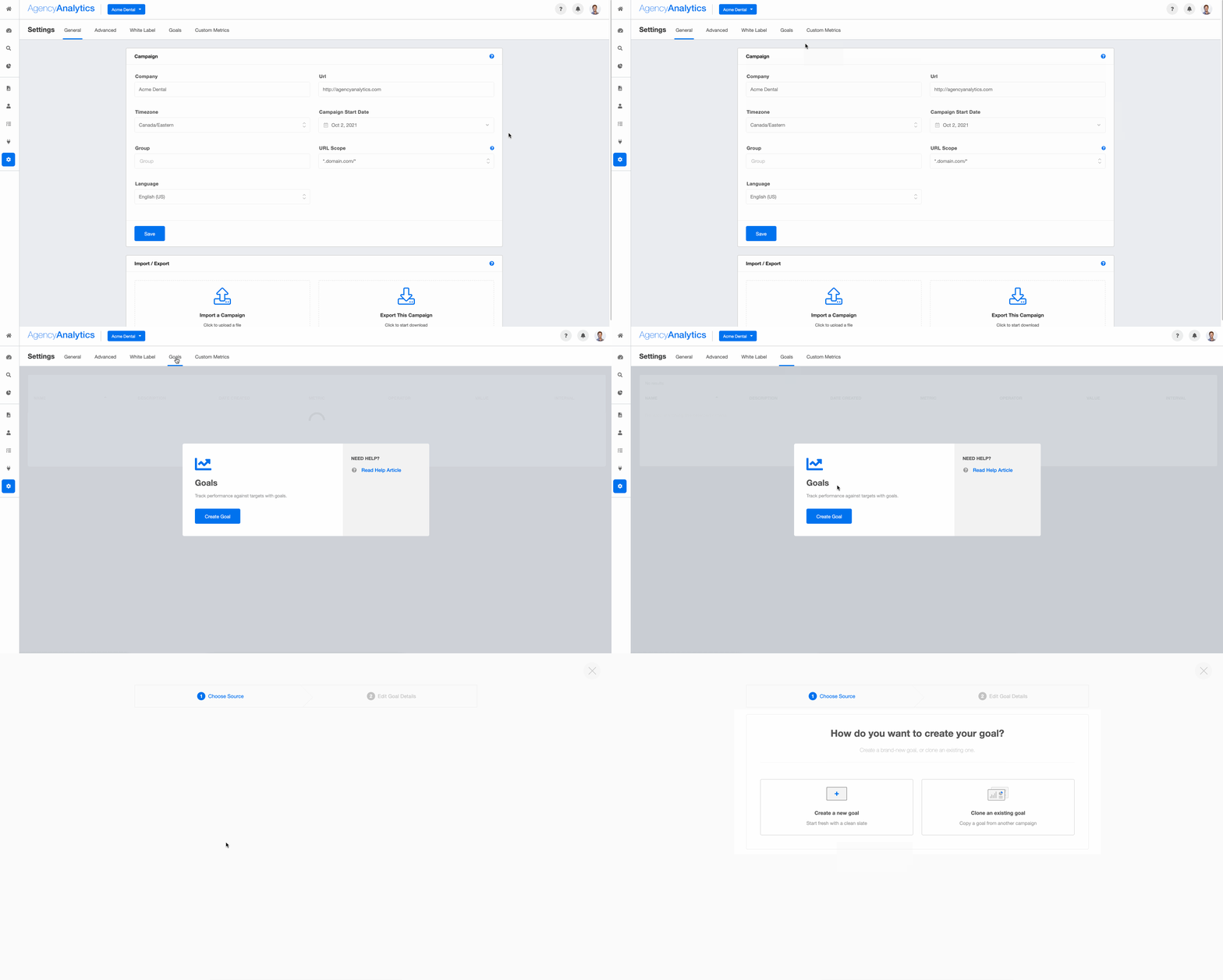
Goal setting is critical for establishing agency-client alignment. When we set goals in collaboration with our clients, not only are we saying, "This is what we are trying to accomplish," but we're also creating the structure for how to determine if our efforts are successful or not.
6. Use annotations and commentary to tell the story
Using the Annotations feature, give your clients more insight to avoid misunderstandings and back-and-forth calls and emails. Explicitly highlighting when you hit targets builds trust and keeps you on their payroll. Add an executive summary and annotations to every report so the numbers have context.
7. Include your agency's markup to avoid confusion
If your agency's business model for PPC management includes a percentage of total ad spend, there's no need to show your agency's gross PPC cost. Automatically include your markup in all client-facing dashboards and performance reports to avoid misunderstandings.
For agencies that bill separately, keeping the markup visible may make more sense. The key is consistency: whatever approach you choose, apply it across all client reports so there's never a question about what the numbers represent.
While your agency is busy staying up to date with the latest trends in PPC advertising, you'll also need to be pushing out reports consistently to keep your clients informed.
We use the SEO and PPC reports templates most frequently as a starting point for the customized reports we deliver to our clients. Instead of starting from ground zero and building a new report from scratch, these templates allow us to speed up the process, saving our team time and resources.
Graham Lumley, Director of Growth Marketing, Blackhawk
Start with what saves the most time: automate data pulls first, then use PPC report templates with scheduled delivery to get recurring reports out the door. Feature your own logo, brand colors, and URL for a personalized touch while remaining fully scalable across multiple clients.
You can decide if you want to approve each PPC report before it gets sent out, so you can review and address any issues. That way, you don't end up with any surprises, and you can showcase exactly how proactive your agency is.
Agency Tip: Check out this blog to see how to automate PPC reporting end-to-end so your team can focus on insights over busywork.
Experience Client Reporting That's Fast, Automated, and Stress-Free
Create Better, Faster, Automated Reports in Just a Few Clicks
Great PPC reporting isn't about showing every metric. It's about presenting exactly what your clients need to see, with enough context to make it meaningful. Here are the most common mistakes PPC agencies make with client reports.
Reporting too many metrics
A 10-page report full of numbers doesn't impress clients. It overwhelms them. Focus on the 5 to 8 metrics that directly connect to your client's business goals, and cut everything else. If a metric doesn't answer a question your client would actually ask, leave it out.
Focusing on vanity metrics instead of revenue
Impressions and clicks look impressive in a chart, but they don't pay anyone's bills. If your monthly PPC reports lead with vanity metrics instead of conversions, CPA, and ROAS, you're burying the value of your work. Lead with the outcomes that matter to the person paying the invoice.
Failing to explain poor performance clearly
Bad months happen. What erodes trust isn't a dip in performance. It's a report that ignores the dip or buries it in a wall of numbers. When something underperforms, address it head-on. Explain what happened, what you've learned, and what changes your team is making for future campaigns. Clients respect honesty paired with a plan.
Skipping attribution and business context
If your reports don't connect ad performance to revenue or lead quality, clients have to guess whether PPC is actually working. Where possible, integrate CRM data, use attribution models, and reference offline conversion tracking to show the full picture. A Google Ads specialist who can connect a $50 lead to a $5,000 closed deal tells a much more powerful story than one who just reports on cost per click.
How often should you send PPC reports to clients?
The right reporting frequency depends on the client, the account size, and how much is being spent. There's no universal answer, but here are some guidelines that work for most PPC agencies.
Weekly vs. monthly reporting
Monthly PPC reports work well for most accounts. They give enough data to identify meaningful performance trends and allow time for optimizations to take effect before the next review.
Weekly reports make sense for high-spend accounts, new campaign launches, or clients who are actively testing new strategies. They're also useful during seasonal pushes when campaign data changes quickly. Use automated reports with scheduled delivery so weekly reporting doesn't eat into your team's billable hours.
How to tailor reports for different stakeholders
The business owner wants to know if PPC is making them money. The marketing manager wants to see which campaigns are hitting KPIs. The CFO wants a line connecting ad spend to revenue.
Tailor your reporting based on who's reading it:
Business owners: Keep it high-level. Lead with ROAS, total leads or sales, and cost per acquisition. Include a brief executive summary and skip the granular keyword data.
Marketing managers: Go deeper. Show campaign or ad group breakdowns, performance trends, Quality Score changes, and creative testing results.
Ecommerce clients: Focus on revenue, ROAS, and product-level performance. Connect ad performance to sales data from Google Analytics or their ecommerce platform.
Lead gen clients: Highlight cost per lead (CPL), conversion rate by channel, and lead quality indicators. If you have CRM integration, show how leads are moving through the pipeline.
How to automate PPC reporting for clients
Client reporting doesn't have to be complicated. With the right reporting tools, your team will spend less time wrestling with spreadsheets and more time acting on strategic insights. That's exactly what AgencyAnalytics is built for: helping marketers turn complex PPC data into meaningful, client-ready reports in a few clicks.
What to automate first
If you're just getting started with automation, prioritize these steps:
Data pulls: Connect all your ad platforms so campaign data flows into one reporting platform automatically. No more manual reporting with screenshots and copy-paste.
Report templates: Build a report template once, then clone it across multiple clients. Customize the metrics, branding, and sections as needed.
Scheduled delivery: Set your automated reports to go out on a weekly or monthly cadence. Decide if you want to review and approve before sending, or let them fly automatically.
AI summaries: Use AI reporting tools to draft performance summaries and identify anomalies so you can add human context on top of machine-generated insights.
How AgencyAnalytics streamlines PPC reporting
PPC campaigns generate a flood of numbers across platforms. AgencyAnalytics brings it all together on one dashboard and adds the context marketers need to make sense of it.
Benchmarking tools: Compare campaign performance over time or against industry standards. This gives clients a clearer view of what's working and what needs attention. Benchmarks also help prioritize where to focus optimization efforts.
Trend forecasting: See where campaigns are heading (before clients ask). Forecasting tools use historical data to project campaign trends, helping you proactively guide strategy instead of reacting after the fact.
Anomaly detection: Spot outliers without digging. Get alerts when something unexpected happens, so you can investigate and respond before it becomes a problem.
Metric alerts: Get notified the moment KPIs hit thresholds you define. Whether performance surges or dips, your team knows in real time.
AI analysis: AgencyAnalytics' AI assistant interprets campaign trends in natural language, identifies anomalies, and drafts insights for client reports automatically. It improves the PPC reporting process without adding manual analysis time.
With customizable PPC report templates and scheduled delivery, creating PPC reports becomes a task your team barely needs to think about. Reports go out on time, every time, fully white-labeled and tailored to each client's goals. The result? Your agency looks organized, proactive, and always on top of the data.
Client reporting made easy with customizable report templates
Frequently asked questions about PPC client reports
An effective PPC report should include an executive summary, key metrics (conversions, CPA, ROAS, CTR, CPC), goal pacing, a breakdown by campaign or ad group, and a section with strategic insights and next steps. The best reports connect ad spend directly to business outcomes and keep the focus on 5 to 8 metrics that matter to the client.
Start with what they care about most: results and ROI. Use plain language to connect ad spend to leads, sales, or revenue. Instead of saying "CTR increased by 2%," say "More people are clicking your ads, which means your messaging is resonating with your target audience and we're paying less per lead." Always tie PPC metrics back to business goals.
The most important KPIs for a PPC client report are conversions, cost per acquisition (CPA), return on ad spend (ROAS), click-through rate (CTR), and cost per click (CPC). For Google Ads specifically, Quality Score and impression share are valuable supporting metrics. The right mix depends on whether the client is focused on lead generation or ecommerce.
AgencyAnalytics is built specifically for agencies managing PPC reports for clients across multiple accounts and platforms. It connects to Google Ads, Facebook Ads, Microsoft Ads, LinkedIn Ads, and dozens of other ad platforms. With white-label dashboards, scheduled delivery, and AI-powered summaries, it handles the entire PPC reporting process so your team can focus on strategy.
Consistent, clear PPC reports build trust by showing clients exactly where their money is going and what it's producing. When clients see regular progress toward their business goals, backed by honest analysis and a clear plan, they're far less likely to look for another agency. Reporting isn't just a deliverable. It's your strongest retention tool.
Too much data, not enough insight. Agencies often send reports packed with every available metric but forget to explain what the numbers mean for the client's business. The fix is simple: lead with outcomes, add context through annotations and commentary, and always end with recommended next steps.
AI speeds up the reporting process by automatically surfacing anomalies in campaign data, drafting performance summaries in natural language, and identifying performance trends that might take a human analyst hours to find. With AI reporting tools, agencies can deliver deeper insights to clients without adding manual analysis time to their workflow.
Lead gen clients need to see cost per lead, conversion rate, and lead quality. Ecommerce clients want ROAS, revenue by campaign, and product-level performance. Business owners want a high-level executive summary. Marketing managers want granular campaign or ad group breakdowns. Build a core report template, then adjust the focus based on who's reading it and what decisions they need to make.
Benchmarking gives context to raw numbers. A $50 CPA means nothing in isolation, but if the industry average is $80, your client knows they're ahead. Use benchmarking tools to compare campaign performance against industry standards and historical data. This helps clients understand where they stand competitively and helps your team prioritize which PPC campaigns to optimize first.
Written by
Richelle Peace
Richelle Peace is a writer with a degree in Journalism who focuses on web content, blog posts, and social media. She enjoys learning about different topics and sharing that knowledge with others. When she isn’t writing, Richelle spends time teaching yoga, where she combines mindfulness, movement, and her passion for wellness.