How to create an irresistible content marketing report for clients


Table of Contents
- Key takeaways
- Why it's important to send a content marketing report to clients
- Report or dashboard? What each one is for
- What to include in a content marketing report
- How to create a compelling content marketing report in 6 simple steps
- How to build the dashboard behind the report in AgencyAnalytics
- What to look for in content marketing reporting software
- The takeaway
- Frequently asked questions about building a content marketing dashboard
7,000+ agencies have ditched manual reports. You can too.
Free 14-Day TrialTable of Contents
- Key takeaways
- Why it's important to send a content marketing report to clients
- Report or dashboard? What each one is for
- What to include in a content marketing report
- How to create a compelling content marketing report in 6 simple steps
- How to build the dashboard behind the report in AgencyAnalytics
- What to look for in content marketing reporting software
- The takeaway
- Frequently asked questions about building a content marketing dashboard
7,000+ agencies have ditched manual reports. You can too.
Free 14-Day TrialThe digital world is all about content, and creating a lot more of it, which is great news for you as a content marketer!
But while there's an abundance of opportunity, it also means the competition has never been more fierce. There are so many skilled content writers and creators out there, so how do you give your agency an edge? That certain je ne sais quoi your ideal clients are looking for?
Would you be surprised to learn that the answer might be a thoughtfully-constructed, results-focused content marketing report?
Think about the last time a client said, "That sounds great. But what was the ROI?" It's a common question after you've executed a digital marketing campaign, and content marketing efforts are always a little more… tricky to quantify. Those newly acquired backlinks? They're building your client's domain authority. That viral Facebook post? It's driving online purchases. Your client's content marketing campaigns are all interconnected, and your agency needs a way to show the complete picture.
If you're a creatively inclined person, the word 'report' likely sends a little shiver down your spine. As a content strategist and white label content agency owner for the last 14 years, I know the first few times I approached the hard facts and stats of my work's performance, I was a little apprehensive.
But, when you break content reporting down into digestible steps, it becomes a painless–and dare I say–enjoyable task. After all, reporting is an invaluable tool to communicate results in a digestible format for clients, highlighting the value your agency brings to the table, and building trust.
This guide gives you everything you need to make an impressive content marketing report in minutes. Let's get started.
Key takeaways
A content marketing report earns its place by connecting scattered performance data to the business outcomes your client actually cares about.
Build the report around your client's goals first, then choose the KPIs that measure progress toward them.
Group your metrics into traffic, engagement, SEO, lead generation, and revenue so a client understands performance at a glance.
Automating data collection removes the 2.5 hours or more per client each month that agencies spend on manual reporting.
AgencyAnalytics connects 85+ data sources and builds a client-ready dashboard section in as little as 11 seconds.
Why it's important to send a content marketing report to clients
Content creators are super busy carefully crafting awesome content for clients. It's easy to question the necessity of reporting when your schedule is jam-packed with other important activities.
But facts are facts: A content marketing report makes an agency appear professional and dedicated to clients while making it easier to sell marketing services going forward. Content marketing reports are even a handy tool for grabbing the attention of potential new clients.
It doesn't matter how spectacular an agency's content creation skills are. If a client isn't seeing the results they're hoping for, they'll move on to the next provider. Harsh, but true.
That's not to say that your agency has failed if a client's social media content or blog posts aren't reeling in the dollar signs at a rate previously unknown to man. Content success is difficult to track and measure. Direct content marketing ROI alone isn't what will benefit your clients.
Content marketing skills offer clients a whole host of benefits that help them grow their businesses and reach their marketing goals in a sustainable way that aligns with their brand values. But it's an agency's job to communicate that to them, proving value as a digital marketer.

Agency Tip: For maximum client engagement, present your achievements for your clients either over Zoom/Teams or in person, in addition to providing access to the report over email or via a live dashboard that highlights how your agency is achieving client goals. This way, you’re available to field any questions right away and discuss the next steps face-to-face.
It proves content ROI when attribution is indirect
This is the challenge that keeps content marketers up at night. Unlike Google Ads (where spend and revenue are directly linked), content marketing ROI involves longer timelines and indirect attribution. A blog post written today might generate organic traffic for years.
The best way to prove content ROI is to track the full funnel: from organic traffic and engagement metrics at the top, through to lead generation, conversion metrics, and revenue at the bottom. When your client can see performance trends alongside business outcomes, the ROI story becomes clear.
It saves hours of manual reporting
Manual data collection is an agency time-killer. Logging into individual accounts, taking screenshots, copying numbers into a spreadsheet… agencies report spending 2.5 hours or more per client on reporting each month.
A content marketing analytics dashboard automates that entire workflow. Instead of pulling data from each platform by hand, you connect your integrations once and let the dashboard tool do the heavy lifting. That's time your team gets back for higher-level content strategy work.
It shows clients progress they can see for themselves
Clients want to know their content investment is paying off. A well-built report makes it easy to show performance trends over time, highlight top performing pages, and connect content marketing data to business outcomes like lead generation and conversions.
Sharing dashboards with clients through direct login access builds trust and keeps everyone on the same page. When clients can see their own data in real time, there are fewer "what's happening?" emails and more productive conversations about what's working.
Transparent communication with clients is vital to building trust and credibility. AgencyAnalytics' intuitive reporting features enabled us to provide clear and concise data visualizations. This makes it easier for clients to understand campaign progress and results.
Jessica Crist, Production Manager, High Five Media
Report or dashboard? What each one is for
A content marketing dashboard is a visual reporting interface that displays key performance metrics from your content marketing efforts in one centralized view. It pulls data from multiple sources (think Google Analytics, Google Search Console, social media platforms, email tools, and SEO software) so you can track content performance without logging into each platform separately.
Unlike a general marketing dashboard that covers paid ads, CRM pipelines, and everything in between, a content marketing dashboard zeroes in on organic content performance. And unlike a static content marketing report (which is a snapshot in time), a dashboard gives you up-to-date information with real-time or near-real-time data that updates automatically.
For agencies managing content across multiple clients, a content dashboard is your performance command center, while reports are the polished deliverables you send to clients. Build the dashboard once, and the report largely builds itself.
The problem both of them solve: scattered data
Content marketing data lives everywhere:
Blog traffic in Google Analytics.
Keyword rankings in Semrush or Ahrefs.
Social engagement on each individual platform.
Email open rates in Mailchimp or HubSpot.
When your data is spread across a dozen tools, getting a complete picture of content marketing performance is exhausting. Presenting some complex spreadsheet won't cut it (and it's a pain to put together). A centralized dashboard solves this by connecting all those data sources in one place, so you can pull insights from complex campaigns fast with data-rich dashboard reporting software.
What to include in a content marketing report
An effective content marketing report groups your content marketing metrics into clear categories, which makes it easier for clients (and your own team) to understand user behavior and content performance at a glance. Here's how content marketers typically organize their reporting.
Traffic and reach metrics
Traffic and reach metrics tell you how many people are finding and viewing your client's content. Track metrics like sessions, page views, traffic sources, and impressions across organic search and social channels. This gives you the complete picture of how far your content reaches across marketing channels.
Engagement metrics
Are people sticking around once they find the content? Track engagement metrics like bounce rate, average session duration, scroll depth, and social media engagement (likes, comments, shares on social media posts). These reveal whether users visit only one page or actually consume the content you're creating.
SEO metrics
SEO metrics are essential for agencies running content marketing strategies with an organic search focus. This includes keyword rankings, organic traffic trends, total backlinks, referring domains, and data from Google Search Console. A dedicated section on your SEO dashboard helps track how content performance feeds into broader search visibility over time.
Lead generation and conversion metrics
Content should drive business outcomes. Track conversion metrics like form submissions, resource downloads, email signups, and the conversion rate on key landing pages. These data points connect your client's content marketing efforts to their sales pipeline and show which content pieces generate the most marketing-qualified leads.
Revenue and ROI metrics
This is where you prove content marketing ROI. Connect your reporting to CRM or ecommerce data to track revenue attributed to organic content. Even if direct attribution is tricky, showing performance trends alongside revenue data helps your clients see how content contributes to business growth.
Separate vanity metrics from actionable metrics
Page views and follower counts feel good. But do they move the needle for your client's business?
Vanity metrics show activity, while actionable metrics show impact. A spike in page views matters when it correlates with more form submissions or sales. A growing follower count is meaningful when engagement rate and click-through rate are climbing too.
Your report should make it easy to see these connections. When you track the right essential metrics side-by-side, you'll know which social media posts actually drive website traffic and which blog posts lead to real conversions.
Need a quick reference for what specific data points belong in a content marketing report? Here are some top-tracked content marketing KPIs.
Metric | Description |
|---|---|
The position of targeted keywords in search engine results. | |
The number of website visitors coming from search engines. | |
The percentage of users who click on a website link (e.g., from search results, social media, or an email). | |
The percentage of users who complete a desired action after clicking a link (e.g., signing up for a webinar). | |
The percentage of visitors who leave after viewing only one page on your client's site. | |
The time that users typically spend on your client's website. | |
Follower growth | The increase in followers across your client's social media platforms. |
The percentage of users that interact with your client's content (likes, comments, shares) relative to follower count. | |
Leads generated | A measure of how many leads were captured through your client's organic content. |
The number of backlinks pointing to your client's website from external websites. | |
Referring domains | The number of unique domains linking to your client's website. |
The number of times users watch a specific video on a platform like YouTube or Vimeo. | |
The average length of time viewers spend watching specific videos. | |
New vs. lost backlinks | The number of new backlinks acquired versus those lost over time. |
Choose the visualization that best illustrates your client’s marketing data. Access a variety of chart types in AgencyAnalytics–sign up for a free 14-day trial today.
How to create a compelling content marketing report in 6 simple steps
Let's take a deeper dive into the step-by-step process for creating content marketing reports that are sure to wow your clients.
Step 1: Define the content marketing strategy goals and key metrics
It's important to be crystal clear on the reason you're creating content for a client. Of course, this is fundamental to creating impactful content and understanding your target audience, but it also means you won't be scrambling for proof that you haven't wasted your client's time and resources for mediocre ROI.
Consider if you're creating a report for a single campaign or as a means to demonstrate the effectiveness of the content strategy overall. Next, take into account the individual goals of the client. Think about your team's content marketing efforts and the KPIs that'll help propel the client to their target, like:
Climbing the ranks in a search engine, like Google
Boosting organic search results and web traffic
Increasing click-through rate
Improving the quantity and quality of leads
Driving engagement on social media platforms
Helping a client meet specific business goals
Getting on the same page with a client about what they're hoping to achieve along with specific content marketing metrics before getting started will make life a whole lot easier, while improving the (measurable) quality of the report.
Then ask who's reading it. An internal marketing team needs granular content performance data. A client who's a CEO wants the high-level story: Is content driving business growth? A hands-on marketing director might want something in between. The audience determines everything from which key performance indicators you include to how detailed your data visualizations get.
Every goal you agree on maps to specific content marketing KPIs. If your client's goal is lead generation, your report should track form submissions, resource downloads, and conversion metrics from landing pages. If the goal is organic search growth, prioritize keyword rankings, organic traffic, and page views.
The point is this: Build your reporting around the goals, not the other way around. Start with the business outcome, then pick the key performance metrics that measure progress toward it.
Create visual goals that reflect progress and show clients whether their content marketing campaign is on the right track. Explore this feature in AgencyAnalytics, free for 14 days.
Step 2: Gather the data and get analyzing
Now that the key results are determined, it's time to dive deep into content marketing analytics.
Collect all the data and insights from different marketing channels to give a well-rounded perspective of the marketing campaign.

Automatically collect data from over 85 marketing platform integrations to create a comprehensive content marketing report.
Start by listing every platform your client uses for content. Typically, that includes Google Analytics for website traffic, Google Search Console for organic search data, social media platforms for engagement, an email tool like Mailchimp for newsletter performance, and SEO tools like Ahrefs or Semrush for keyword rankings and backlink data.
When analyzing website content and blog posts, there are multiple tools out there, but I find good old Google Analytics and SE Ranking are great content marketing reporting tools. Both of these platforms are always super reliable and effective for gathering the relevant metrics I need.
These web analytics tools show us the marketing data that helps guide our strategies. For example, we'll conduct a content analysis that includes engagement metrics, website visitors, and more. We're then able to create content with the aim of increasing organic traffic with a better understanding of promoting content that will likely convert.
Your clients' content marketing strategies span blog posts, social media posts, email newsletters, landing pages, YouTube videos, and more. Without a single view, tracking content performance means bouncing between Google Analytics, social media platforms, email marketing tools, and SEO software. That's a lot of tabs.
Bringing all those data sources into one place lets you see how an SEO blog post is driving organic search traffic, how a LinkedIn infographic is generating social media engagement, and how an email campaign is pushing resource downloads, all on the same screen. This cross-channel visibility is what separates data-driven decisions from guesswork.
Without a dashboard that automatically tracks your clients' marketing metrics, you'll be logging into multiple platforms and manually creating reports. This unnecessarily eats up your agency's time. From a user experience perspective, it ends up being much easier to get the data from within a dashboard than it is to go directly to the data provider.
Jason Hylan, CEO, Clix
Show the bigger content picture with Google Analytics
Take a content marketing report one step further by showing clients how their content plays a part in their larger marketing campaigns. For example, how does their website traffic connect to their blog post content? Are their users engaged? Are they getting quality leads from the content your agency is producing? Who are their website visitors?
Incorporating Google Analytics helps showcase content marketing metrics, giving clients a transparent and detailed view of how their website's content is performing.
Some key performance metrics to include:
Clients often look for this information to better understand their content's ROI, helping them make informed decisions on future content marketing budgets. They want to know how many visitors are quality leads and which are turning into paying customers.
With AgencyAnalytics, marketing agencies connect over 85 marketing platforms, like Google Analytics, Hubspot, or Google Search Console, to highlight content marketing metrics.

Get started with the Google Analytics Dashboard to easily communicate content marketing metrics with clients. Try it free for 14 days.
Step 3: Create compelling visuals
Congratulations! You played the numbers game and now you get to move on to the fun stuff!
Nobody wants to look at numbers uninspiringly thrown into a spreadsheet.
Take a client's boring data and transform it into aesthetically appealing visualizations that impress and communicate the undeniable success of your content marketing efforts.

I find the best way to present client data in a clear, digestible way is by creating:
Charts
Graphs
Infographics
Tables
Statistics (think impressive, easy-to-understand percentages)
Not only will data visualizations make a report more interesting and engaging, but they make it easier for clients to understand and remember complex information.
Match the visualization to the metric. Use line charts for performance trends over time, pie charts for traffic sources, and tables for detailed KPI breakdowns. A bar chart showing organic traffic by month is easier for clients to grasp than a spreadsheet row of session counts. A geographic map that shows visitors by country tells a story that a number alone can't. The goal: A client should be able to open your report and understand what's happening within seconds.
AgencyAnalytics has all of the visualization tools an agency needs to let a client's marketing data tell a story. From line graphs and map charts to gauge charts and stat widgets, build a customizable content report template in minutes. White-labeling features also allow your agency to feature its branding throughout.

Build stunning marketing reports that you’ll be proud to associate with your agency’s brand. Start your 14-day free trial.
You have a few options for the build itself. You can start from scratch with a blank custom marketing dashboard, use a pre-built content marketing template, or clone a dashboard you've already built for a similar client. Templates save time when your content marketing teams handle similar campaign types across clients. Custom builds make sense when a client's content strategy requires a unique layout or very specific data points.
It's important to remember that content marketing reporting is going to vary from client to client. Just like when you're creating content, make sure the client is the focus of the content marketing report. After all, it is for them at the end of the day!
For example, you might need to deliver a detailed, high-level summary for a brand-new client to earn their trust. Whereas, long-time partners who you've already built up a good rapport with might only need to see the highlights of their content marketing campaign.
Collecting data is one thing. Presenting it so a client actually understands it is another. Too many raw numbers, too many tabs, or too much jargon, and your client's eyes glaze over. Highlight the metrics that directly connect to their goals, and keep layouts clean enough that a client can open the report and get the story without a 30-minute walkthrough.
Depending on the services your agency offers, it's a nice touch to deliver client reports in their own unique branding. For example, brand the report with the client's logo instead of your agency's, or place the logos side-by-side in the report to reinforce the benefits of the relationship. Regardless of visual branding, always make sure you're communicating with them in a voice and tone that resonates with them so the report doesn't fall flat.
Step 4: Provide context and examples
It's essential to present marketing data in a clear, compelling way. It's also key to provide enough context around the data to help a client understand what it actually means for their business.

Tell a winning story by adding insightful context to your reports with personalized annotations. Try AgencyAnalytics free for 14 days.
Help them see where their campaign has really hit the mark by outlining factors that influenced its performance, like:
Content trends
Marketing patterns
Points of success
Areas for improvement
The secret weapon to really making content marketing reports land is to deliver real-life examples and case studies from your agency's professional experience.
For example, one of our blogging clients has seen his top 10 performing web pages filled out with blog posts, his home page, and his contact page. He's now ranking in the top 3 spot for 17 out of 20 of his most important key phrases. He's also getting inbound leads for the first time in his 10 years of owning a website.
Make your clients swoon by highlighting the most successful campaigns and published content. How did your agency's work contribute to their bottom line?
This way, they see the room for their own growth if they continue working with you–which is precisely the goal of your content reports!
Clearly communicate your agency’s success in driving revenue and ROI with a customizable Campaign Performance Report Template. Try AgencyAnalytics free for 14 days!
Step 5: Offer recommendations and next steps
Your agency's goal is to create long-term partnerships with clients and establish a steady stream of revenue.
Use your content marketing reports to show clients how your agency will be a valuable asset to them–way into the future!
Wrap up the report by suggesting actionable steps clients should take to get them even closer to their goals and fast-track their path to success.
You're the expert, after all. Demonstrate how your agency has the skills and expertise to optimize a client's content strategy. Making adjustments to their existing approach and offering suggestions in their content reports shows that your team is open to experimenting with new formats and mediums that may help them tap into their target audience in a more direct way.
You both share the same goal of achieving better results, so really zero in on how to alter the strategy to boost performance and maximize impact in their niche, together.
Step 6: Seek feedback and iterate
The most effective way to create compelling content marketing reports worthy of tens across the board is to continuously improve your agency's skills and service offerings.
Ask your clients for feedback on the experience by asking questions like:
Did they connect with the material?
Did they find the information easy to digest?
Was the report engaging and interesting?
Was the data presented relevant to them?
Do they feel your content efforts have benefited the business?
Some client conversations are difficult, but understanding the experience from their perspective is absolutely invaluable. Really take their feedback on board and infuse their insights into future campaigns and reports to ensure your agency is delivering the most value possible through its services.
How to build the dashboard behind the report in AgencyAnalytics
AgencyAnalytics is purpose-built for marketing agencies. It connects all your clients' data sources, automates reporting, and gives you a content marketing analytics dashboard you can share with clients in a few clicks. Here's how to set one up.
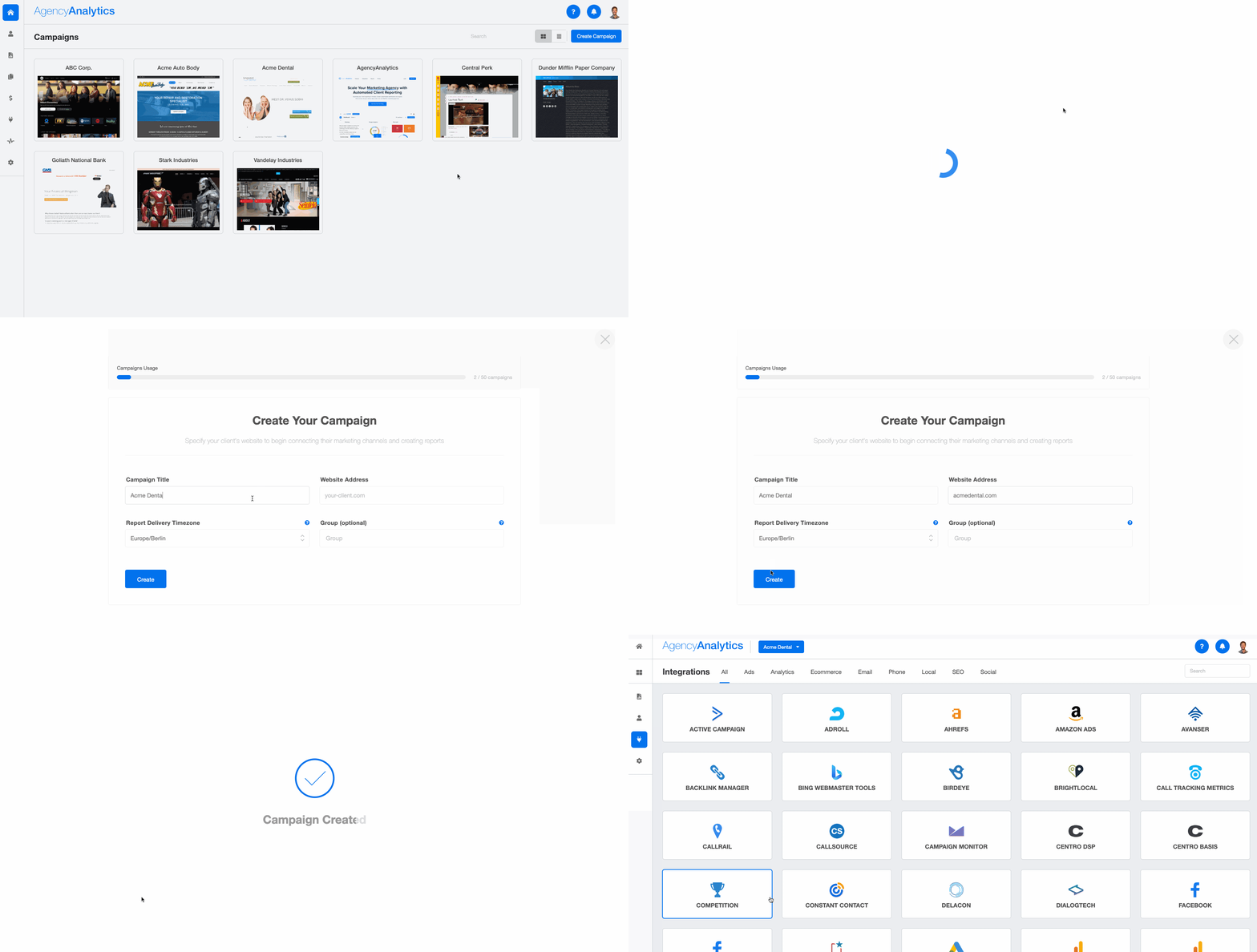
1. Create a content marketing campaign. Click the "Campaign" button in the top right corner, fill in the details, and tap "Create."
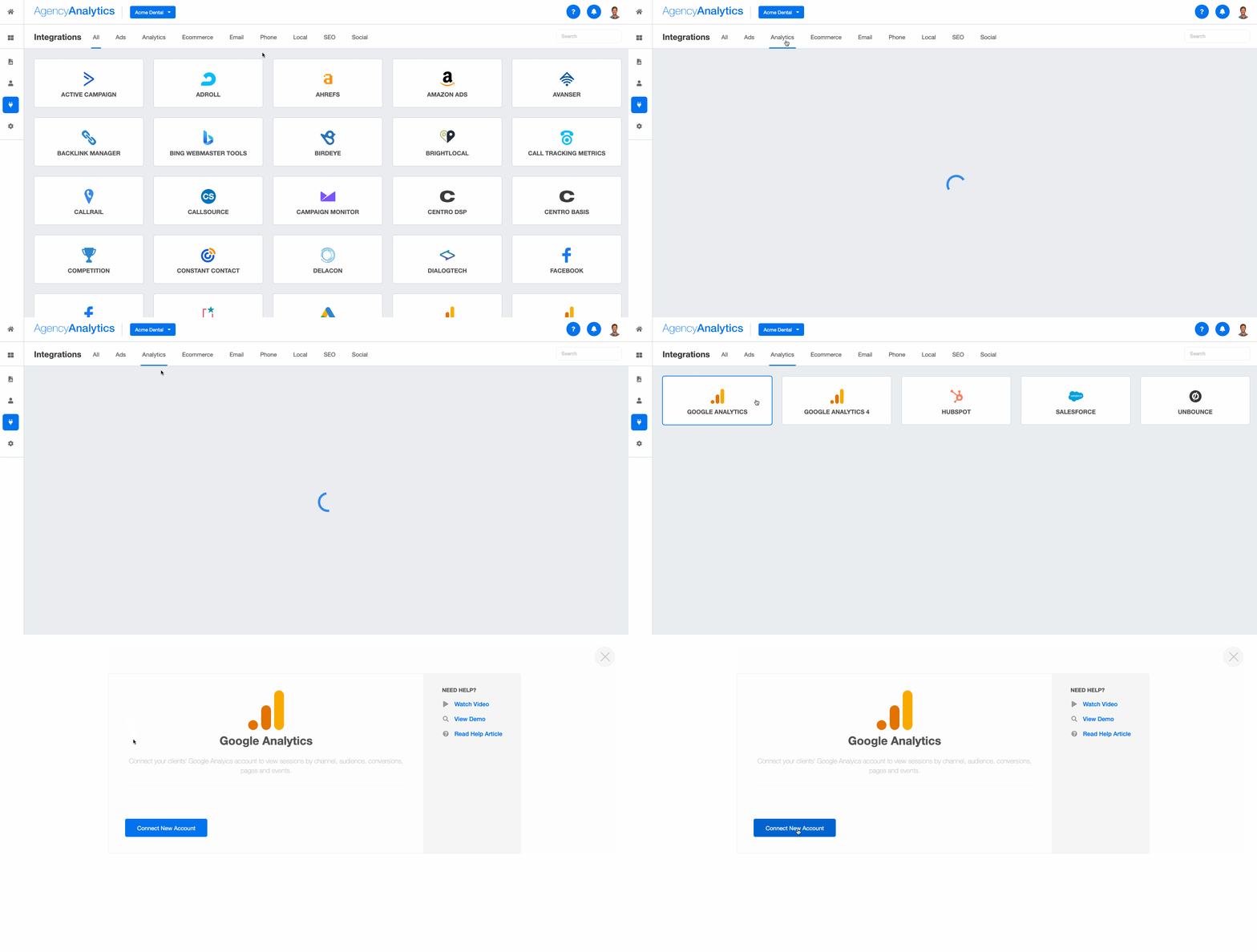
2. Connect your clients' integrations. Go to the "Integrations" section on the left-hand menu and choose from platforms like:
There are 85+ integrations to choose from. Repeat this step when integrating multiple data sources.
3. Create dashboard sections. Once your client's integrations are connected, go to the home page, click the campaign you just created, and click "Create Dashboard Section." You'll have the option to:
Start with a blank dashboard (ideal for building a custom marketing dashboard from scratch).
Generate a "Smart Section" that pre-populates a dashboard with data from your client's integrations in just 11 seconds.
Clone a section from one of your existing dashboards.
Choose one of the pre-built marketing dashboards and customize it as needed.
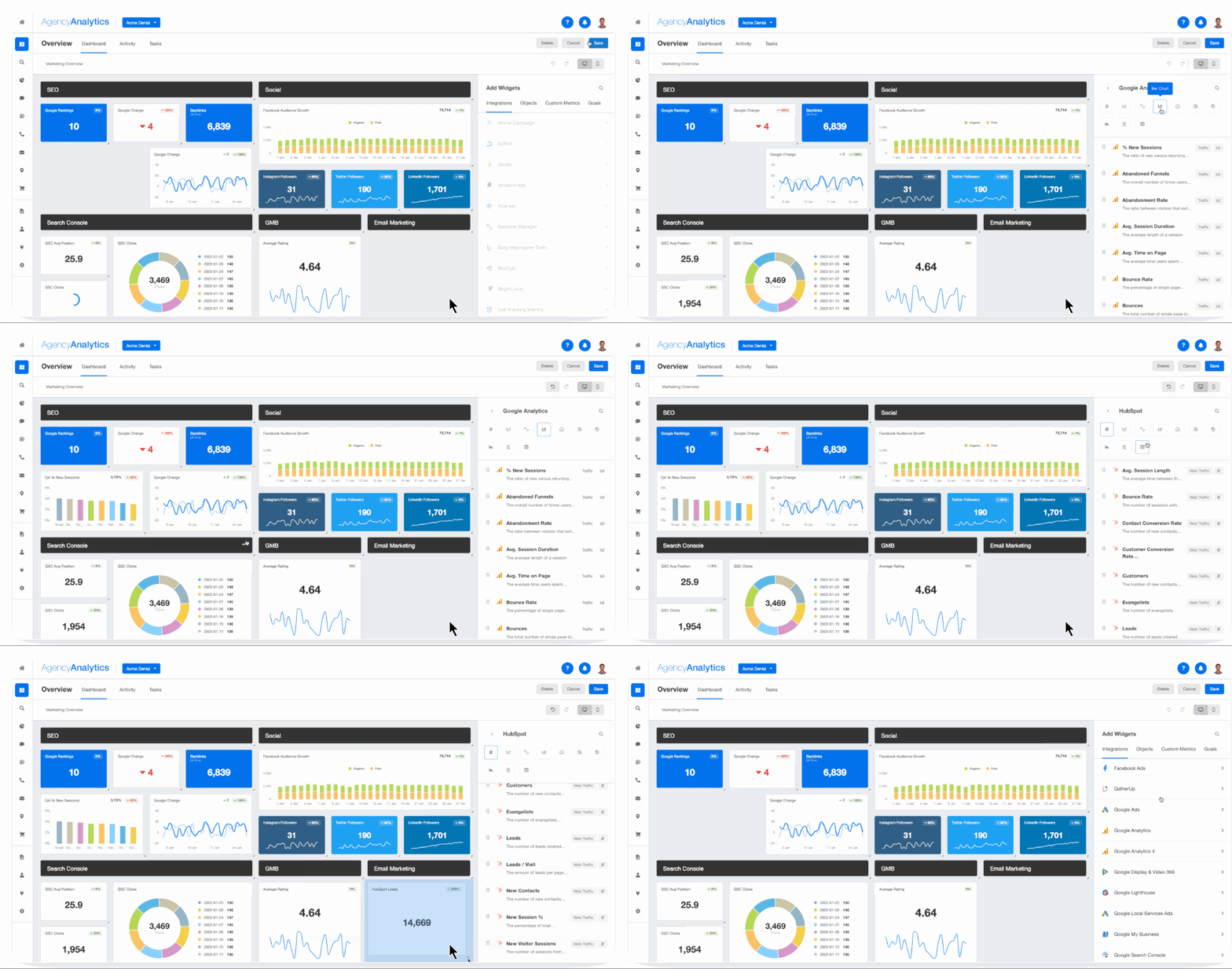
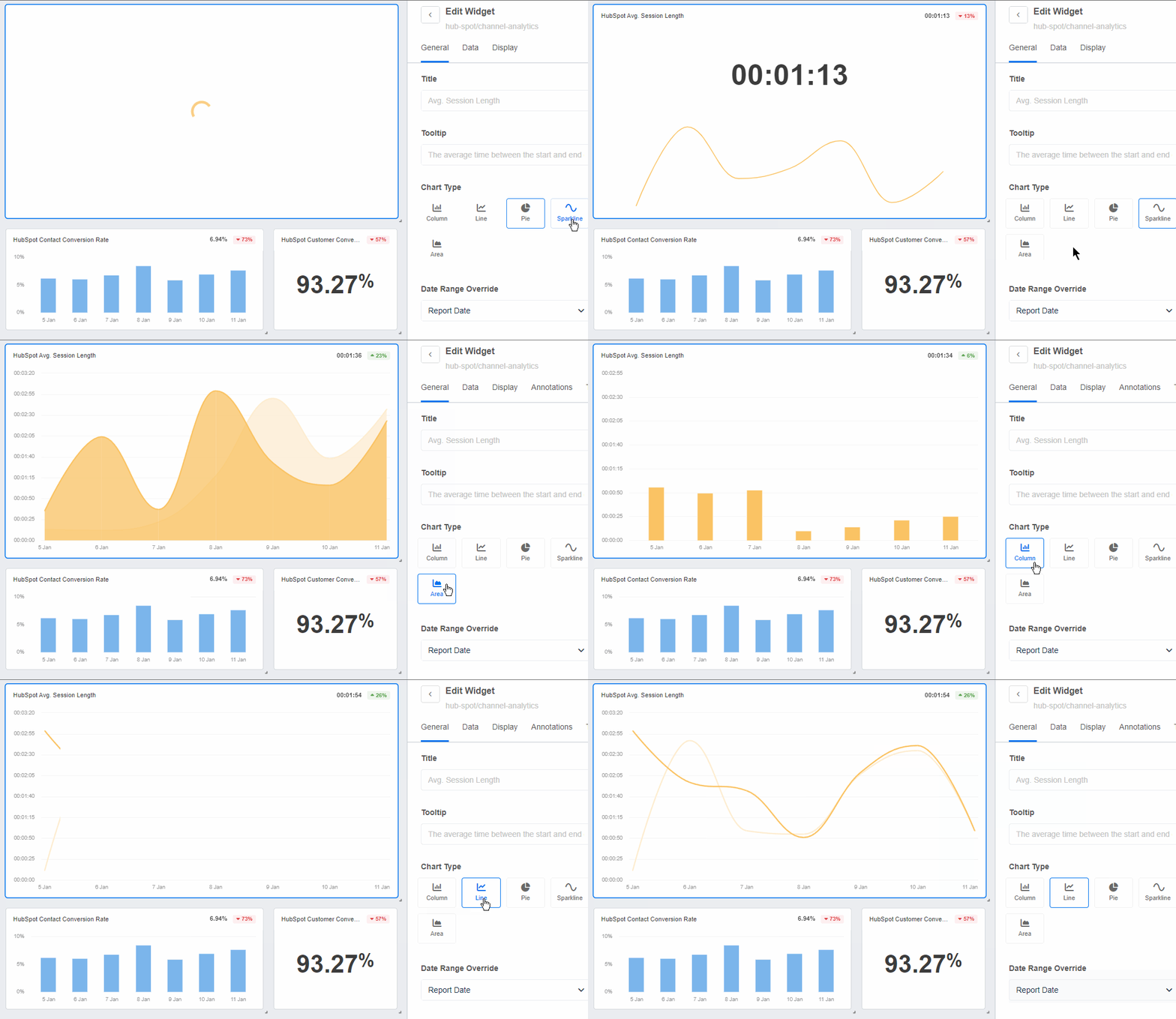
4. Add widgets and switch between visualizations. Add widgets, shift things around, and make them your own. Toggle between data visualizations too. For example, switch from a bar chart to a geographic map when sharing website traffic data. This illustrates visitors by country, which is something your client may prioritize. Got clients who prefer static report formats? Easily flip any dashboard into a downloadable PDF. Or use the 11-second Smart Report feature, which auto-populates with the most popular metrics from your client's integrations.
5. Share the dashboard and automate delivery. Share it with clients through login access so they can check their content performance data anytime. Schedule automated reports on a weekly or monthly cadence, and your team won't have to think about report delivery again. White-label the entire experience with your agency's branding, set up automated delivery, and let the platform handle the recurring reports while you focus on driving content marketing success for your clients.
A dashboard that requires manual updates defeats the purpose. Set up your integrations so content marketing data flows in automatically, then schedule regular reports so clients get updates without your team lifting a finger. Instead of spending hours assembling a content marketing report every month, you schedule it once and let the platform handle the rest. Your team reviews, adds commentary where needed, and moves on to actual strategy work.
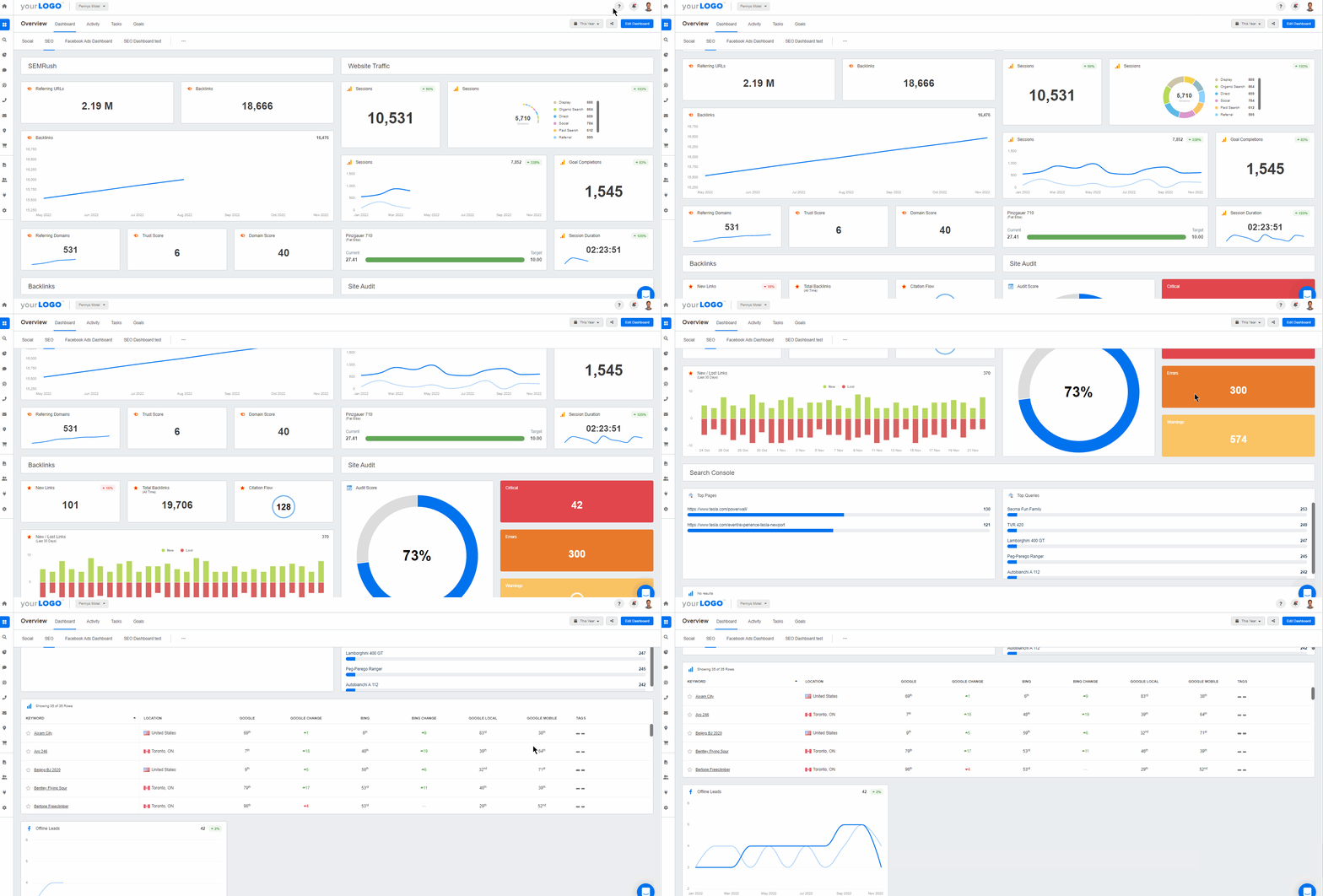
Customize a pre-built SEO template or create content marketing dashboards from scratch. Easily track the performance of social media posts, engagement metrics, and more–try AgencyAnalytics, free for 14 days.
Bonus: track content marketing tasks in-platform
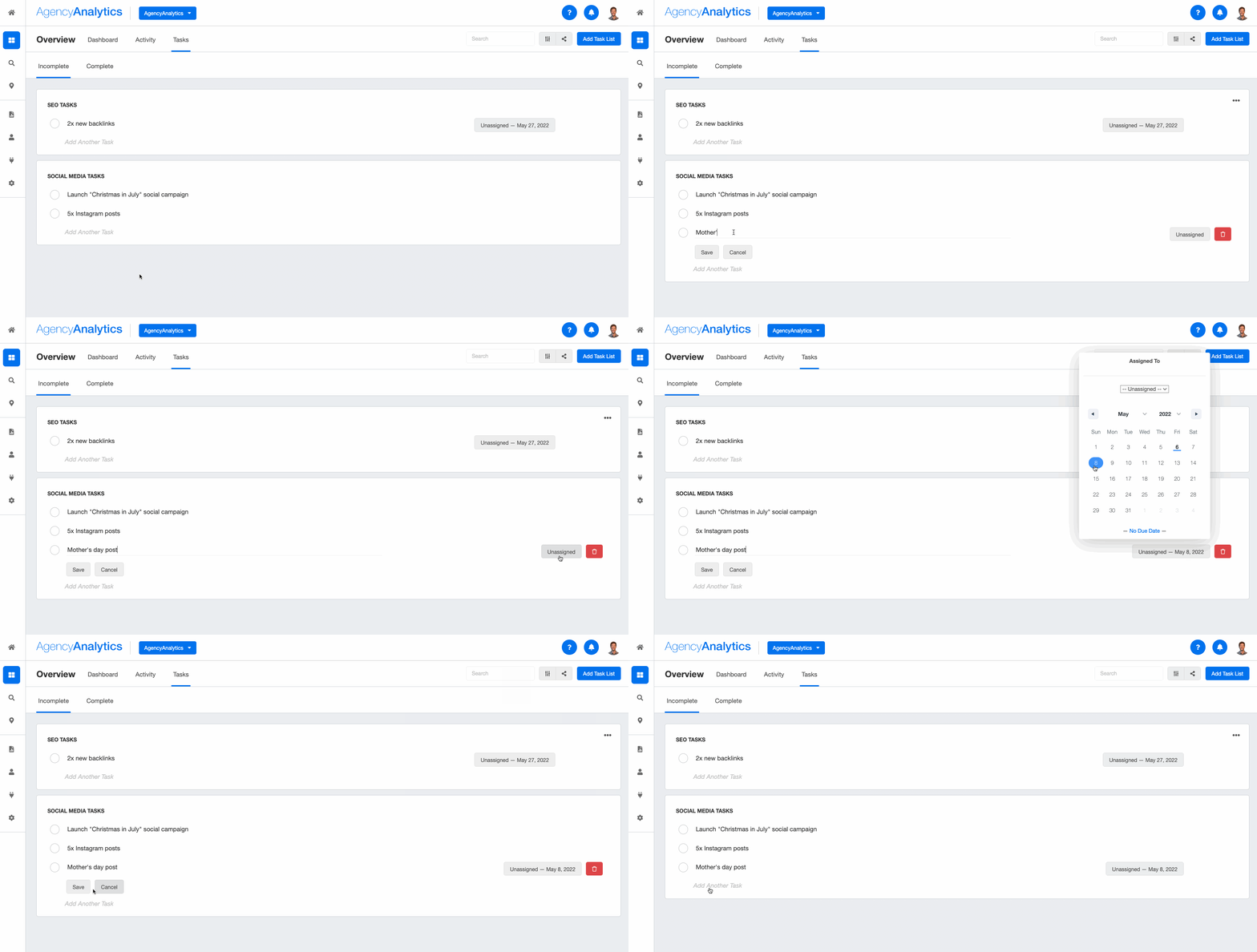
Here's a nifty way to get more from the tool. Use the task management feature to streamline editorial planning, track the status of content creation, and assign deliverables to team members.
This keeps your client's content pipeline managed effectively. It also shows what work is in progress or has been completed, right alongside your content performance data.
What to look for in content marketing reporting software
"Can this dashboard handle an increase in content volume?"
"Will this software make it easier to show our clients content marketing metrics and ROI?"
"How well does this fit with our existing tools and systems?"
Sound familiar? These are common (and valid) questions when deciding on content marketing software. Here are the key things to evaluate.
Integration depth and data accuracy
Your content dashboard is only as good as the data flowing into it. Evaluate your clients' top-used content marketing platforms (e.g., Google Analytics, Mailchimp, Google Search Console). Then choose software that has each required API integration. Look for tools that can pull data from SEO platforms, social media platforms, email marketing tools, CRMs, and more without manual data collection or complex API coding.
Traditional analytics tools like Google Data Studio can connect some of these, but agencies managing multiple clients across many marketing channels benefit from a tool built specifically for multi-source, multi-client reporting.
Customization and white-labeling
Agencies need dashboards that look like they belong to the agency, not to a third-party tool. Look for white labeling capabilities, custom metric creation, a drag-and-drop builder, and annotation features. These let you build branded, client-facing dashboards that you can reuse across your target audience list of accounts.
Real-time reporting and automation
Opt for a tool that provides real-time data updates and advanced report scheduling. Automated reporting means your content marketing teams spend less time building reports and more time finding actionable insights. Look for features like scheduled email delivery, live dashboard login access for clients, and the ability to export reports in multiple formats (e.g., PDF).
Scalability for multi-client reporting
If your agency manages 20, 30, or 50+ clients, your dashboard tool needs to keep up. Consider whether the platform supports multi-campaign management, lets you clone dashboard structures across clients, and handles increasing amounts of content marketing data over time without slowing down.
Most dashboard tools aren't built for agencies. They're built for single teams or individual marketers. Investing in a general-purpose solution means dealing with workarounds, missing integrations, or program crashes as your agency grows. That's time (and patience) you don't have.
Content marketing analytics software streamlines client reporting and measures changes in campaign performance. That's what your clients really care about. When you start to layer on 7 to 10 different marketing activities and channels, it becomes very complex to track everything accurately. Being able to easily report on our results to clients with AgencyAnalytics has been extremely valuable to our company.
Kevin Szypula, COO, Ferocious Media
Use this checklist to compare your options side by side.
Consideration | Description |
|---|---|
Learning Curve | Choose a tool that's user-friendly for both internal marketing teams and clients. Dashboards should be easy to navigate and adopt, all while providing actionable insights. |
Integration Capabilities | Evaluate your clients' top-used content marketing platforms (e.g., Google Analytics, Mailchimp, Google Search Console). Then, choose software that supports all required API integrations to ensure a seamless connection and data retrieval. |
Customization Options | Look for customization features that enhance the overall value of dashboards. These may include custom metric creation, white labeling, a drag-and-drop builder, and the ability to add annotations. |
Real-Time Data Access | Opt for a tool that provides real-time data updates. This ensures that the most current information is always available for analysis and decision-making. |
Scalability | When choosing a platform, consider your agency's current and future growth trajectory. Research whether this tool is equipped to handle increasing amounts of data and more client projects over time. |
Pre-Built Reporting Templates | Whether you need a white-label Google Analytics dashboard, a dedicated YouTube dashboard for video performance, or a broader SEO dashboard to track organic search. Pre-built dashboard templates and report templates save a lot of time and effort. |
Diverse Reporting Formats | Look for robust features, including login access to live dashboards, advanced report scheduling, and the ability to export reports in various formats (e.g., PDF). |
Cost-Effectiveness | Research the upfront investment for this tool and the cost of any package upgrades. Also, consider other cost-related benefits, such as billable time saved. |
Customer Support | Explore whether this tool offers adequate customer support (e.g., a 24/5 live chat or an online knowledge base) for any platform-related questions or issues. |
Reviews and Ratings | Research user feedback to understand the tool's performance and usability. Explore review sites like G2 and Capterra for unbiased, real-life opinions. |
Mobile Accessibility | Select a tool that provides accessibility across various devices (e.g., the option to use a mobile app). This makes it easier for clients to access their data while on the go. |
Free Trial Signup | Take advantage of any free trial period to test the tool's features and usability. That way, you'll have a solid understanding of whether it actually meets your agency's requirements. |
Choose a platform with robust capabilities, solid customer support, and a range of customization features. Try AgencyAnalytics today, risk-free for 14 days.
The takeaway
Your client's content marketing efforts are all connected:
Blog posts feed organic search.
Social media posts drive website traffic.
Email newsletters nurture leads.
Your agency needs a way to show how all those marketing channels work together to drive real results. Good reporting makes that possible. It eliminates manual data collection, gives your team actionable insights across every content channel, and helps you prove content marketing ROI to clients who want to see the numbers.
Agencies should be constantly expanding professional parameters and striving to keep up with our fast-paced industry. Listen to your clients, research the latest trends and best practices, and make sure to stay invested in your work.
At the end of the day, content reports aren't just about presenting data. They're about telling the story of how your content will help take your client's dreams and turn them into a reality.
So, reach for the stars! Your motivation is contagious and is sure to inspire your clients to do the same.
AgencyAnalytics is an all-in-one marketing analytics dashboard built for agencies like yours. Connect 85+ platforms, use a pre-built content marketing report template, and automate your reporting so you can focus on marketing wins for your clients.
AgencyAnalytics allows me to integrate all of my important data easily and create gorgeous dashboards and reports that my clients love at an affordable price point. If you are considering using AgencyAnalytics, know that it will pay for itself, and your clients will be blown away with how amazing the software is.

Studio West Design Co.
Impress clients and save hours with custom, automated reporting.
Join 7,000+ agencies that create reports in minutes instead of hours using AgencyAnalytics. Get started for free. No credit card required.

Frequently asked questions about building a content marketing dashboard
A content marketing dashboard should include metrics across five categories: traffic and reach (sessions, page views, traffic sources), engagement (bounce rate, average session duration, social interactions), SEO (keyword rankings, backlinks, referring domains, organic traffic), lead generation (form submissions, resource downloads, conversion rate), and revenue (content-attributed sales or pipeline value). The specific mix depends on your client's content marketing goals.
Live dashboards should update automatically as new data comes in from connected integrations, giving you real-time visibility into content performance. For client-facing reports, most agencies send formal updates on a weekly or monthly basis. The advantage of a live dashboard is that anyone can check in at any time for up to date information, while scheduled reports provide a structured summary with added context.
Yes. With a tool like AgencyAnalytics, agencies create individual campaigns for each client, each with its own dashboard, integrations, and reporting schedule. You can clone dashboard structures across clients to save time, then customize each one to match the client's specific goals and marketing channels. White-labeling lets you brand each dashboard with your agency's look and feel.
No. Modern dashboard tools built for agencies use drag-and-drop builders and pre-built templates, so you don't need coding skills or spreadsheet expertise. AgencyAnalytics, for example, lets you build dashboards in as little as 11 seconds using Smart Sections that auto-populate with data from connected integrations. If you can click a button, you can build a dashboard.
Written by
Abby Wood is the founder of The Content Lab (a white label content agency serving digital agencies worldwide) and Content Goodies (providing white label copywriting templates for web designers).
Read more posts by Abby WoodWhat other agency experts are reading

The 39-Point SEO Content Checklist You Need Before Hitting Publish (Free Download)
Use this writing checklist before publishing your next blog post or web page for your clients to ensure that your content is adequately optimized for readers, search crawlers, and their marketing goals.

What to include in a digital marketing report to wow clients
Discover the essentials of a top-notch digital marketing report. Understand the importance of setting goals, identifying KPIs, utilizing dashboards, and visualizing data for impactful storytelling.

Top content marketing metrics in 2025: Measure ROI & optimize strategy
Discover the most important content marketing metrics to track in 2025. Optimize your strategy and drive maximum output.