Ask Claude or ChatGPT about any client’s performance
Client answers your team can trust and control
Your team already works in AI tools. The AgencyAnalytics MCP brings each client’s marketing data into the conversation, reads it with the same permissions your team has in the platform, and asks before it changes anything.
Connect in one click
Scoped to the clients you name
Same data as your reports
Changes need your approval
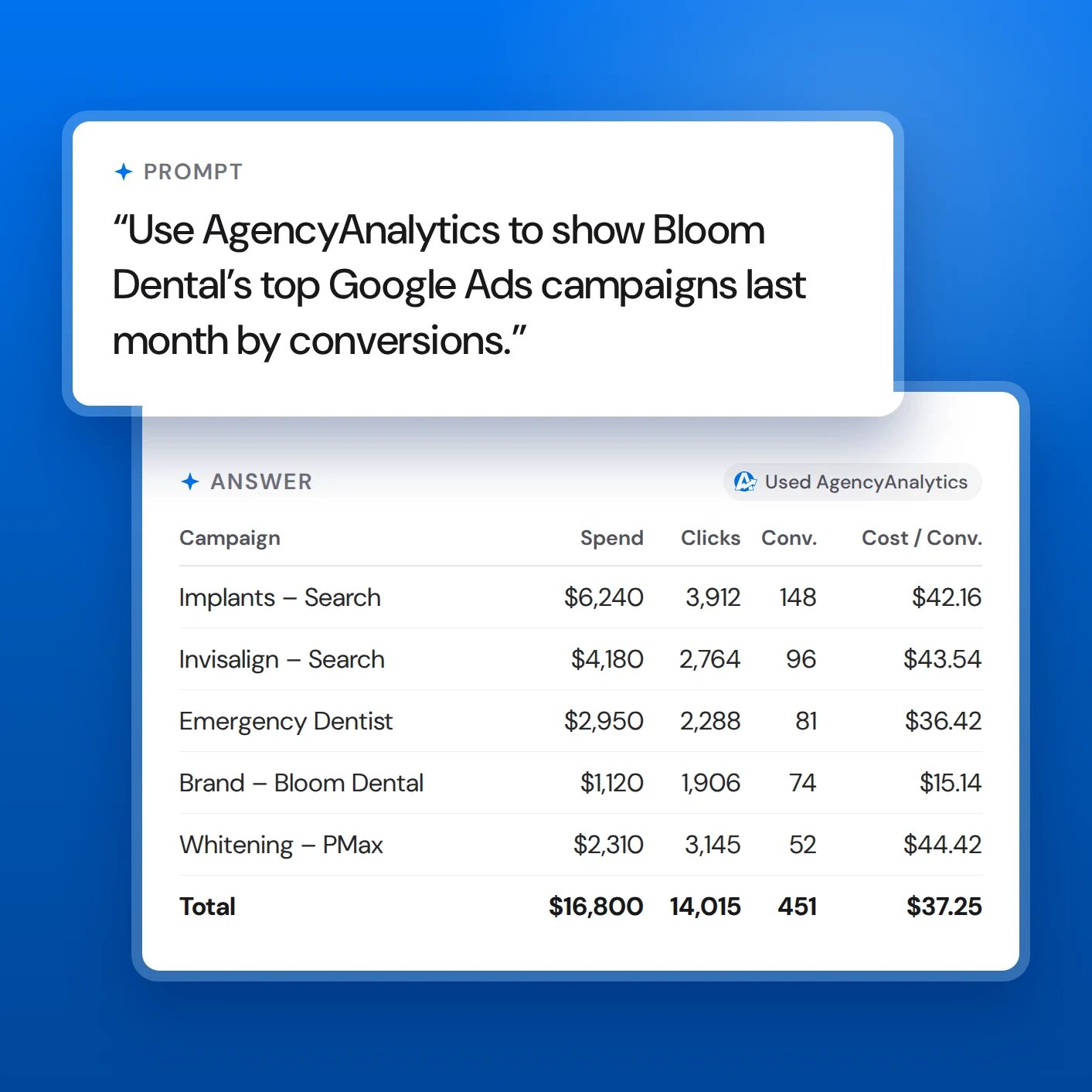
“Use AgencyAnalytics to show Bloom Dental’s top Google Ads campaigns last month by conversions.”
You get each campaign’s spend, clicks, conversions, and cost per conversion from that client’s connected Google Ads account, totaled and ready to talk through. No logging in, no exporting, and no one-off report built five minutes before the call.
“What changed the most for Northside Fitness over the last 30 days?”
AgencyAnalytics ranks that client’s biggest-moving metrics by percent change, against the previous period and the same time last year, so you start with the story instead of a spreadsheet. Ask a follow-up and your AI tool drills into the campaign, page, or keyword behind the change.
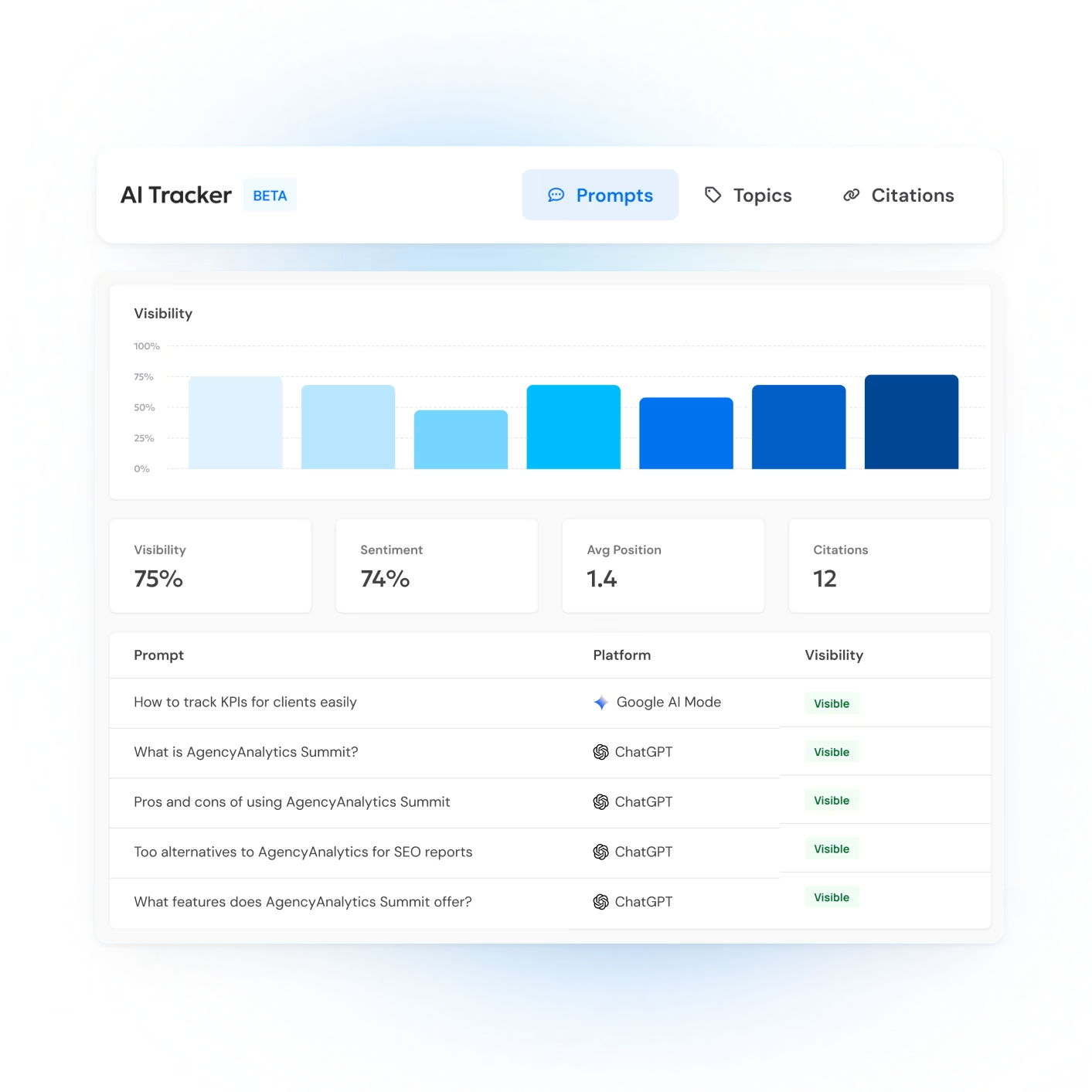
“How is Harbor Law showing up in ChatGPT, Perplexity, and Google AI Overviews, and which tracked keywords dropped this month?”
The answer pulls from AI Tracker and Rank Tracker for that client: visibility by AI platform and prompt, the sources AI engines cite, and keyword movement across Google and Bing. Site Auditor health scores are one more question away.
“Compare organic traffic this month against last month for Bloom Dental, Harbor Law, and Northside Fitness.”
Name up to 10 clients in one prompt. Each one is read separately and every figure is labeled by client, so nothing bleeds between accounts. It’s a quick way to prep for account manager check-ins and team stand-ups.
“Pull last month’s performance for Bloom Dental and draft a short recap email for the client.”
Your AI tool gets the figures from the client’s connected integrations and writes the draft right where you’re working. Ask it to check the brief or meeting notes uploaded to that client first, and the recap leads with what they care about. You review it and hit send.
Start Your 14-Day Free Trial
MCP access included. No credit card, no sales call.

The minute you guys added the MCP server, it turned us from, hey, should we be looking at creating our own software solutions to help manage report data… to, wait a minute, we can pull in all these integrations. We have an MCP server to access this data. So that then frees me up to try to solve other problems in our operation and not try to fix something that’s not broken.

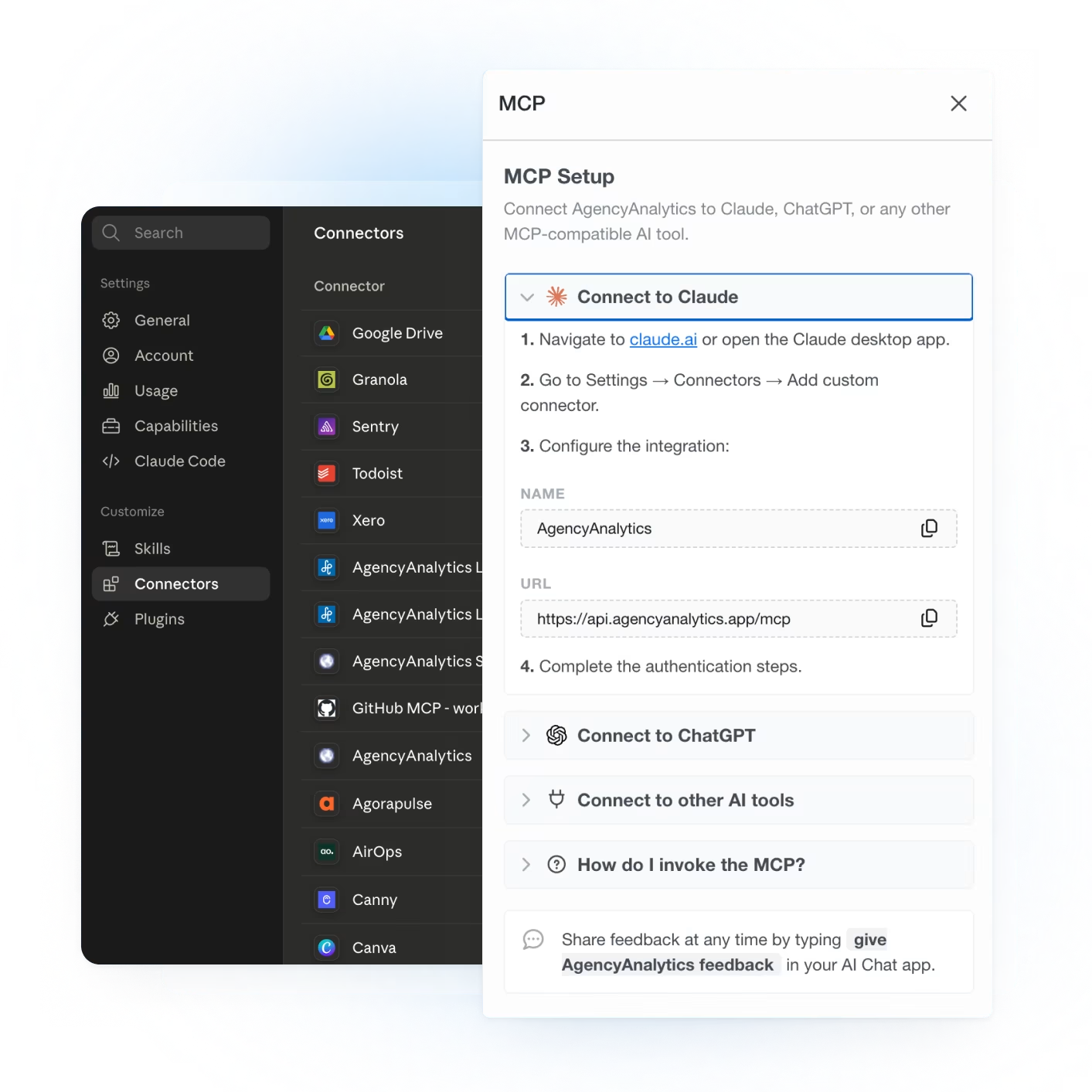
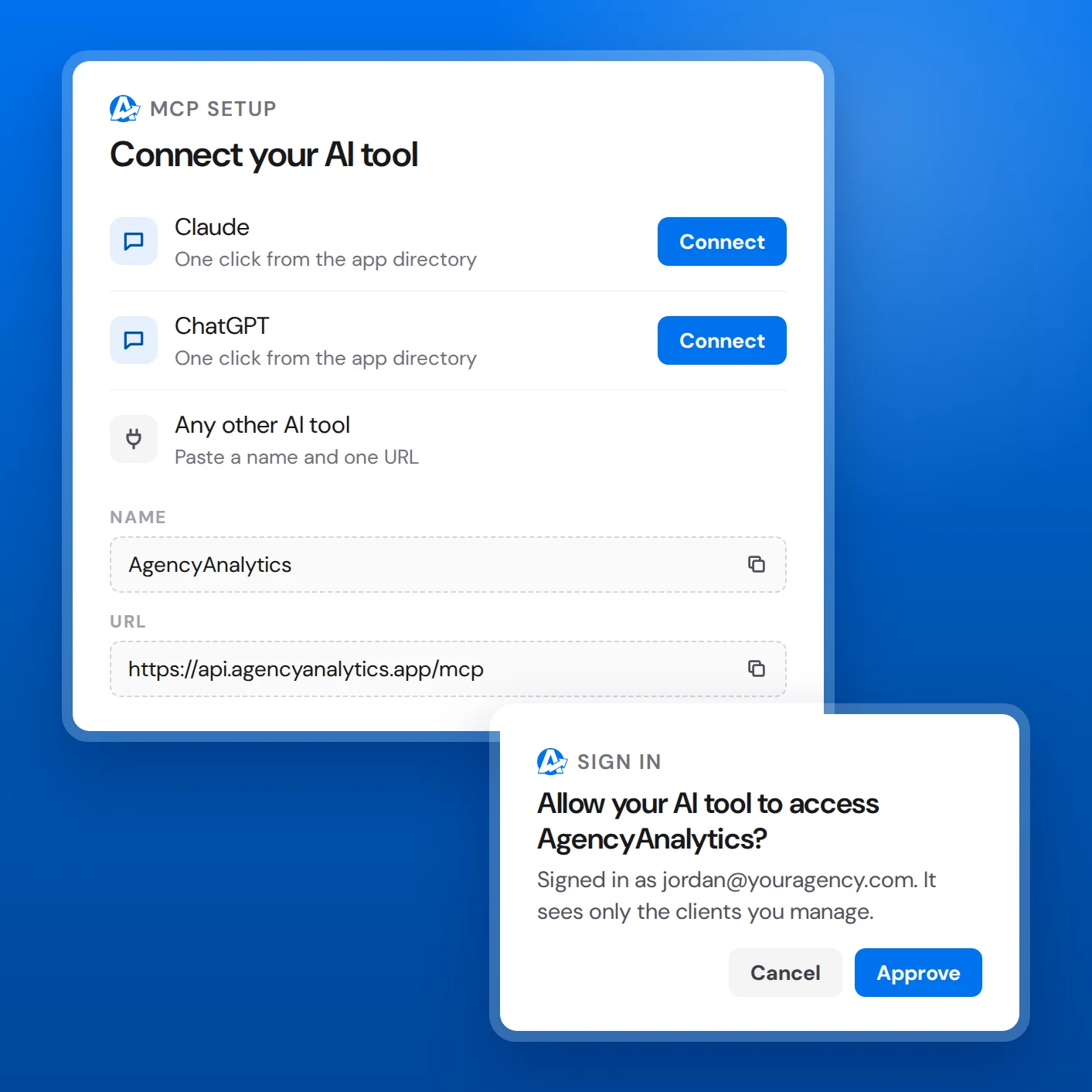
In Claude or ChatGPT, open the AgencyAnalytics listing in the app directory, click connect, and sign in with your AgencyAnalytics login. That’s the whole setup.
For any other tool that supports remote MCP servers, click the MCP icon in AgencyAnalytics, copy the server name and URL into your tool’s connector settings, then sign in and approve access. The steps for each tool are listed inside your account.
The MCP reads client metrics, dashboards, reports, Rank Tracker, AI Tracker, Site Auditor, Google Sheets, custom metrics, and documents uploaded to the client.
It can also add and edit clients, invite teammates and manage their client access, build custom metrics and views, and refresh keyword rankings. Every change shows a preview first and saves nothing until you confirm it. Anything with a cost, such as a ranking refresh or a client beyond your current allowance, is spelled out in the preview.
Each person connects with their own AgencyAnalytics login through a sign-in and approval screen, so there are no API keys or shared passwords. Only admins and staff can connect; client users can’t.
Access is checked on every request, so teammates only reach the clients they already manage in AgencyAnalytics. Data is fetched only when someone asks a question, and removing the connector from your AI tool cuts access right away. Answers you pull into Claude or ChatGPT then follow that tool’s own data settings.
MCP access comes with every client you add, alongside unlimited data sources, reports, and staff accounts. Start a 14-day free trial with no credit card and connect your AI tool on day one.
When a question turns into a monthly deliverable, the data is already in AgencyAnalytics: white-labeled dashboards, automated reports, and client portals across 90+ integrations. Your AI tool handles the quick answers, and your reports carry your agency’s brand.
If tomorrow you were to delete the MCP, I would be quite lost. It is just so much easier to have an assistant that is able to look at the data and collaborate with me. Taking that away would mean it takes me more time to find the data that I need, and it’s harder to scale larger sets of data… I don’t know how I went so long without it.

Frequently Asked Questions
It’s a Model Context Protocol (MCP) connection that lets AI tools like Claude and ChatGPT read your AgencyAnalytics client data and, with your approval, make changes in your account. You ask in plain English, and the AI tool pulls the answer from the integrations connected to that client.
Performance data from the integrations connected to each client, such as Google Analytics, Google Ads, Google Search Console, Facebook Ads, and your email and ecommerce platforms. It also reads Rank Tracker, AI Tracker, Site Auditor, Google Sheets, custom metrics, dashboards, reports, and documents uploaded to the client.
Claude and ChatGPT connect in one click from their app directories. Any other tool that supports remote MCP servers with a sign-in connects with the server URL in your account, where the steps are listed.
No. In Claude or ChatGPT, it’s one click from the app directory and a sign-in. Other tools take a name and one URL pasted into their connector settings. The MCP connection guide has the steps for each tool.
Only what you approve. The MCP can add and edit clients, invite teammates and manage their client access, create and edit custom metrics and views, and refresh keyword rankings. Each change is shown as a preview first, and nothing is saved until you confirm it. Everything else is read-only.
Admins and staff users. Each person connects with their own login and reaches only the clients they can already access in AgencyAnalytics. Client users can’t connect to the MCP.
Yes, up to 10 clients you name in a single prompt. Each client is read separately and every figure is labeled, so nothing mixes between accounts. Questions across your whole client list, like ranking every client by growth, aren’t supported yet. For that view, use a roll-up report.
No. MCP access is included in every plan and in the 14-day free trial. A few actions use the same credits they would anywhere in AgencyAnalytics, such as refreshing keyword rankings, and the preview shows the cost before you confirm.
The data comes from the same connected integrations your dashboards use, read for the exact client and date range you ask about. Your AI tool writes the summary around it, so check key figures before they go to a client, as you would with any AI-written draft.
Remove the AgencyAnalytics connector in your AI tool’s settings and access stops immediately. To reconnect, add it again and sign in.