SEO metrics are the backbone of a successful digital marketing strategy, offering far more than keyword rankings and traffic numbers. They reveal the bigger picture—how well a website performs in search engines and where opportunities for growth lie. From tracking organic traffic to assessing backlink quality and conversion rates, these metrics provide actionable insights that shape winning SEO strategies. This article examines the key SEO metrics that agencies must track to drive client success, optimize performance, and deliver measurable marketing outcomes.
Measuring your clients' marketing metrics is a vital aspect of any marketing agency’s job, and SEO is no exception. However, due to its long-term nature and slow ROI, tracking SEO performance can be a challenge. Search engine optimization is a long-term marketing strategy focused on the process of getting your website ranked as high as possible in search engine results pages (SERPS).
The keyword here is “process.”
Without a consistent that includes reporting and consistent tracking with , clients may underestimate the value of your services and your ability to deliver results. To avoid this, your agency must track SEO performance regularly to provide clients with tangible evidence of that progress.
The Google Ads Optimization Guide + Checklist includes everything your agency needs to make sure that your client’s campaigns are running as efficiently as possible.
But with so many SEO metrics to choose from, what exactly should you be tracking?
Fear not: We’ve outlined the 11 most important SEO metrics agencies should monitor in a scalable way, and exactly how to set up a report to easily onboard new clients. By keeping tabs on these metrics, you’ll help clients meet their SEO goals, monitor progress over time, and prove your agency’s worth along the way.
What are SEO metrics?
SEO metrics are your agency's scoreboard—they tell you what’s working, what needs improvement, and how to get better results for your clients. They go beyond just tracking keyword rankings or website traffic; they provide a full picture of how well a website is performing in search engines.
For agency clients, SEO KPIs (key performance indicators) are invaluable. They show SEO campaign progress, highlight wins, and make your work tangible. Clients don’t just want to hear that their rankings have improved. They want to see how that translates into more leads, sales, and business growth. The right SEO metrics—from organic traffic to engagement and crawl errors—help you tell that story in a way that makes sense to them.
Which SEO metrics to consistently monitor?
The answer is: It depends.
Instead of tracking individual SEO performance metrics (such as backlinks or rankings), you need to define SEO success, which will vary from client to client. That's why it's essential to figure out your clients' goals while developing the SEO strategy.
For example, one client may want to increase their organic traffic, another wants credible backlinks from local directories, and a third could be targeting low-traffic but high-converting niche searches.
With so many ranking factors, you’ll need to select the key metrics that help you connect each dot. Our SEO analysis guide shows how to translate metrics into a prioritized action plan.To get started, ask your clients the following questions:
What does SEO success look like for you? (e.g., more foot traffic at a physical store location, increased online sales—see: local SEO metrics)
Use these questions to develop a plan of action and determine the applicable SEO analytics.
Have a scalable system in place to track SEO reporting metrics
Regardless of which SEO metrics your agency decides on, you’ll need to shift to a multi-metric tracking system to determine SEO success. It’s the only way to avoid tracking individual SEO performance metrics (like backlinks or rankings) and scale in a more sustainable way.
The solution? Invest in SEO software for agencies and SEO analysis tools to monitor and track SEO data insights, which is key to identifying which strategies are working (and which aren’t). To simplify SEO tracking, use a tool like AgencyAnalytics that easily replicates SEO reporting campaigns spanning multiple marketing channels. It’s especially handy if you decide on an SEO reporting structure that’s similar across clients.
Agency Tip: Working with high-volume clients? Make sure you have the right strategy and track enterprise SEO metrics that reflect their goals.
11 most important SEO metrics to track
Without further ado, here are the top SEO metrics to put on your radar (they're also included in our SEO dashboard template).
1. Organic traffic
All the SEO effort in the world is useless unless it actually brings your clients qualified organic traffic. Tracking organic sessions over time is one of the strongest indicators of SEO performance metrics. Seasonal fluctuations aside, a month-over-month increase in visitors from organic search shows that rankings are improving (even for keywords you weren't targeting).
While other SEO metrics might show trends, this metric gives quantifiable proof that your agency's marketing efforts are bringing in more visitors, which should, all else being equal, convert to leads and customers. It’s even better if your clients’ organic traffic and conversion rates are growing at a faster rate than other channels!
The quality of the search traffic will depend on which keywords you're ranking for, the content that they are landing on, and how you define conversions (which we’ll discuss in the next section).
How to track organic traffic
There are a couple of ways to track organic traffic in Google Analytics.
The easiest way is through the Reports section. Log into your agency’s or client’s GA4 account. Navigate to Reports > Acquisition > Traffic Acquisition. Locate the Session Default Channel Group column and find Organic Search to view key metrics like sessions, users, engagement rate, and conversions.
To further analyze organic traffic, you can apply filters or compare different dimensions, such as traffic sources or landing pages.
If you want to isolate organic traffic as a segment for deeper analysis, follow these steps:
1. Log into your agency's or client's GA4 account and navigate to Explore.
2. Click + Create a new exploration and choose Free Form.
3. In the Segment section, click + Create a segment and select User Segment.
4. Under the filter conditions, choose First user medium or Session medium and set the value to organic.
5. Apply the segment to your exploration to analyze organic traffic separately.
An alternative: Track organic traffic with an AgencyAnalytics dashboard
If you're looking for a more time-effective alternative, use a Google Analytics dashboard (or a web analytics dashboard) to monitor organic search traffic. Follow these steps to get started.
1. After successfully integrating Google Analytics, go to your dashboard (which is under the left-hand Analytics menu).
2. On your Google Analytics dashboard, navigate to the Organic tab and check out your traffic count under Sessions.
Track your clients’ search performance and confidently report on their organic traffic numbers with Google Analytics SEO reports and dashboards. Consolidate data insights easily with AgencyAnalytics–it’s free for 14 days!
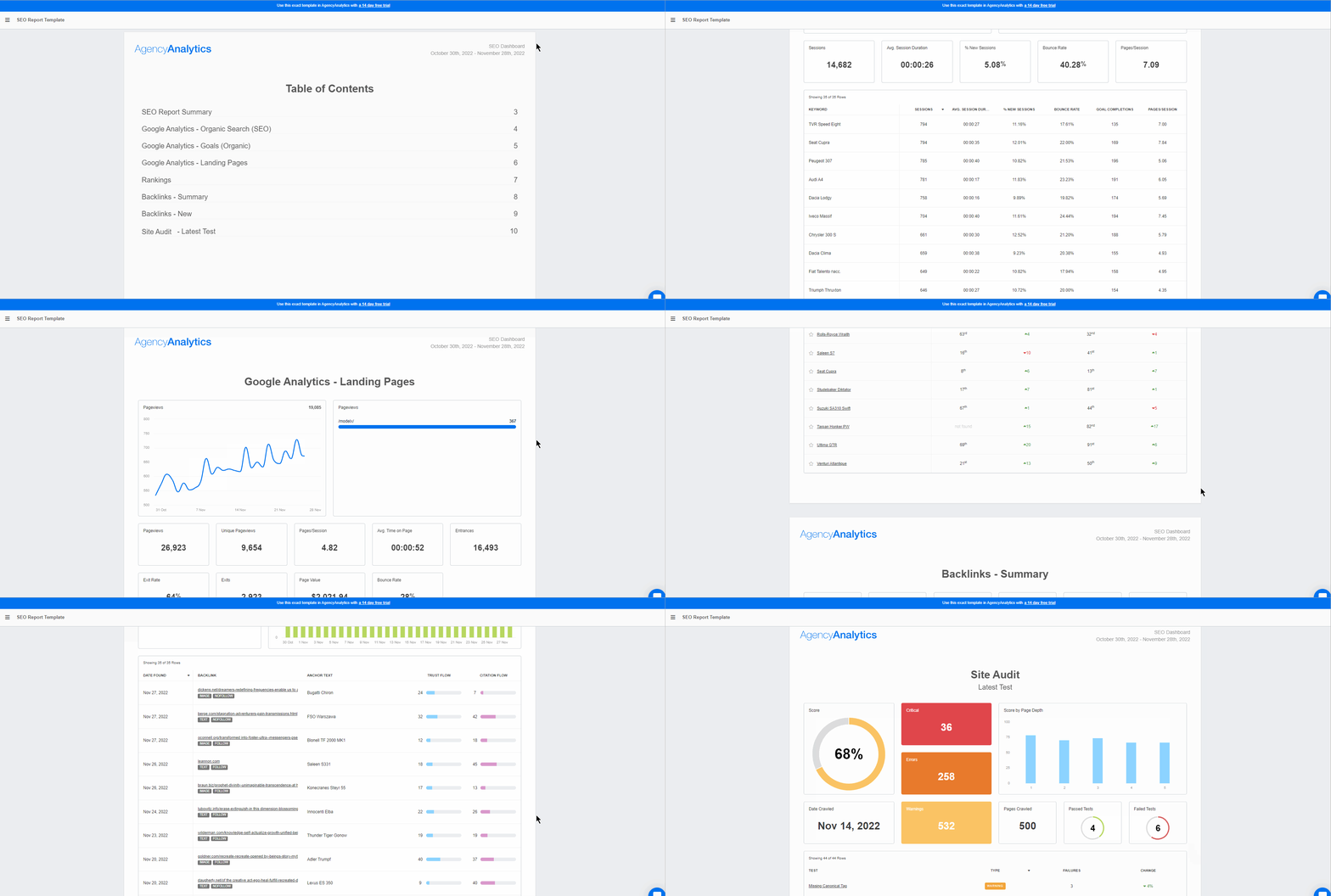
And if you’re looking for a way to capture a range of insights across multiple platforms, build an SEO report and customize it as you see fit.
2. Organic clicks
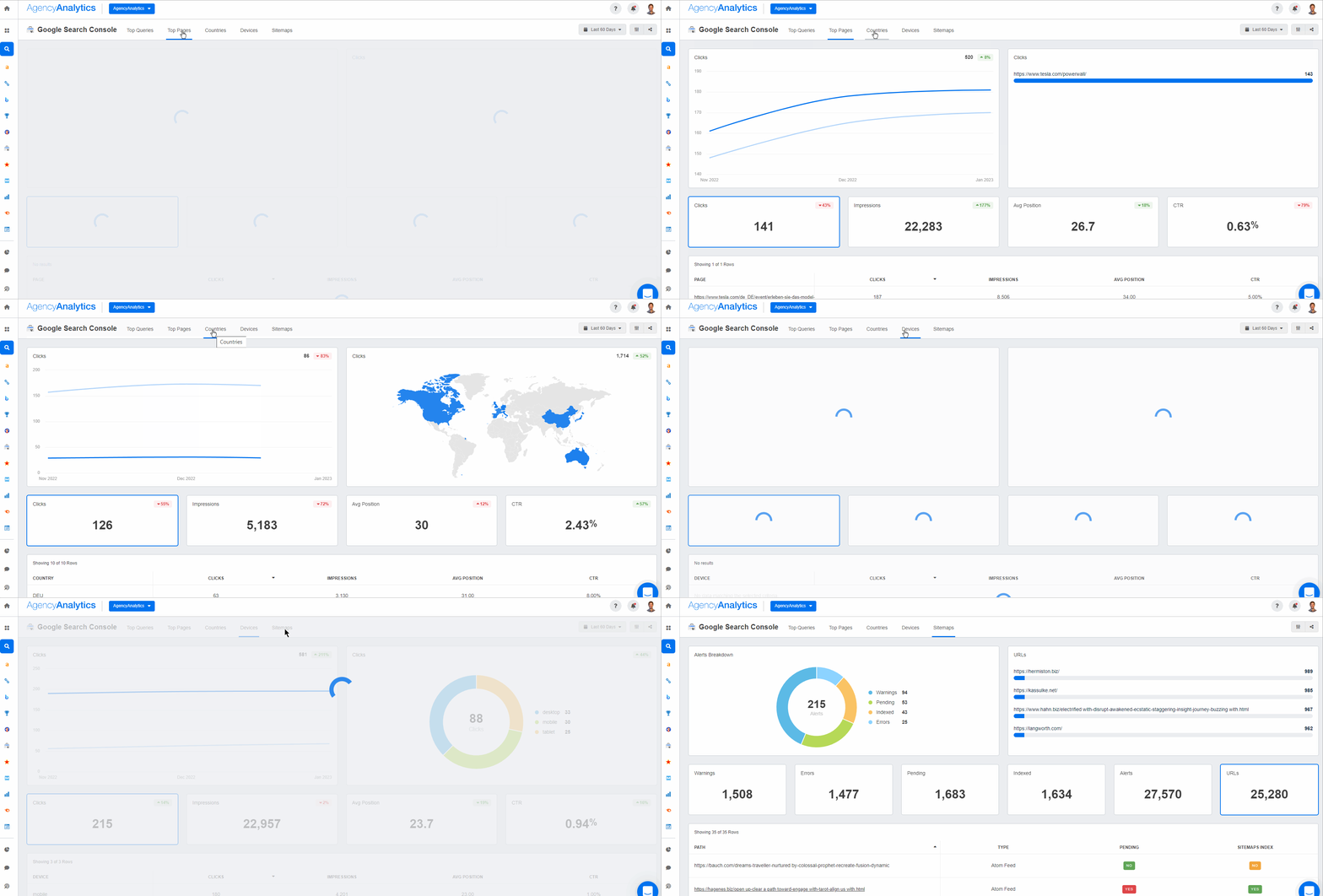
If you’re looking for information on the organic traffic driven by specific keywords, you’re unlikely to find that in the Google Analytics reports without enabling the Google Search Console report. GSC provides valuable insights into how individual keywords perform in Google search results.
The Query data available in the report shows the search queries that users typed into Google search, the average position for that keyword (and the site as a whole), and how many impressions and clicks the client’s website received for each query.
The main difference between this and keyword rank tracking (which we outline below) is that the query report identifies all of the keywords that generated impressions and clicks for a client’s website, whereas a keyword rank report typically focuses on the priority keywords that will move the needle.
How to track organic clicks
To track organic clicks, head straight to Google Search Console. It’s the cleanest source of “what people actually clicked in Google,” down to the query and landing page level.
1. Open the Performance Report: Go to Google Search Console and select your property. Click “Performance” in the left menu and select “Search Results.”
2. View clicks: The main chart shows impressions and clicks over time. You'll see totals at the top for clicks, impressions, CTR, and average position. You can select a timeframe ranging from 24 hours to 3 months and beyond at the top of the report.
3. Analyze tabs: Switch between the tabs below the chart for detailed data:
Queries: See which keywords brought clicks.
Pages: See which pages received clicks.
Countries/Devices/Search Appearance: Filter by user location or device.
4. Use URL inspection: Click on a URL in the report to use the URL Inspection tool to check its index status or see performance details for that specific page.
An alternative: Track organic clicks with an AgencyAnalytics dashboard
Pull clicks, impressions, CTR, and average position into a single AgencyAnalytics dashboard so you can monitor trends and report faster.
Connect the Google Search Console integration in AgencyAnalytics.
Open (or create) a dashboard and add Google Search Console widgets for clicks, impressions, average CTR, average position, top queries, top pages, and more.
Drop the dashboard into your client reporting flow and keep a consistent “organic clicks” section ready to go each month—no manual exports required.
Get valuable insights into user intent and refine your clients’ keyword strategies with the Google Search Console dashboard in AgencyAnalytics—free for 14 days.
Easily Report on Your Clients' Google Analytics Metrics
Now that you see organic traffic coming in, the next question to ask yourself is: What is the quality of that traffic?
As you know, organic sessions alone aren't enough. A high volume of organic traffic is one thing, but it won’t mean much if it never turns into a lead or sale. That’s where organic conversion rates come in.
Alternatively, add an organic conversion rate widget to your SEO dashboard in AgencyAnalytics.
See exactly how website traffic translates to conversions. Monitor these data insights side-by-side on AgencyAnalytics, free for 14 days.
4. Keyword rankings
With Google’s AI-based search algorithm and continuously changing search results, should you even bother tracking keyword rankings?
The answer is (unsurprisingly and resoundingly) yes!
Even though organic search results are seldom the same at the user level (thanks to personalization), keyword ranking reports tell you two things:
The general direction of your clients' SEO efforts: Better rankings for one keyword usually indicate improved rankings overall, especially for related long-tail keywords. Plus, tracking keywords shows you the effectiveness of your clients’ SEO strategies.
Keyword selection: If your clients’ other SEO metrics improve (such as domain ratings or organic traffic), but you don't see an improvement in target keyword rankings, it usually indicates poor keyword selection. In such a case, choose less competitive keywords and try to rank for them first. Also, the types of keywords matter.
How to track keyword rankings
White label keyword rank tracking is a built-in feature in AgencyAnalytics. Here are steps to follow when adding keywords to your clients’ campaigns.
1. After creating a new campaign, click the ‘Add Keywords’ button in the center of the Rank Tracker module. If you're adding keywords to an existing campaign, you'll find it in the upper right-hand corner of your Rank Tracker module.
2. Next, add the list of keywords you’d like to track and click Continue.
3. After you've added your keywords, choose the location and language to pair the keyword list with.
4. Finally, add a tag to these keywords (if needed) to stay organized.
5. Head to your Rank Tracker module and track those keyword insights with ease!
Access real-time keyword insights and capitalize on untapped opportunities. Make data-informed recommendations by using AgencyAnalytics–it’s free for 14 days.
Between two pages with similar on-page metrics (bounce rate, time on site, content quality, etc.), the one with more backlinks from higher-quality domains will most likely win.
That’s why your agency must track referral traffic from backlinks and referring domains from your clients’ link-building campaigns.
And while more backlinks might not immediately lead to better rankings, they will show that things are moving in a positive direction.
How to track backlinks
To perform this exercise, be sure to use SEO software with a backlink monitoring tool. There are three things to look out for when choosing a backlink tracking tool:
Update frequency: Your tool should index new backlinks as they appear online. If the tool refreshes its index too slowly, new backlinks may not appear for weeks.
Accuracy: Actual backlinks and follow/no-follow links should be shown separately. The ability to track anchor text and backlink source authority is a big plus as well.
Trends: Tracking the overall general trend is key, and your chosen tool should show whether you've lost or gained backlinks over time.
For free (although sometimes inconsistent) backlink tracking, head over to Google Search Console and put in your site name.
While there’s no associated cost, keep in mind this list isn’t frequently updated. It also won’t show backlink acquisition trends.
6. Domain authority and trust flow
Tracking the sheer number of backlinks on your clients’ websites isn’t enough. The quality of backlinks is also critical, and whether there’s an increase in domain authority (DA).
Although it’s not a direct Google signal (it was developed by Moz), a higher domain authority score indicates higher trustworthiness, which in turn impacts SERP rankings. Majestic SEO measures this score via a metric called "trust flow."
An upward tick in trust flow means that your clients’ SEO efforts are bearing fruit. That being said, keep an eye out for poor-quality backlinks (which could have dire consequences in the long run).
How to track authority metrics
Majestic is a powerful tool for measuring domain authority and trustworthiness by analyzing backlinks and link quality. It provides two primary authority metrics: trust flow and citation flow.
Trust flow measures the quality of links pointing to a site, while citation flow evaluates the quantity of links. These metrics help agencies assess the credibility and influence of a client’s website.
Use the search bar to enter your client’s domain and analyze its backlink profile.
Navigate to the Site Explorer and check the Trust Flow and Citation Flow scores. A higher trust flow indicates stronger, high-quality backlinks, while a high citation flow with low trust flow may indicate spammy or low-quality links.
An alternative: Use the Majestic integration in AgencyAnalytics
There's a much faster (and more accurate) way to monitor authority, referring domains, and backlinks with AgencyAnalytics. To get started, use the Majestic integration to see a complete view of your clients’ site authority metrics and other Majestic SEO metrics.
Don’t let inaccurate data slow you down or skew your agency’s recommendations. Get real-time backlink analysis on AgencyAnalytics–sign up for a free 14-day trial today.
7. Core web vitals
Core web vitals are Google’s way of measuring how users experience a site. These metrics go beyond keywords and backlinks—they focus on how fast, stable, and interactive a website is. Because Google values great user experiences, core web vitals play a key role in rankings.
Why does this matter? Google’s ranking algorithm isn’t about traditional SEO factors anymore. It looks at how real people interact with a site. If pages load slowly, shift unexpectedly, or lag when users try to engage, Google notices—and so do visitors.
Google’s RankBrain algorithm uses these user experience signals to help determine rankings. The better the experience, the better your chances of ranking higher in the search results.
How to track core web vitals
The easiest way to monitor Core Web Vitals at scale is Google Search Console, then use PageSpeed Insights to diagnose (and validate) fixes on specific URLs.
1. Open Google Search Console and choose the correct site property.
2. Go to Experience → Core Web Vitals. This report groups URLs by issue and shows whether they’re Poor, Needs improvement, or Good based on real-user data (28-day window).
3. Look at either Mobile or Desktop performance by clicking “Open Report.” Prioritize whichever device drives the most value (for many sites, that’s mobile).
4. Click into the biggest Poor / Needs improvement groups first, then open example URLs to see what’s affected:
LCP (loading)
INP (interactivity)
CLS (visual stability)
5. After deploying improvements, return to Search Console and click Validate fix on the issue to monitor recovery and confirm the affected URLs move back into “Good.”
An alternative: Use the Google Lighthouse integration in AgencyAnalytics
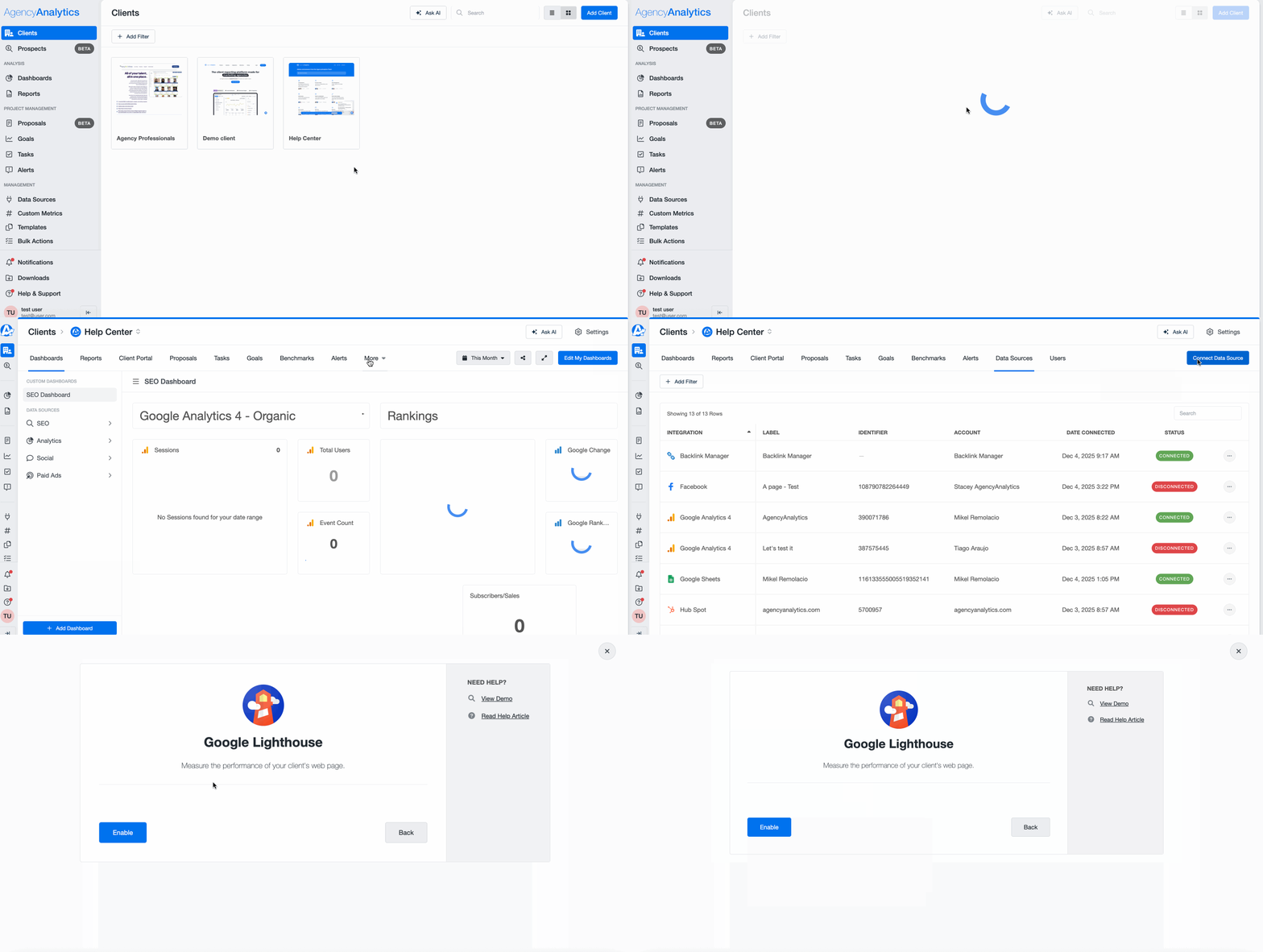
If you want a quicker, dashboard-friendly way to keep tabs on site performance, enable Google Lighthouse in AgencyAnalytics and review audit results alongside the rest of your SEO reporting.
1. In the client section, go to Data Sources → Connect Data Source.
2. Search for Google Lighthouse and click Enable.
3. Once enabled, AgencyAnalytics will scan the client’s URL and generate weekly audits automatically.
4. Add the Lighthouse widgets to your SEO dashboard/report so you can monitor performance trends and spot problem pages fast.
Paying attention to your core web vitals report is critical. A core web vitals report helps you identify areas where your client’s site performance might hold back rankings and user engagement. A fast, seamless website keeps Google happy, keeps potential customers on the page longer, and improves conversion rates.
8. Mobile traffic
It’s no secret that optimizing for mobile search is more important than ever, especially now that mobile-first indexing is the standard for Google.
Keeping track of mobile traffic can indicate the following:
Mobile-friendliness issues: Google prefers mobile-friendly sites in its mobile search results. If mobile traffic remains static (even as overall traffic increases), it might indicate issues with mobile friendliness.
Usage patterns: If you notice an increasing amount of traffic coming from mobile devices, it may indicate shifting usage patterns among the target audience. Use this as an indicator of whether a client should invest more in mobile development (such as a mobile-first site or app).
Mobile-only search terms: Because users are on the go, they may use fewer words on a mobile search compared to a desktop search. Therefore, you must track mobile-only search terms and treat them differently from other searches.
How to track mobile performance
There are two key SEO metrics to track here: mobile traffic and mobile rankings. Here’s how to do it with AgencyAnalytics:
1. To track mobile traffic, go to Analytics > Audience > Devices. This will show the total traffic from different devices as well as goal completions from mobile, desktops, and tablets.
2. To see mobile rankings, go to SEO > Rankings, then click on Google Mobile Rankings in the slide-out window.
3. Finally, if you prefer to track mobile traffic in Google Analytics, go to Reports > User > Tech > Tech details. Scroll down to see mobile, desktop, tablet, and smart TV traffic.
Engagement metrics help you diagnose the quality of content and UX, as well as conversion performance. They often correlate with SEO outcomes, but aren’t direct Google ranking signals.
How to track engagement metrics
By default, Google Analytics shows engagement metrics on its opening page. This includes SEO metrics such as pages per session, views, and average time per session.
Alternatively, use AgencyAnalytics to consolidate these metrics to track (alongside other SEO metrics, if you choose). That way, you’ll see the overall SEO picture more clearly.
No need to get lost in a haystack of data points. Use AgencyAnalytics to show Google Analytics metrics in a visually appealing format–sign up for a free 14-day trial today!
10. Average CTR (click-through rate)
While the above SEO metrics measure the engagement of visitors once they're on your client’s site, tracking organic CTR (click-through rate) is a measure of engagement while the user is still on the SERP.
This is directly tied to clicks (#2 on our list), but it looks deeper at the combination of impressions and clicks to provide insights into the click-through rate.
In other words, this SEO metric indicates whether a user is interested enough to even click on a website when it shows up. There’s no engagement if users don’t click on your clients’ websites to begin with!
Does the meta description entice users to learn more?
What other pages show up for these searches?
Getting to the heart of the matter means making the necessary changes and improving CTR over time.
How to track organic CTR
To monitor organic CTR, find it directly within the ‘Performance’ section of Google Search Console.
Alternatively, use an AgencyAnalytics dashboard to view CTR alongside other SEO-related metrics.
Analyze your clients’ best-performing pages at the click of a button. Consolidate Google Search Console insights on AgencyAnalytics–it’s available with a free 14-day trial.
11. Crawl errors
For Google to rank a website, it has to be able to read it first.
A site with lots of technical SEO issues (such as broken links and missing pages) means that Google has difficulty crawling the site. If Google can't find your clients’ pages, it can't rank them either.
Running an SEO site checker on a regular basis will help your agency keep an eye on crawl errors and fix them as soon as possible. This will improve site readability and search rankings over time. As a best practice, set a regular cadence for running SEO audits (such as monthly).
How to track crawl issues
Use Google Search Console to find (and prioritize) crawl and indexing problems, then validate fixes as you go. This is the fastest way to spot issues like 404s, server errors, blocked pages, and redirect problems that can prevent pages from being crawled and ranked.
1. Open Google Search Console → Indexing → Pages. This is where most “crawl/error” style problems show up as Not indexed reasons—Not found (404), Soft 404, Server error (5xx), Blocked by robots.txt, Redirect error, etc.
2. Click into the biggest Not indexed buckets first, then review the example URLs to confirm the pattern (single page issue vs. site-wide template/redirect rule).
3. For any important URL, use URL Inspection (hover over “Not Started” and click the magnifying glass icon) to see what Google last saw (status, crawlability, indexing) and test after fixes.
4. Check Settings → Crawl stats to monitor crawl health at the site level (response codes, spikes in errors, host issues). Use this to catch problems like outages or persistent 5xx errors that can slow crawling.
5. Once you’ve fixed the root cause, go back to the issue in Search Console and click Validate fix to confirm Google’s recrawl and resolution.
Honorable mentions
AI & LLM-driven traffic
AI is changing how people discover websites. Some users will click through from tools like ChatGPT or Perplexity, and Google’s AI Overviews and AI Mode can shift your search traffic patterns (often with impressions up and clicks not moving the same way).
How to track AI & LLM traffic
1. Track AI referrals in GA4
Go to Reports → Acquisition → Traffic acquisition.
Set the primary dimension to Session source / medium.
Search for sources like chatgpt.com / referral (and other AI tools), then add a secondary dimension like Landing page + query string to see which pages those visits land on.
Agency Tip: AI clicks are often undercounted because referrer data can get stripped (mobile apps, copy/paste, privacy settings), so some of this traffic shows up as Direct.
2. Create an “AI traffic” view for ongoing reporting
Build a simple Exploration (or saved report) that filters Session source by a regex of AI domains (e.g., ChatGPT/Perplexity/etc.), then trend sessions, conversions, and top landing pages over time.
3. Understand what you can (and can’t) isolate in Search Console
Google includes AI Overviews (and AI Mode) performance within the Search Console Performance → Web totals, but you generally can’t filter out “AI-only” performance as a separate report.
Practical workaround: watch for query-level CTR changes or unusual impression shifts on queries where AI features are showing more often.
AI & LLM citations
In 2026, it’s not just about ranking—it’s about getting cited. When tools like ChatGPT, Gemini, and Perplexity answer questions, they often include sources.
If your client’s site (or brand-controlled profiles) are consistently cited, that’s a strong signal their content is being used as “the answer,” even when the user never clicks through.
How to track AI & LLM citations
1. Create a “prompt set” that matches real buyer questions: Build a list of prompts that reflect how people actually ask for recommendations (e.g., “best accounting software for agencies,” “how to fix X issue,” “alternatives to Y”). Then check those search intent prompts regularly across major AI platforms and log:
Whether your client is mentioned
Whether their site is cited/linked
Which URL/domain is used as the source
2. Track “share of citations,” not just presence: One-off mentions are nice, but the meaningful metric is consistency. Track:
Citation rate (how often your client is cited across the prompt set)
Which pages earn citations most often (so you know what to update/expand)
3. Watch where AI is pulling information from: AI systems frequently cite sources brands already control (websites + listings), which means clients can often improve citations by tightening content clarity, keeping listings consistent, and strengthening key “fact pages” (services, locations, pricing, comparisons, FAQs).
A few metrics to ignore (mostly)
These metrics can be useful diagnostics, but they’re usually weak SEO success KPIs on their own. They’re heavily influenced by page type (blog post vs. landing page), intent (research vs. “buy now”), and tracking setup—so use them to spot potential UX/content mismatches, not to “prove SEO is working” in isolation.
Bounce rate
In GA4, bounce rate is basically the inverse of engagement rate—it’s the share of sessions that weren’t “engaged” (e.g., didn’t last 10+ seconds, didn’t trigger a key event, and didn’t include a second page/screen).
That makes bounce rate easy to misread. A “high bounce” blog post might be doing its job if users get the answer, scroll, and leave. Meanwhile, a low bounce rate doesn’t guarantee quality traffic if it’s not converting.
Use it as a page-type check rather than a report card:
Compare bounce rate within similar pages (blog vs. blog, landing vs. landing)
Pair it with organic conversions/key events/engagement time before acting
Exit rate
Exit rate often creates false alarms because every session ends somewhere—so “high exits” isn’t automatically bad. It can even be good (e.g., users exit on a thank-you page after converting).
Also, GA4 makes this metric harder to use: GA4 has an “Exits” metric in Explorations, but doesn’t provide “Exit rate” as a built-in metric, so you typically end up calculating it externally.
Instead of obsessing over exit rate, focus on:
Funnel and path analysis (where users drop before key events)
“Dwell time” gets talked about like it’s an SEO KPI, but it’s not something you can measure cleanly in analytics—and Google doesn’t present it as a direct, trackable metric.
Average session duration can also be misleading because it’s affected by tab switching, inactivity timeouts, and whether a user views multiple pages.
If you want a more reliable “did they actually pay attention?” signal, prioritize:
Average engagement time (GA4’s better replacement for “time on page”)
Automate SEO metrics reporting to save time, retain clients, and scale your agency
As SEO has become increasingly complex, measuring success has also become more challenging. You can no longer rely on individual metrics to tell the story of your SEO efforts. Instead, you need to track multiple metrics covering everything from backlinks and rankings to engagement and conversions.
Everyone can say they provide search engine optimization services. However, to make your agency stand out from the competition, it needs a systematic and scalable approach to showcase the SEO metrics that matter most.
With AgencyAnalytics, there’s no need to copy and paste screenshots across multiple marketing platforms! Whether you’re creating an SEO dashboard or a white labeled SEO report, automate the data retrieval process and put hours back into your day. Plus, AgencyAnalytics provides built-in industry data to help you benchmark your SEO performance, so you can see how your clients stack up against competitors and identify areas for improvement with ease.
Access a range of time-saving features on AgencyAnalytics and impress your clients with easy-to-understand reporting. Sign up for a free 14-day trial today!
Written by
Joe Kindness
Joe is the co-founder and CEO of AgencyAnalytics, a marketing reporting platform used by more than 7,000 agencies. With experience creating multiple businesses, he thrives on tackling the challenges of sustainable growth and innovation.