Best social media analytics tools in 2026: Features, pricing & reporting for agencies


Table of Contents
- Key takeaways
- What are social media analytics tools?
- Why agencies need social media analytics tools
- The three metrics that anchor social media reporting
- What to look for in a social media analytics tool
- Social media analytics tools vs. social media management tools
- Best social media analytics tools at a glance
- 11 best social media analytics tools for agencies and marketers
- Two listening-first tools also worth a look
- How to choose the right social media analytics tool for your agency
- Turning the data into better reach and engagement
- Take your social media marketing analytics to new heights
- Frequently asked questions about social media analytics tools
7,000+ agencies have ditched manual reports. You can too.
Free 14-Day TrialTable of Contents
- Key takeaways
- What are social media analytics tools?
- Why agencies need social media analytics tools
- The three metrics that anchor social media reporting
- What to look for in a social media analytics tool
- Social media analytics tools vs. social media management tools
- Best social media analytics tools at a glance
- 11 best social media analytics tools for agencies and marketers
- Two listening-first tools also worth a look
- How to choose the right social media analytics tool for your agency
- Turning the data into better reach and engagement
- Take your social media marketing analytics to new heights
- Frequently asked questions about social media analytics tools
7,000+ agencies have ditched manual reports. You can too.
Free 14-Day TrialSocial media analytics tools are the difference between guessing what works for your clients and knowing. If you're running campaigns across multiple platforms, you need a clear view of performance, engagement, and ROI, without spending half your week pulling screenshots.
The challenge? Data lives in different places. Maybe short-form videos are driving clicks on TikTok, while carousel posts are sparking engagement on Instagram. Native platform analytics tell you bits and pieces, but not the full story across all your clients' social channels.
The right social media analytics software pulls that data into one place, so you can track performance, spot emerging trends, and build reports your clients actually want to read. Below, we compare the best social media analytics tools for agencies: standout features, pricing, integrations, and what to weigh before you commit.
Key takeaways
Centralized data across social platforms: The best analytics tools pull metrics from every social channel into one dashboard, so you're not jumping between Facebook analytics, Instagram insights, and TikTok's built-in analytics for a single client.
Actionable insights beyond vanity metrics: The real value comes from tools that show which content formats drive the highest engagement rate, how audience demographics shift over time, and where competitors are gaining ground.
Faster reporting and agency efficiency: Instead of spending 2.5 hours per client cobbling together data, you can generate polished, branded reports in minutes and put that time into strategy.
Better client communication and ROI visibility: When clients see exactly how their social media efforts translate into business results, they're more likely to stay, invest more, and refer you to others.
What are social media analytics tools?
Social media analytics tools are software platforms that collect performance data from social media accounts and turn it into actionable intelligence. They connect to major social media networks like Facebook, Instagram, LinkedIn, TikTok, and YouTube, then consolidate social metrics, audience data, and engagement patterns into a single view.
That's different from the analytics built into each platform. Native analytics (like Meta's Insights or TikTok's own data) only show performance for that one channel. A dedicated social media analytics platform pulls data from various platforms into one place, so you can compare performance across channels, spot patterns, and report on everything from a single social media dashboard. Most include:
Engagement tracking for likes, shares, comments, and clicks.
Audience insights such as demographics, location, and interests.
Content performance metrics to identify which social media campaigns are gaining traction.
Sentiment analysis to understand audience opinions and streamline reputation management.
More specific than broad marketing analytics software, the right analytics tool helps agencies analyze social data, surface hidden insights, and deliver social media reporting that actually moves the needle.
Why agencies need social media analytics tools
Without specialized tools, your social media managers spend hours switching between platforms, compiling screenshots, and typing numbers into spreadsheets. At 20, 30, or 50+ clients, that doesn't scale.
Google Analytics shows how social traffic drives on-site actions like purchases or downloads, but web analytics stop short of the deeper questions. Here's what social media analysis tools reveal that Google Analytics and native analytics cannot:
Which specific social posts drove the most audience engagement (and why)
Whether brand sentiment improved or declined after a product launch or campaign
How a client's share of voice compares to competitors on specific social channels
Which content formats (Reels, carousels, static images) perform best on each platform
How audience demographics and behavior patterns differ across social media platforms
Here's how closing that gap plays out for your agency.
Efficiency and scalability
Centralizing metrics from every platform removes the jumping between accounts, which shortens turnaround times and reduces the risk of errors. Instead of logging into five platforms to pull monthly data for one client, you see everything in one view. Multiply that across 20+ clients and you're saving hours every reporting cycle, with consistent reporting whether you're managing five clients or fifty.
Competitive benchmarking
Competitor analysis tools show what rivals post, which formats get the best response, and how their engagement trends over time, which makes gaps and openings easy to spot. With social media benchmarks, you can jump on topics competitors have missed and target overlooked audience segments, guided by real social data rather than instinct.
Deeper audience insights
By analyzing comments, mentions, hashtags, and engagement patterns across platforms, these tools show how your client's audience thinks and behaves: how demographics shift after a campaign, which content formats earn the strongest response from which segments, and whether sentiment is trending positive or negative. That makes targeted messaging a matter of evidence rather than guesswork.
Real-time optimization and decision-making
Because most tools deliver real-time data, you can adjust campaigns while they're still running. Shift budget toward a high-performing ad set. Test a new posting time while engagement is spiking. And with AI-powered insights becoming more common in social analytics platforms, optimization recommendations surface faster, without advanced technical skills.
We rely completely on social media analytics. They help us make better decisions (backed by data). Otherwise, we'd be winging it, and you shouldn't be winging it when it comes to the success of your clients' businesses.
Hayley Peters, Co-Owner, OhMyDigital
Client reporting and retention
Reporting platforms make it easy to deliver polished reports that highlight what clients care about most: campaign performance, ROI, and follower growth. Clear data visualizations turn complex results into something a client can read at a glance, and that transparency is what keeps them around. This social media reporting guide covers how to build reports that keep clients engaged.

Deliver social media metrics in a sleek, visual reporting format. Use this exact social media template in the AgencyAnalytics platform. Sign up for a free 14-day trial today.
What this looks like in practice
Say a local jewelry store client wants more engagement to boost brand awareness and drive sales. You give the owner access to a custom social media dashboard so they can track likes, comments, and shares and see which content resonates. You use the same data to build a more targeted strategy around visual content and specific calls to action. Six months on, engagement rates are up 30% and website traffic from social is up 20%.
The three metrics that anchor social media reporting
How do you measure the traction of your clients' campaigns? Remember this triage: reach, impressions, and engagement. It matters most if you want to stand out or scale social media services. After all, what's your value proposition beyond "This post got 1,000 likes"?
I think any metric taken in isolation is a vanity metric. To really understand performance, you need a range of metrics, and they need to be analyzed together. Taking the time to explain reports and the metrics contained helps clients focus on the right things.
Paul Morris, Managing Director, Superb Digital
Here's how each of these social media metrics works.
Reach
Reach is the number of unique users who saw your clients' content. If the same user sees a post more than once (through retargeting ads, for instance), it isn't counted twice.

It's a good measure of:
The effectiveness of your clients' targeting strategies (e.g., sponsored posts or a big organic promotion)
Whether you're producing relevant content (e.g., using the right keywords or hashtags to reach the right demographic)
Brand awareness (especially if your client's reach is being seen by the intended target audience)
Reach doesn't account for any brand interactions, so don't treat it as a North Star metric. Track it over time instead, to spot trends in audience reach and find new demographics or interests to target.
In addition to measuring the number of unique users who have seen a social media post, track the sources of reach, such as organic vs. paid to understand the effectiveness of your social media marketing campaigns and make informed decisions about where to allocate their marketing budget and efforts.
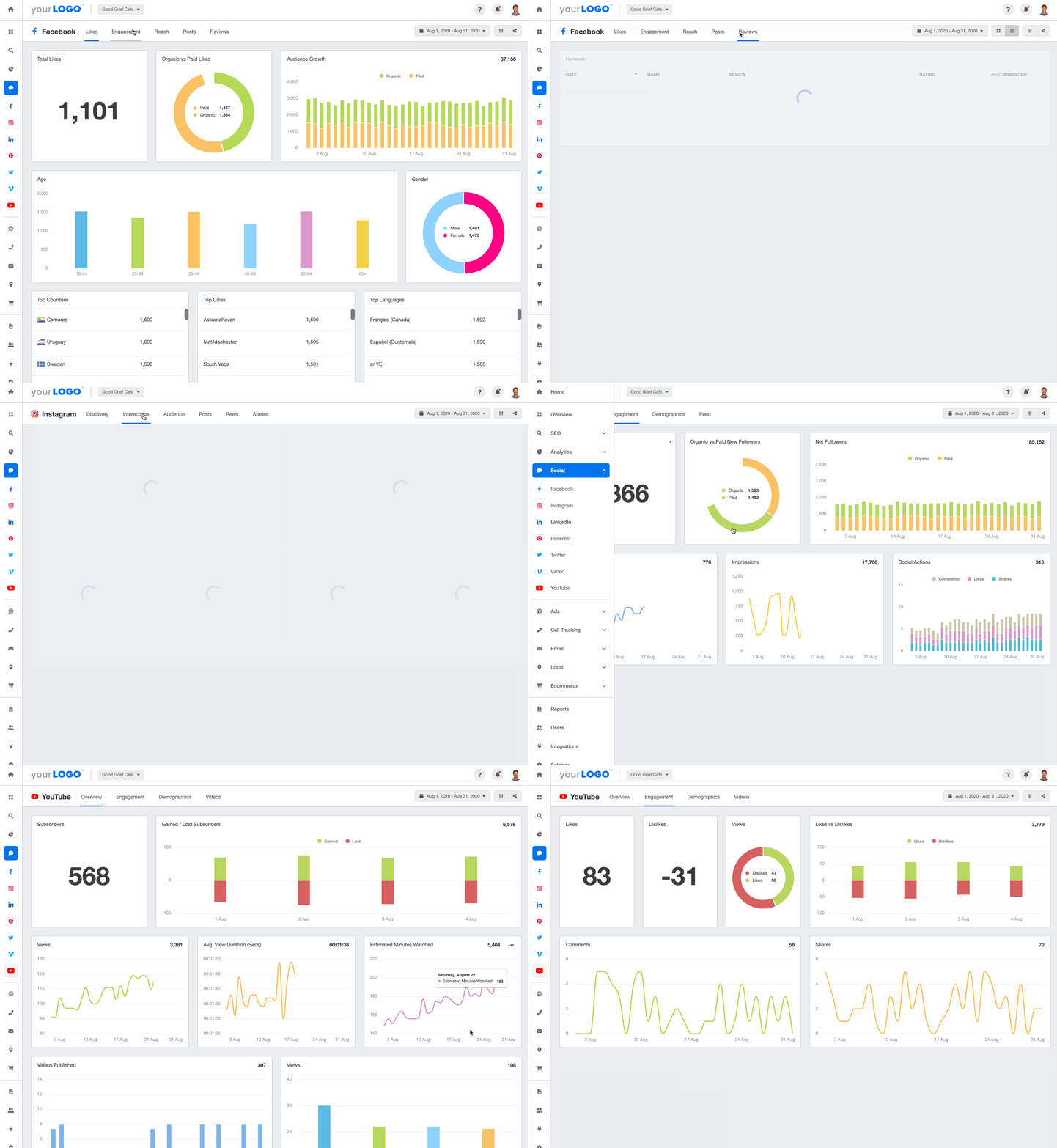
Use AgencyAnalytics to zoom in and out of date ranges easily to identify trends. Try it free for 14 days!
Impressions
Impressions count the number of times content showed up on user interfaces. The catch: it doesn't mean anyone looked. A client's post may have appeared on a user's LinkedIn page without registering at all, and if it appeared twice, it counts twice.

Some argue impressions are fluff, but it depends on what the client defines as success. Local businesses often rely on visibility to attract in-person customers, even if it takes more than a few displays to get there.
Impressions, visits to websites, calls, and driving directions are the most important positive metrics to get a broader viewpoint of whether business growth is happening in your local community.
Kira Krostag, CEO and Founder of Site Smart Marketing
Tracking impressions tells you how visible a client's brand is and where to post next. If you see high impressions but low engagement on an Instagram post, reconsider the timing or the format.
Agency Tip: While there’s no 100% guarantee, explore the best social media posting times to increase impressions and boost brand visibility.
What's the difference between reach and impressions?
The two are close, so it helps to hold onto the distinction:
Reach accounts for unique users that have seen your clients' content
Impressions focuses on the number of times an ad or piece of content was displayed, including if it was shown to the same user multiple times
For this reason, impressions are always higher than reach.
Engagement
High reach and impressions may be enough for some clients, depending on their goals. But when a client wants users to act and move further down the social media funnel, engagement metrics are what show it. They track interaction at a granular level, which gives a far more detailed read on campaign impact.

Social media engagement KPIs come in different forms, including shares, comments, likes, poll responses (e.g., on Instagram stories), and clickthrough rates (e.g., clicking a website link or a CTA like "Download App Now"). As more users interact, content gets displayed on their networks too, which drives further visibility and growth.
Engagement is the metric that we look at the most. If we are reaching and interacting with people, that typically hits the goal for our customers.
Patrice Valentine, President of ProFusion Web Solutions
Track click-through and conversion rates alongside likes, comments, and shares. That's what shows how social drives traffic and conversions on the client's website, and where to focus effort next.
Agency Tip: To ensure your clients’ marketing efforts get maximum engagement, optimize social media image sizes. After all, it won’t make sense to expect users to follow through on CTAs if they can’t see your clients’ social media posts correctly.
What to look for in a social media analytics tool
Your chosen tool should pull data from every channel into one place, remove manual compilation, and give you enough clarity to make confident decisions. Here's what to evaluate.
Platform coverage and integrations
The tool should connect directly with every platform your clients use, including Facebook, Instagram, LinkedIn, TikTok, YouTube, and Pinterest. Beyond social, look for integrations with Google Analytics, CRM tools, ad platforms, and email marketing software to build a complete view of marketing data and ROI.
A platform like Looker Studio may work while you have a limited number of clients. As you scale, you'll likely hit limitations such as a lack of marketing integrations, so it pays to invest in the right infrastructure early.
Feature | Description |
|---|---|
Data integration | Connects directly with major platforms (like Facebook, Instagram, LinkedIn, TikTok, YouTube, etc.) to pull accurate, up-to-date performance data into one place. |
Audience insights | Breaks down demographics, locations, and interests, while also tracking behavior patterns to understand what drives engagement. |
Content performance tracking | Tracks key metrics like engagement metrics (likes, comments, shares), reach, impressions, and click-through rates (CTR) to measure content effectiveness. |
Competitive benchmarking | Compares your client's key performance indicators against competitor metrics, including posting frequencies, engagement trends, and overall content performance. |
Reporting & visualization | Creates branded, client-ready reports with customizable dashboards, visual charts, and trend summaries for quick interpretation. |
Social listening | Monitors brand mentions, campaign hashtags, and relevant keywords to identify conversations, sentiment shifts, and potential advocates. |
Workflow & scalability | Offers features for post scheduling, task assignments, team collaboration, and automated reporting. |
Third-party integrations | Syncs with CRM, ad platforms, and email marketing tools for a complete view of marketing performance and ROI. |

There's no shortage of social media integrations on AgencyAnalytics. Easily populate reports and dashboards with insights from over 85 marketing platforms–sign up for a free 14-day trial today.
Reporting and white-label customization
Look for reporting that lets you build branded, client-ready output without starting from scratch each month: customizable dashboards, visual charts, trend summaries, and scheduled delivery. White-label options matter for any agency that wants reports to feel like their own.
Many tools are built for in-house social teams rather than agencies. Check that yours includes:
White label features that put your agency's brand forward
Automated data collection from all your clients' marketing platforms that automatically stay up to date
Custom metrics to create reports that specifically track your clients' goals
Annotations and goals to add more context and track social media goal progress
A range of data visualizations that makes social media insights easier to understand
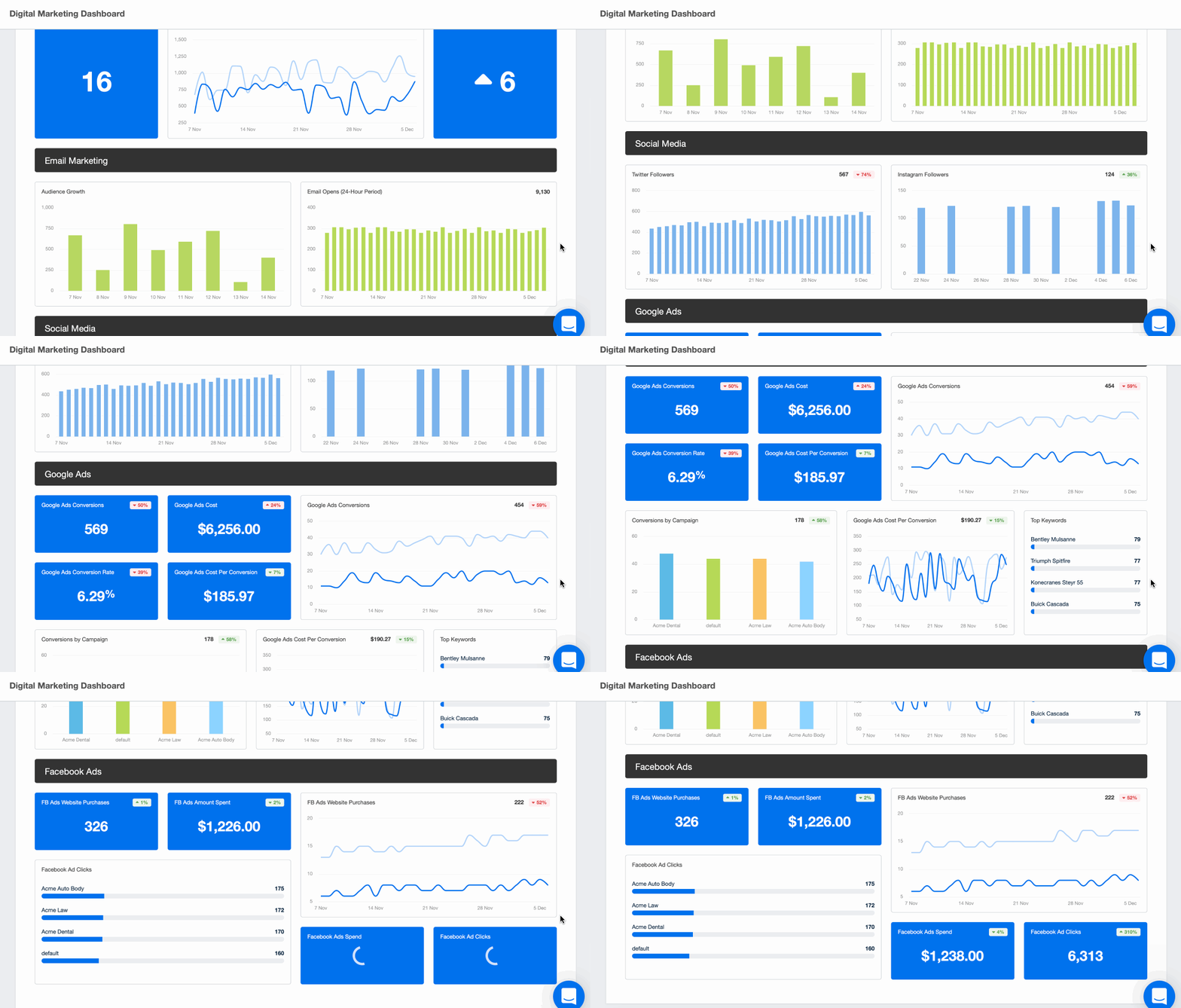
Pre-built dashboard and reporting templates (e.g., a digital marketing dashboard)
Embeddable content to incorporate a video overview explaining their results
Snapshots of their actual social media posts alongside their marketing metrics so clients can easily match performance to creative
Client login profiles that give your clients 24/7 on-demand access to their social media metrics
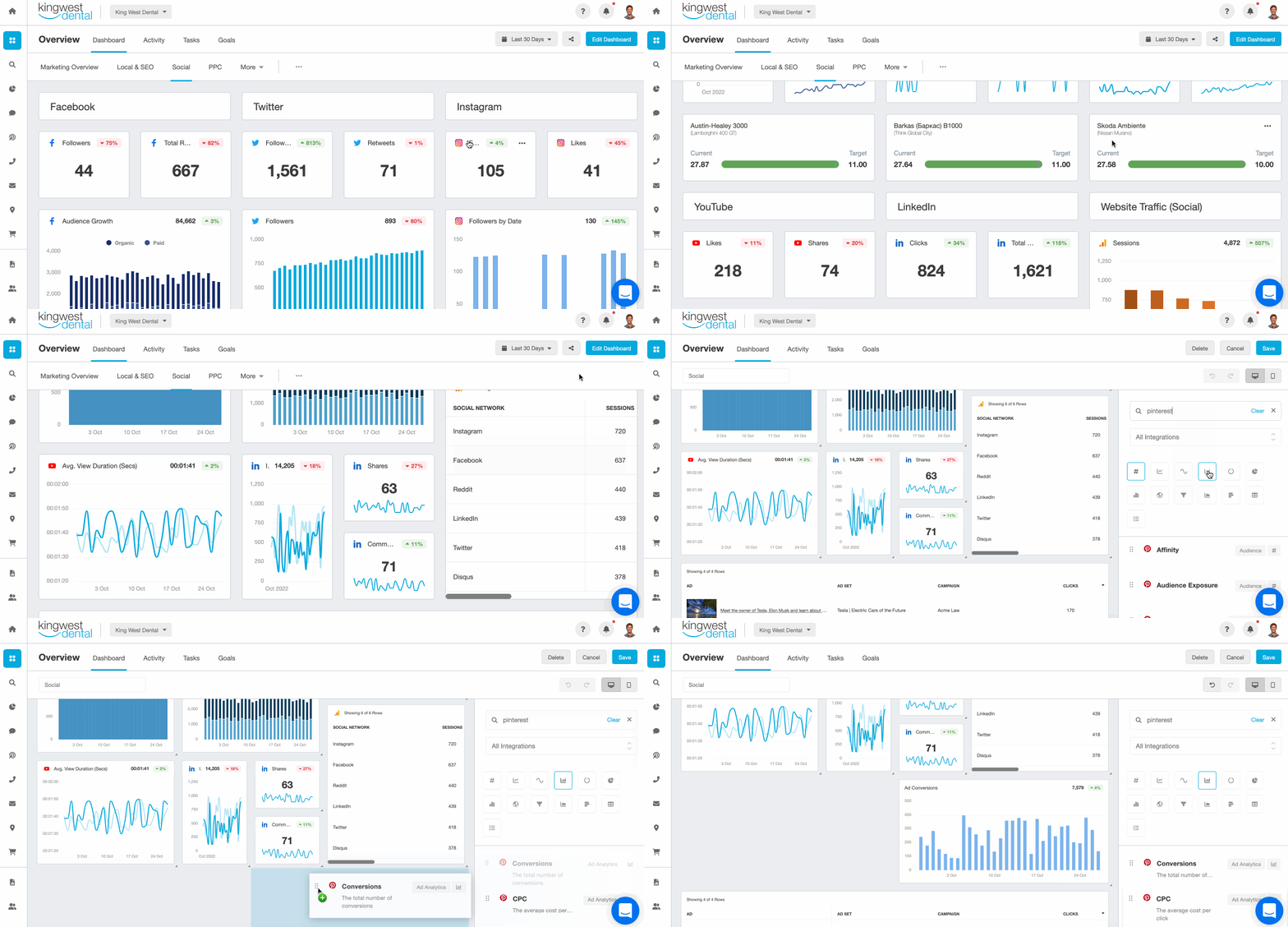
Add context to your clients' social media metrics and visually showcase their data using a professional Social Media Report Template or a Facebook Ads Report Template built specifically for agencies–try it on AgencyAnalytics with a free 14-day trial.
Customization for different client goals
Every client has different goals. One may be focused on sales through social commerce; another only cares about web analytics like organic traffic and time per session. A standard report won't cover both, so look for a drag and drop report builder that lets you customize live dashboards and reports in minutes.
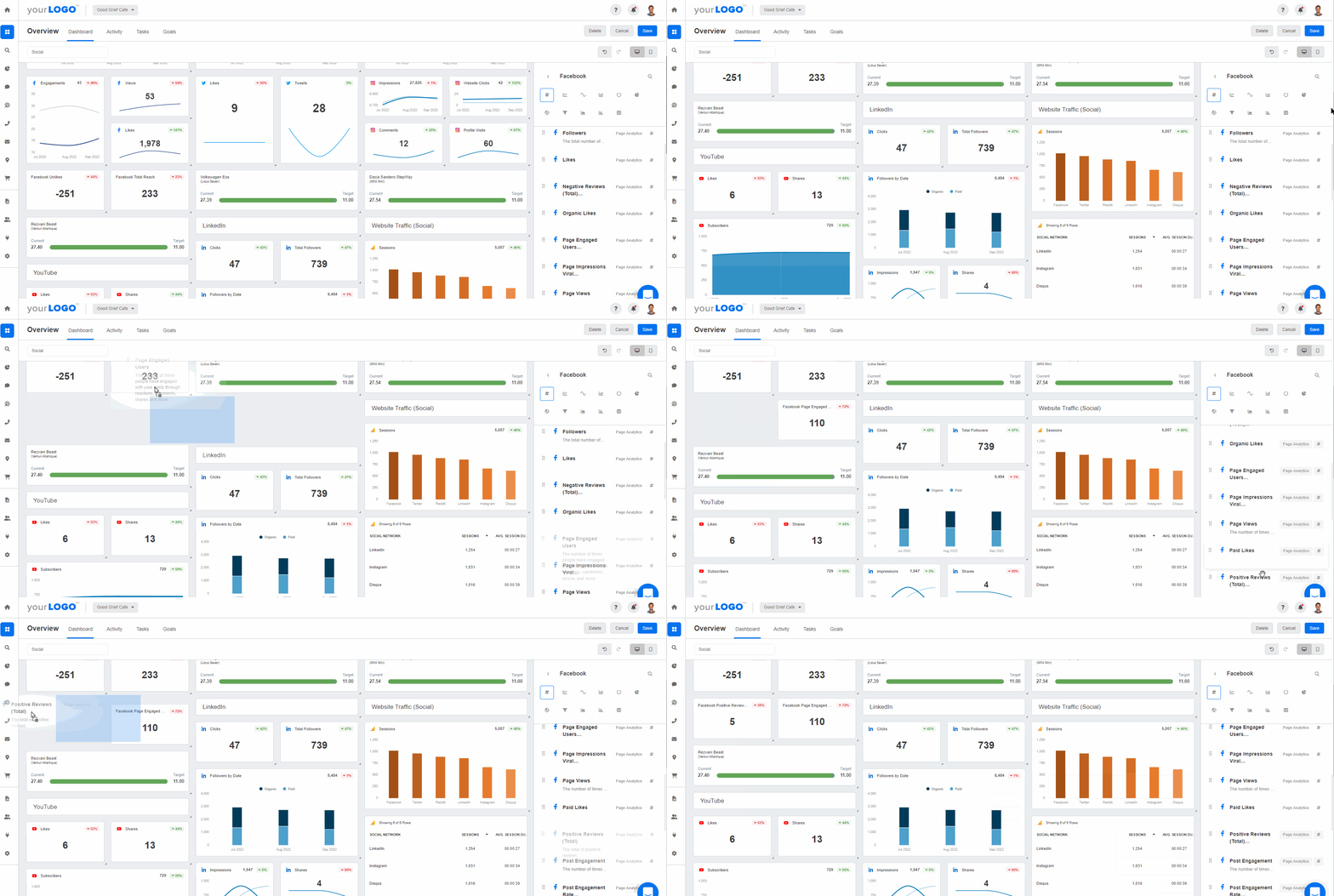
Don't settle for ordinary, standard client reporting. Go the extra mile by reporting on customized social media insights–try it on AgencyAnalytics with a free 14-day trial.
Paid and organic performance tracking
Most clients run both organic posts and paid campaigns. The right platform tracks ad analytics alongside organic performance, covering impressions, reach, click-through rates (CTR), conversions, and ad spend across multiple networks.
Competitor analysis and benchmarks
Benchmarking features compare a client's KPIs against competitor metrics: posting frequency, engagement trends, overall content performance. Some tools add industry-level social media benchmarks so you can show clients where they stand against their peers.
Pricing, usability, and scalability
Consider how pricing scales as you add clients or team members, and use free trials to test usability before committing. Make sure the platform can grow with you, whether that means more social accounts, new integrations, or automated reporting for dozens of clients at once.
Social media analytics tools vs. social media management tools
The two categories overlap, but they solve different problems.
Social media management tools focus on the day-to-day work of running channels: scheduling posts, managing a content calendar, handling community engagement, publishing across networks from one place. Buffer, Later, and Hootsuite started here.
Social media analytics tools are built around data: tracking performance, measuring engagement rate, monitoring competitors, analyzing audience patterns, and generating client-ready reports. AgencyAnalytics and Brandwatch lean into this side.
Many platforms now do both. Sprout Social combines management with strong social listening and analytics; Agorapulse pairs workflow management with ROI tracking. The question is where you need depth. If your team already handles scheduling, prioritize a reporting-first platform. If you need everything in one place, a hybrid saves you from juggling subscriptions.
Best social media analytics tools at a glance
Tool name | Best for | Cons | Pricing |
|---|---|---|---|
AgencyAnalytics | All-in-one agency reporting across social and 85+ channels | Suited for scaling agencies; may be too comprehensive for single-client reporting | From $25/month/client |
Sprout Social | Advanced social listening and analytics | High pricing; less accessible for smaller agencies | From $299 per seat/month |
Hootsuite | Multi-channel analytics and management | Cluttered interface, steep learning curve | From $99 per user/month |
Buffer | Simple analytics for small teams | Limited free plan; not ideal for larger teams | Free plan; paid from $5/month per channel |
Keyhole | Hashtag and influencer tracking | Occasional data discrepancies | Pricing on request |
Facelift Data Studio | Long-term trend analysis | Higher cost could deter smaller agencies | Pricing on request |
Iconosquare | Instagram and multi-profile analytics | Possible issues with Instagram account setup and Reels audio | From €69/month for 5 profiles (~$75 USD) |
Brandwatch | Enterprise listening and sentiment analysis | Mixed reviews on customer support and occasional bugs | Custom pricing |
Zoho Social | Collaboration and CRM integration | Limited Facebook Groups insights | From $230/month (agency plan) |
Later | Visual content analytics | Post caps, limited free plan, occasional reconnections needed | From $37.50/month |
Agorapulse | ROI-focused reporting workflows | Potential Instagram integration issues (according to some users) | From $119 per user/month |
11 best social media analytics tools for agencies and marketers
Whether you're after comprehensive social media analytics software or something more specialized, there's an option here for you. Each entry covers its best use case, standout features, integrations, pricing, and limitations.
1. AgencyAnalytics: best for all-in-one agency reporting

AgencyAnalytics is an all-in-one analytics platform built specifically for marketing agencies. It connects to Facebook, Instagram, TikTok, and YouTube to show clients how their paid and organic posts are performing from a single social media dashboard, and it integrates with 85+ other marketing channels to unify marketing analytics across social, SEO, and paid ads.
For monthly reporting there are pre-built dashboard and report templates, all fully customizable and schedulable to the client's cadence. Short on time? The Smart Report autopopulates with a client's social metrics in 11 seconds.
Standout features
White label social media reporting tool: Customize reports with your agency's branding for a seamless, client-ready finish.
AI-generated insights: Use AI reporting tools to get instant insights about a client's social media performance, including takeaways and optimization recommendations.
First-party data benchmarks: Show clients how they're performing against others with benchmarks derived from 150,000+ campaigns across 7,000 agencies.
Integrations
Social media platforms like Facebook, Instagram, TikTok, and LinkedIn.
Web analytics tools such as Google Analytics and Matomo.
Paid advertising platforms like Google Ads, Facebook Ads, TikTok Ads, and more.
Pricing
Price: Starts at $25/month/client.
Key inclusions: Access to 85+ integrations, unlimited staff users, custom metric creation, and alerts.
2. Sprout Social: best for advanced social listening and analytics

Sprout Social combines advanced analytics, social listening, and automated reporting, with post-level metrics, sentiment tracking, and a "Virality Score" that estimates how likely content is to be shared. It suits agencies handling multiple campaigns, though its pricing sits at the higher end, which can be a stretch for smaller teams.
Standout features
Social listening: Gain insights from social conversations to inform your client's social strategy.
Advanced scheduling: Plan and schedule social posts across multiple platforms.
Report automation: Automatically deliver customized, visual reports to clients.
Unified social inbox: Manage messages, customer interactions, and shared brand assets in one place, with a mobile app for on-the-go management.
Integrations
Social platforms, including Facebook, Instagram, Threads, TikTok, etc.
Lead gen and CRM platforms such as Salesforce and Marketo.
Social commerce platforms, including Shopify, Facebook Shops, and WooCommerce.
Pricing
Price: The Essentials Plan starts at $79 per seat/month. The Professional Plan starts at $299 per seat/month.
Key inclusions: Competitive reports, paid social reporting, custom workflows, and scheduling for optimal send times.
3. Hootsuite: best for multi-channel analytics and management

Hootsuite is a well-established management platform with customizable reporting, campaign tracking, and team performance metrics across multiple channels. It leans toward management-plus-analytics rather than agency reporting-first workflows, and its interface can feel cluttered for new users, so budget extra time for setup and onboarding.
Standout features
Customizable reports: Build reports that focus on the metrics each client values most.
Team performance tracking: Track response times, task completion, and overall productivity across your social team.
Social ROI measurement: Connect social activity to business outcomes by tracking leads, conversions, and revenue generated.
Integrations
Social media platforms like Facebook, Instagram, and LinkedIn.
CRM and marketing tools like HubSpot and Salesforce.
Advertising integrations with Facebook Ads, Instagram Ads, and LinkedIn Ads.
Pricing
Price: The Standard plan starts from $99 per user/month.
Key inclusions: Unlimited posts, 10 social accounts, custom analytics (in higher-tier plans), and team roles.
4. Buffer: best for simple analytics for small teams

Buffer delivers detailed insights into post performance, audience engagement, and the best times to publish, with an intuitive interface that makes scheduling and reporting straightforward. It works well for small teams and solo social media managers. The free plan is limited to a small number of accounts, and agencies handling multi-client reporting may find it too lightweight.
Standout features
Post performance metrics: Detailed insights into the performance of social media posts.
Audience insights: Understand the audience demographics and behaviors of your client's social media followers.
Custom reports: Create custom reports tailored to a client's specific needs.
Integrations
Social media channels like Facebook, Instagram, and Threads.
Local SEO tools such as Google Business Profile.
Ecommerce platforms including Mastodon and Shopify.
Pricing
Price: Free plan available. The Essentials plan starts at $5/month per channel (billing annually).
Key inclusions: Basic analytics, scheduling, engagement tools, and team collaboration features on paid plans.
5. Keyhole: best for hashtag and influencer tracking

Keyhole offers real-time tracking and reporting with detailed insights into hashtags, keywords, and account metrics, which makes it easier to spot emerging trends and measure campaign impact. Rather than full cross-channel reporting, it specializes in hashtag tracking, influencer reporting, and campaign-specific monitoring. Some users report occasional discrepancies against other analytics tools.
Standout features
Hashtag tracking and analysis: Monitor performance trends for specific hashtags to gauge reach, engagement, and audience sentiment.
Influencer tracking: Evaluate the impact of influencer collaborations by measuring engagement, reach, and conversions, with dedicated influencer analytics and an influencer reporting list.
Competitor analysis: Benchmark a client's social media performance against competitors to identify strengths and opportunities.
Integrations
Social media platforms like TikTok, Instagram, Facebook, X, and LinkedIn.
Media monitoring across news sites, blogs, and other sources across the web.
Reporting exports for data sharing.
Pricing
Price: Not listed on Keyhole's website. A demo is available upon request.
Impress clients and save hours with custom, automated reporting.
Join 7,000+ agencies that create reports in minutes instead of hours using AgencyAnalytics. Get started for free. No credit card required.

6. Facelift Data Studio: best for long-term trend analysis

Facelift tracks performance across different social channels with a focus on historical trend analysis and enterprise-style dashboard customization, which helps marketers work from precise, long-range data. Those advanced capabilities come at a higher cost that may give smaller agencies pause.
Standout features
Custom dashboards: Build tailored views to gain deep insights and highlight advanced social media analytics.
Historical data analysis: Review past performance to identify long-term trends and measure progress over months or years.
Benchmarking: Evaluate social performance against industry averages to spot strengths and gaps.
Integrations
Supported social media platforms include Facebook, Instagram, Snapchat, and X.
Graphics design tools like Canva.
Advanced data analysis software like Tableau.
Pricing
Price: Available upon request only.
7. Iconosquare: best for Instagram and multi-profile analytics

Iconosquare is built for agencies managing multiple client accounts, with a customizable dashboard for key metrics and tools that simplify day-to-day management. It suits Instagram-heavy agencies and teams that need detailed Pinterest analytics alongside Instagram data. Some users report difficulty adding Instagram accounts and occasional audio issues with Reels.
Standout features
In-depth Instagram analytics: Access detailed metrics to measure and optimize Instagram performance.
Content calendar: Plan, schedule, and publish posts seamlessly across social channels.
Competitive analysis: Monitor and compare performance against selected competitors to identify opportunities.
Integrations
Social media platforms including Instagram, Facebook, X, LinkedIn, and TikTok.
Scheduling and publishing tools for streamlined content management.
Analytics exports in formats like CSV and PDF.
Pricing
Price: The Scale plan starts from €69/month (~$75 USD) for 5 social profiles.
Key inclusions: Advanced analytics, competitor tracking, automated PDF reports, and promoted post analytics.
8. Brandwatch: best for enterprise listening and sentiment analysis

Brandwatch gives marketing teams deep insight into online conversations and brand sentiment, using predictive analytics and AI-powered insights to track trends and audience behavior across channels. It leans heavily toward listening rather than day-to-day reporting, and some users report occasional bugs and inconsistent support responsiveness.
Standout features
Sentiment analysis: Gauge the tone and sentiment behind social media mentions to understand public perception.
Trend analysis: Spot and act on emerging trends through detailed social media monitoring, including tracking industry influencers.
Customizable reports: Build tailored reports that align with specific client goals and metrics.
Integrations
Major social platforms including Instagram, Facebook, and LinkedIn.
CRM and marketing platforms such as HubSpot and Salesforce.
Messaging tools like Zendesk.
Pricing
Price: Custom pricing based on your agency's unique needs.

Experience why AgencyAnalytics clients rave about our customer support. Get help from a real human, not a chatbot. Start your free 14-day trial today. We're here to help whenever you need it.
9. Zoho Social: best for collaboration and CRM integration

Zoho Social offers real-time monitoring, advanced scheduling, and detailed analytics for engagement, reach, and audience growth, plus collaboration features for team management and client reporting. It's strongest for teams already in the Zoho ecosystem, since the CRM integration is where it shines. Some users note limitations with Facebook Groups functionality.
Standout features
Advanced scheduling: Plan and publish content across multiple social media channels from a single dashboard.
Performance analytics: Access detailed metrics to evaluate post and campaign effectiveness.
Collaboration tools: Streamline teamwork with built-in features for planning, feedback, and approvals.
Integrations
Social media platforms like Facebook, Instagram, X, Pinterest, and YouTube.
Google Business Profile for managing business listings directly.
Zoho CRM for syncing social engagement data with customer records.
Pricing
Price: Agency pricing starts from $230/month.
Key inclusions: Client portal, agency reports, brand health dashboard, and team collaboration.
10. Later: best for visual content analytics

Later streamlines visual content planning with a drag-and-drop calendar, performance insights, and optimal posting time suggestions, which makes it popular with Instagram-focused agencies and useful for influencer analytics. Its analytics depth doesn't match dedicated analysis tools, lower tiers cap posts per profile, and users note the need to periodically reconnect accounts.
Standout features
Scheduler: Plan and schedule content with an intuitive drag-and-drop calendar for a clear visual workflow.
Analytics: Access in-depth metrics to measure engagement, reach, and audience growth over time.
Optimization: Identify optimal posting times to maximize visibility and interaction.
Integrations
Social media platforms, including Instagram, Facebook, Pinterest, and YouTube.
Canva for creating and editing visuals directly within Later.
Dropbox, Google Drive, and OneDrive for importing media assets.
Pricing
Price: The Growth Plan starts at $37.50/month (annual billing).
Key inclusions: Analytics, scheduling for up to 180 posts per social profile, and collaboration tools.
11. Agorapulse: best for ROI-focused reporting workflows

Agorapulse simplifies workflows with real-time inbox monitoring, advanced scheduling, and in-depth analytics that include competitive benchmarking and ROI tracking. Compared with agency-first reporting tools, it focuses more on the management side with ROI measurement as an added layer. Users have reported Instagram glitches that block photo previews and make scheduling Reels in advance difficult.
Standout features
Unified inbox: Monitor and manage social media interactions in real time from a single dashboard.
Detailed analytics: Track performance metrics, benchmark against competitors (only in higher-tier plans), and measure ROI.
Social listening: Monitor brand mentions and industry trends to inform your client's entire social strategy.
Integrations
Social media platforms including Instagram, Facebook, X, and TikTok.
Meta's Conversions API and Google Analytics for connecting social performance data to web tracking.
Dropbox and Google Drive for importing, storing, and organizing media assets.
Pricing
Price: The Professional Plan starts at $119.00 per user/month.
Key inclusions: Social inbox, publishing, analytics, and team collaboration.
Two listening-first tools also worth a look
The 11 tools above are the ones agencies usually compare on features, pricing, and reporting depth. Two more are worth knowing if your clients care about brand monitoring and sentiment as much as performance data.
Talkwalker

Talkwalker is a listening and analytics tool with crisis management and influencer marketing features, using AI and machine learning to generate insights and predictions from social data. Its most widely used tools include:
Social media listening to monitor social media platforms, news sites, blogs, forums, and other online sources in real-time
Influencer marketing to find and connect with influencers
Real-time alerts and notifications to quickly respond to potential crises and protect your client's reputation
Competitive intelligence that keeps tabs on your clients' competitors' social media activity and benchmarks your performance against theirs
Image and video recognition that uses AI to monitor and analyze visual content on social media and other online sources
Mention

Mention tracks brand mentions, monitors competitors, and analyzes social performance, with sentiment analysis, influencer tracking, and alerts that let you respond to industry trends as they happen. Its most widely used tools include:
Real-time media monitoring to track brand mentions, social media activity, and other online conversations
Competitor analysis to see what's working for your clients' competitors and adjust strategies accordingly
Influencer tracking to build relationships and create more effective influencer marketing campaigns
Scheduling social media posts across multiple platforms
Alerts to quickly respond to and mitigate any potential reputation damage
One caveat. Listening-first trackers are useful for keeping on the pulse of things, but they can fall short on customized reporting. They don't always include what agencies need, like reporting templates, annotations, or integrations with other marketing channels such as PPC or SEO. An agency-centric social media reporting tool covers those gaps and makes reporting on a client's full digital marketing analytics a snap.
How to choose the right social media analytics tool for your agency
With 11 tools compared above, how do you decide? Here's a practical framework based on how agencies actually operate.
Start with your client count. Under 5 clients, a simpler tool like Buffer or Later might be enough. Past 10 or 15, you'll want a platform built for scale, with automated reporting, white-label dashboards, and multi-client workflows.
Look at your channel mix. If your clients are mostly on Instagram, Iconosquare could fit. If you're running campaigns across Facebook, LinkedIn, TikTok, YouTube, and Google Ads at once, you need a platform that connects all of it into one view.
Evaluate your reporting needs. Agencies that want to cut reporting time from 2.5 hours per client to under 30 minutes should prioritize automated, white-label reporting. Run a social media audit of your current workflow to find the bottlenecks first.
Consider paid plus organic in one workflow. Most agencies run both for the same clients. A tool that tracks ad analytics and organic analytics together saves time and gives a clearer picture of total performance.
Factor in the budget. Some tools charge per user, some per social profile, some a flat monthly rate. Compare what you're paying now across spreadsheets, individual tools, and manual labor against a centralized platform. The time savings usually justify it on their own.
Turning the data into better reach and engagement
Once the data is in one place, the job is acting on it. Here's how agencies use reach and engagement reporting to change what gets posted.
Monitor overall reach
To understand reach, go beyond a single number. Take this example from the AgencyAnalytics Facebook dashboard:

Analyze your clients' social media reach and make informed recommendations. Give your clients valuable social media insights by using AgencyAnalytics, free for 14 days.
It shows total reach, a comparison of organic and paid reach, video views, and demographic breakdowns. That level of detail is what lets you pinpoint patterns over time, or build new ICPs (ideal customers) to target.
Five ways to improve social media reach
Marketing agencies use these reports to take a data-driven approach to reach.
Know your audience: If the client targets women aged 20-29 in the US but the reports show reach skewing to Australian men in their mid-40s, the content strategy needs adjusting.
Post consistently: Regular posting keeps profiles fresh. If 99% of reach comes from paid ads, you're probably not posting often enough. Find the point between overposting and going MIA.
Control your CPM: The average CPM on platforms like Facebook Ads keeps climbing, currently around $15.00. It varies by industry and audience, but controlling it maximizes reach without sacrificing targeting or creative quality.
Use hashtags wisely: Hashtags extend reach on Instagram and Twitter. Research relevant, trending tags that fit the brand, and don't go overboard.
Optimize content for each platform: Tailor content to each platform's audience, whether that's snappy tweets, eye-catching Instagram visuals, or thought-provoking LinkedIn articles.
Evaluate engagement metrics
Engagement needs the same data-driven treatment. The YouTube dashboard below covers likes and dislikes (with comparative and visual analysis), comments, shares, notable percentage changes, and historical trends.
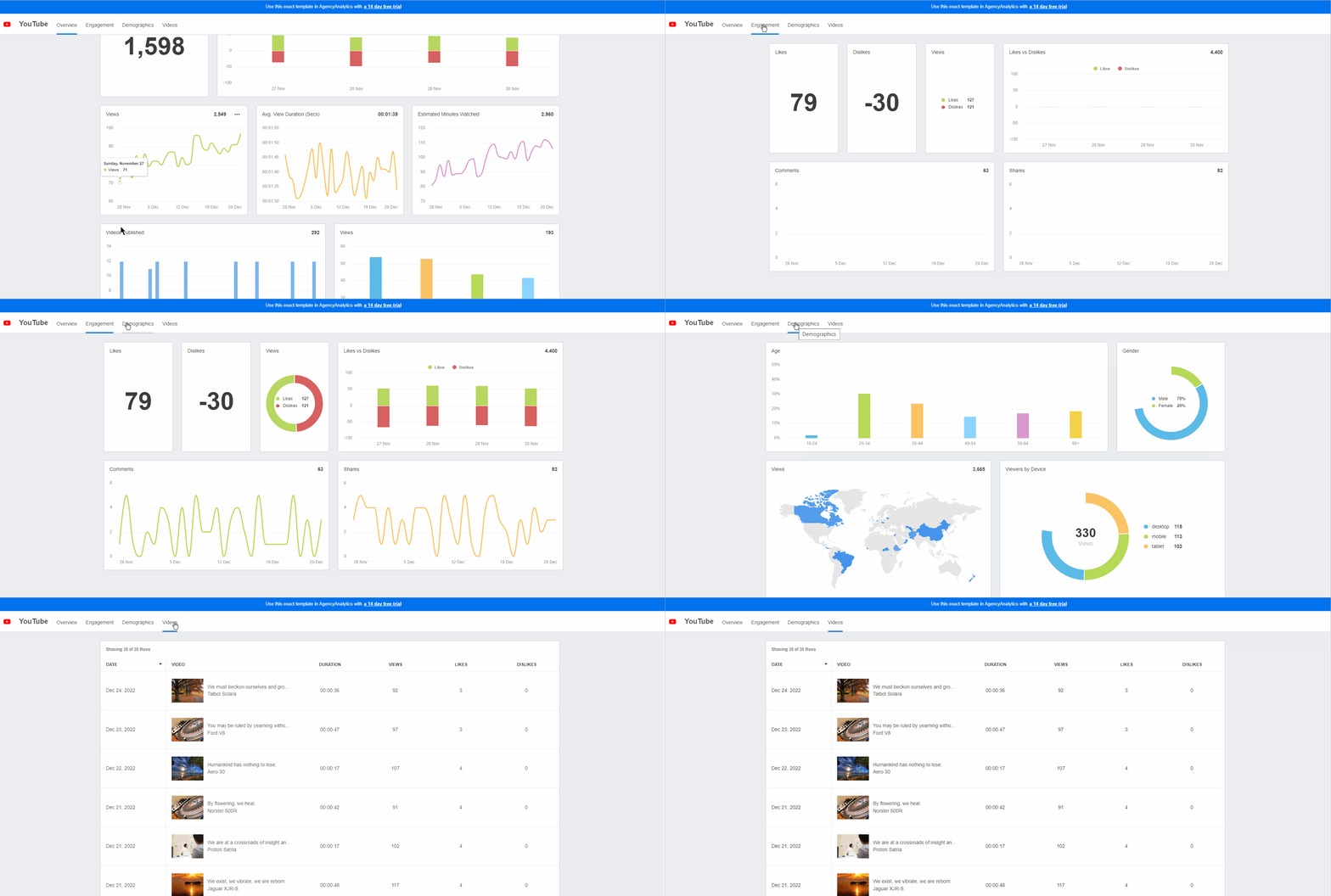
See what content resonates with your clients' target audiences most. Improve your clients' social media strategies and track their insights on AgencyAnalytics–it's free for 14 days.
Five ways to improve engagement rates
Real-time engagement data is what makes these five moves possible, and what lets you show the results in your social media analytics reports.
Craft compelling content: Focus on high-quality, shareable content, and mix videos, images, polls, and stories. Drill into the reach, impressions, and clicks for each social ad to see which drive the most engagement.
A/B test your campaigns: Test different headlines, visuals, and CTAs on paid ads, then use what you learn to optimize.
Use audience targeting: It's not what you post, it's who you reach. Tailor content to segments based on demographics, interests, and behaviors.
Encourage interaction: On most platforms, engagement equals additional exposure. Ask questions, run polls, or host live Q&A sessions.
Monitor and respond: Keep an eye on comments, messages, and mentions. Timely responses raise engagement and build stronger relationships with the audience.
Agency Tip: Pay attention to the content that results in the most reach and engagement over time. That way, you’ll know what type of content to focus on and how to improve over time (e.g., incorporating specific hashtags or using specific CTAs).
Take your social media marketing analytics to new heights
Choosing the right tool doesn't have to be complicated. Identify the social media KPIs that matter most, use free trials to test functionality, and pick the platform that fits your workflow. You can't steer clients to social media success if you can't report on performance, and paying attention to reach and engagement is what lets you build experiences that captivate audiences and drive results.
Whether you're tracking a handful of social platforms or managing dozens of client accounts, AgencyAnalytics brings everything together in one place, with the functionality of social media analytics software plus integrations with over 85 other channels.
AgencyAnalytics takes digital marketing campaigns to the next level. The dashboards empower agencies and clients, providing a one-login solution to understand campaign performance across SEO, Google Ads, Social Media, and more.

Bonfire
Centralize social media analytics, generate professional reports, and share reliable first-party data benchmarks. It's all possible with AgencyAnalytics. Try it free for 14 days.
Frequently asked questions about social media analytics tools
Social media management tools focus on scheduling, publishing, and community engagement. Social media analytics tools focus on measuring performance, tracking social metrics, and generating reports. Many platforms now offer both, but agencies that need deeper reporting and competitive benchmarking should prioritize analytics-first platforms, since built-in analytics on management tools sometimes only cover basic analytics.
Yes, but not every platform supports it equally. Some social media reporting tools let you add your agency's logo, colors, and custom domain to dashboards and reports. Others limit branding options to higher-tier plans. If white-label reporting is important to your agency, check whether the tool supports branded scheduled reports, client-facing dashboards, and multi-client workflows before committing.
A strong client report should cover the metrics that connect social media efforts to business outcomes. Here's what to include:
Reach and impressions
Engagement rate (likes, comments, shares, clicks)
Follower growth
Click-through rate and conversions
Paid ad performance (spend, ROAS, cost per result)
Social media benchmarks against competitors or industry averages
For a deeper look at tracking the right numbers, check out this guide to social media KPIs.
Many social media analytics tools include competitive analysis features. These can show how your client's engagement, posting frequency, and audience growth compare to competitors. Some platforms, like AgencyAnalytics, also offer benchmark comparisons based on real campaign data from thousands of agencies. Others provide share-of-voice insights and competitor posting pattern analysis.
As a practical default, review analytics weekly for optimization decisions (like adjusting posting schedules or shifting ad budgets) and generate formal client reports monthly. For high-spend paid campaigns or product launches, daily monitoring can help you spot opportunities and address issues faster. The key is to track social media analytics consistently so trends become visible over time.
Richelle Peace is a writer with a degree in Journalism who focuses on web content, blog posts, and social media. She enjoys learning about different topics and sharing that knowledge with others. When she isn’t writing, Richelle spends time teaching yoga, where she combines mindfulness, movement, and her passion for wellness.
Read more posts by Richelle PeaceWhat other agency experts are reading

The essential social media reporting guide (+ Free report templates)
A comprehensive social media report is non-negotiable for showcasing results. This guide covers everything needed to highlight key metrics and trends, backed by free social media report templates to streamline and make your reporting process stress-free.

How To Do a Social Media Audit for Clients
In this guide, we walk you through the step-by-step process of how to conduct a social media audit to set your client relationship up for success.

The 15 Best Social Media KPIs and How To Track Them (With Examples)
Track the most important social media KPIs in 2025 to measure success, boost ROI, and improve your strategy with clear, real-world examples.