The 11 most important SEO metrics to track in 2026 (and what to ignore)


Table of Contents
- Key takeaways
- What are SEO metrics?
- Which SEO metrics should you consistently monitor?
- How often to check SEO performance
- Set up a scalable system before you track anything
- 11 most important SEO metrics to track
- AI and LLM visibility: the newest layer of SEO performance
- A few metrics to ignore (mostly)
- Common SEO monitoring mistakes to avoid
- Best SEO tools for performance monitoring
- Automate SEO metrics reporting to save time, retain clients, and scale your agency
7,000+ agencies have ditched manual reports. You can too.
Free 14-Day TrialTable of Contents
- Key takeaways
- What are SEO metrics?
- Which SEO metrics should you consistently monitor?
- How often to check SEO performance
- Set up a scalable system before you track anything
- 11 most important SEO metrics to track
- AI and LLM visibility: the newest layer of SEO performance
- A few metrics to ignore (mostly)
- Common SEO monitoring mistakes to avoid
- Best SEO tools for performance monitoring
- Automate SEO metrics reporting to save time, retain clients, and scale your agency
7,000+ agencies have ditched manual reports. You can too.
Free 14-Day TrialMeasuring your clients’ marketing metrics is part of the job, and SEO is no exception. But SEO is long-term work with slow ROI, which makes progress hard to show.
It also rarely crashes overnight. It drifts. A few keyword rankings slip, CTR dips, and organic traffic starts to look off.
Without a consistent SEO analysis process that includes reporting and regular tracking with SEO monitoring tools, clients underestimate what your agency delivers. Track performance on a schedule and you always have evidence of progress, and you catch the drift before it becomes a call you did not want to take.
So which metrics should you actually track? Below are the 11 worth monitoring, how often to check each one, how to track AI visibility, and how to set up reporting that scales across clients—so your clients hit their SEO goals and can see the work paying off.
Key takeaways
SEO success looks different for every client, so agree the goals first and track only the metrics that prove them.
Eleven metrics cover most agency reporting: organic traffic, clicks, conversions, keyword rankings, backlinks and referring domains, domain authority, core web vitals, mobile traffic, engagement, average CTR, and crawl errors.
Cadence matters as much as the metric list: daily checks for indexing and technical issues, weekly checks for trends, a monthly review of authority, behavior, and visibility.
AI visibility is now part of SEO performance, so track GA4 referrals from tools like ChatGPT and Perplexity, and how often your client is cited across a fixed prompt set.
Bounce rate, exit rate, and dwell time are diagnostics for spotting content and UX mismatches, not proof that SEO is working.
What are SEO metrics?
SEO metrics are your agency’s scoreboard. They tell you what’s working, what needs improvement, and how to get better results for your clients, going beyond keyword rankings and traffic to show how a website performs in search overall.
For agency clients, SEO KPIs (key performance indicators) make the work tangible. Clients don’t just want to hear that rankings improved. They want to see how that turns into leads, sales, and growth. The right metrics—from organic traffic to engagement and crawl errors—tell that story in terms they understand.
Monitoring, tracking, reporting, and analytics often get lumped together. They’re four different jobs:
SEO monitoring: Keeping tabs constantly, like noticing a product page slip a few positions in the SERPs.
SEO tracking: Measuring numbers over time to spot trends.
SEO reporting: Sending your client a snapshot of traffic and rankings to show what happened.
SEO analytics: Figuring out why it happened, whether a drop in clicks came from a meta description change or a competitor grabbing a featured snippet.
Monitoring lets you fix problems before they escalate, tracking gives you the data to back it up, and SEO analytics and reporting turn that into the moves that keep your clients winning.
Agency tip: Need a refresher on KPIs vs metrics? Just remember: metrics tell you what happened, KPIs tell you why it matters.
Which SEO metrics should you consistently monitor?
It depends on the client. Rather than tracking backlinks or rankings in isolation, define what SEO success means for each client while you’re building the strategy. One wants more organic traffic, another wants credible backlinks from local directories, a third is targeting low-traffic but high-converting niche searches.
Our SEO analysis guide shows how to translate metrics into a prioritized action plan. To get started, ask your clients:
What are your long-term business objectives?
Do you have a timeline for achieving these goals?
What are your SEO forecasting strategies?
What are your current challenges?
What does SEO success look like for you? (e.g., more foot traffic at a physical store location, increased online sales—see: local SEO metrics)
Use the answers to build the plan and pick the applicable SEO analytics. Priorities also shift by client type. For most agency accounts the core three are keyword rankings, organic traffic, and click-through rate. Beyond that:
Ecommerce
Product page rankings: Make sure your key products show up where shoppers can find them.
Conversion rate from organic search: Traffic is great, but is it turning into sales?
Page speed: Slow pages frustrate users and hurt rankings.
Local SEO, map pack, and Google Business Profile
Local keyword rankings: See if you appear where your client’s customers are searching.
Google Business Profile engagement: Clicks, calls, and direction requests.
Reviews and ratings: Social proof can make or break local search visibility.
Enterprise teams
Organic search share vs competitors: Are you winning the SERP battle?
Technical SEO health: Broken links, indexing issues, and core web vitals.
Site speed: Impacts both user experience and search rankings.
How often to check SEO performance
Clients don’t care about one bad month. They do notice when things quietly drift and nobody’s paying attention. A routine stops small slips from snowballing, tells you why numbers moved, replaces spreadsheet digging with automated checks, and keeps competitor moves, snippet steals, and Google updates from catching you out. Cadence matters as much as the metric list.
Daily (15 minutes)
Keyword drops that need immediate attention.
Traffic spikes or dips that don’t make sense.
Indexing issues in Google Search Console.
Broken links, site speed hiccups, or other technical glitches.
Weekly (15 minutes per client account)
Keyword ranking movement for priority terms, and trends across multiple keywords.
Organic traffic trends, plus sudden drops in impressions or clicks and CTR changes.
Search visibility shifts and engagement metrics like time on page.
Technical issues like crawl errors or broken pages.
Monthly (about an hour)
Overall organic traffic trends and content performance in search results pages.
Site health audits and technical SEO.
Brand mentions and citations in AI/LLM results.
The monthly review is where you step back. Spend the hour on three areas:
Authority: Referring domains, new backlinks, and internal links, to see whether you’re building momentum.
Behavior: Engagement metrics like time on page, and conversion rate from organic search. Traffic is good, traffic that converts is better.
Visibility: Keyword movement, featured snippets, and other SERP features—where your client is gaining ground and where competitors are sneaking ahead.
AgencyAnalytics keyword ranking reports put those trends, wins, and problem areas in one place.
As an SEO consultant, accurate client reporting is essential to be able to evaluate how well various SEO strategies are working.
Kelly Fitzgerald, Founder, Savvy Marketing Services

Turn on anomaly detection and metric alerts in AgencyAnalytics to replace the daily manual check-in with an automatic notification every time there’s a spike or dip. Try it free for 14-days.
Set up a scalable system before you track anything
Whichever metrics your agency settles on, you’ll need a multi-metric tracking system rather than a handful of standalone numbers. It’s the only way to scale sustainably.
Invest in SEO software for agencies and SEO analysis tools to track the data and identify which strategies are working. To simplify SEO tracking, use a tool like AgencyAnalytics that replicates reporting campaigns across multiple marketing channels—especially useful when your reporting structure is similar for every client.
Get the infrastructure in place first and you’ll have a process for showing long-term SEO progress and improvement. Here’s the setup, in order:
1. Connect your data sources. GSC tells you which pages are indexed and getting impressions. GA4 shows how visitors behave on those pages. Rank trackers reveal which keywords are climbing or slipping. Backlinks show which pages are gaining traction.

Agency tip: For high-volume accounts, standard tracking isn’t enough. You need agency rank tracking that scales across hundreds of locations and multiple languages. AgencyAnalytics pulls in live data from 85+ integrations, so you can monitor all clients in one login—and it’s free to start.
2. Create a clean keyword set. Organize keywords by intent or campaign. Selling custom backpacks? Keep “buy backpacks online” separate from “backpack packing tips.” The best keyword rank tracking software hits Google, Bing, and Yahoo, handles multiple locations, and plugs straight into your dashboards—so you know what’s driving conversions and what’s background noise.
Broken or missing internal links or lack of a plan for sharing are some pretty standard issues across all industries. Everything should always be tested, shared and tracked for traffic, backlinks, social stats and lead conversions.
Kristen Ewen, Director of SEO, Property Manager Websites
3. Build an SEO monitoring dashboard. The best ones show organic traffic, keyword shifts, and page health at a glance, so you spot problems and wins before anyone has to ask. AgencyAnalytics puts it together in minutes, without the dev work.
4. Set alerts for the anomalies you can’t miss. Set automated alerts for big drops in traffic, spikes in broken links, or core web vitals issues so you can act before rankings move. AgencyAnalytics also sends branded reports automatically, so clients stay in the loop without extra work.
5. Add annotations so changes have context. When you update content, fix a technical issue, or push new links, make a quick note on your charts: what changed, which pages were affected, what campaign triggered it. When rankings shift weeks later, you already know why.
Agency Tip: Working with high-volume clients? Make sure you have the right strategy and track enterprise SEO metrics that reflect their goals.
11 most important SEO metrics to track
Here are the metrics to put on your radar. They’re also included in our SEO dashboard template.
1. Organic traffic
All the SEO effort in the world is wasted unless it brings your clients qualified organic traffic. Seasonal fluctuations aside, a month-over-month increase in organic visitors shows rankings are improving, including for keywords you weren’t targeting.
Other metrics show trends. This one is quantifiable proof that more people are arriving, which should—all else being equal—convert to leads and customers. Better still if organic traffic and conversion rates grow faster than your client’s other channels. Quality depends on which keywords you rank for, the content people land on, and how you define conversions.
How to track organic traffic
The quickest route is the GA4 Reports section. Go to Reports > Acquisition > Traffic Acquisition, find the Session Default Channel Group column, and select Organic Search to see sessions, users, engagement rate, and conversions. Apply filters or compare dimensions such as traffic sources or landing pages to dig further.

To isolate organic traffic as a segment for deeper analysis
1. In GA4, navigate to Explore.
2. Click + Create a new exploration and choose Free Form.

3. In the Segment section, click + Create a segment and select User Segment.


4. Under the filter conditions, choose First user medium or Session medium and set the value to organic.

5. Apply the segment to your exploration to analyze organic traffic separately.
A faster alternative: an AgencyAnalytics dashboard. After connecting Google Analytics, open your dashboard under the Analytics menu, go to the Organic tab, and read the count under Sessions. A web analytics dashboard does the same job across channels.

Report on organic traffic with Google Analytics SEO reports and dashboards, consolidated in AgencyAnalytics—free for 14 days. To pull insights from multiple platforms into one place, build an SEO report and customize it as you see fit.
2. Organic clicks
For traffic driven by specific keywords, Google Analytics reports won’t help unless the Google Search Console report is enabled. GSC shows how individual keywords perform in Google search results.
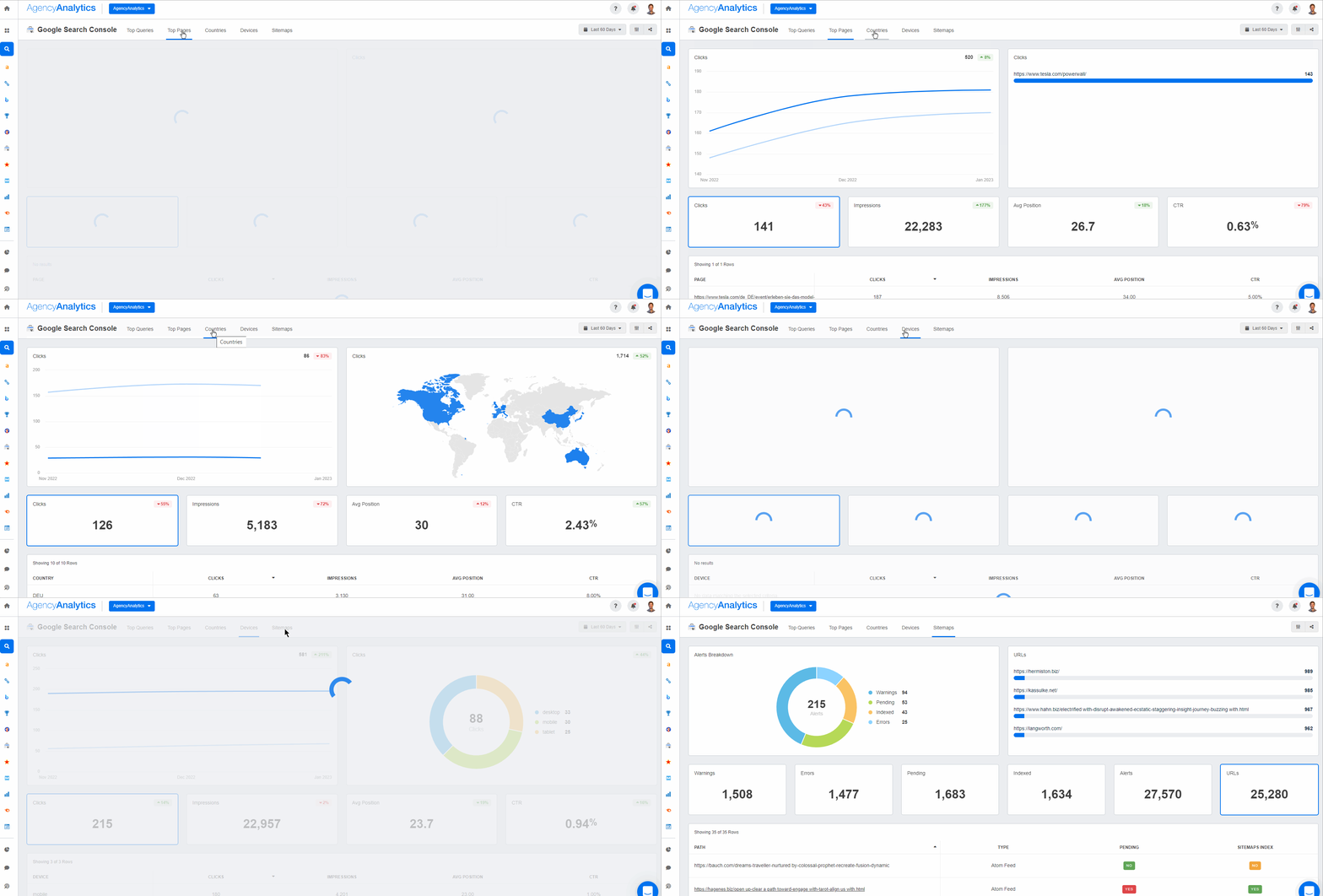
The Query data shows the queries users typed into Google, the average position for that keyword and for the site as a whole, and how many impressions and clicks the client’s website received for each one. The difference between this and keyword rank tracking (below) is coverage: the query report identifies every keyword that generated impressions and clicks, whereas a rank report focuses on the priority keywords that move the needle.
How to track organic clicks
Google Search Console is the cleanest source of what people actually clicked in Google, down to the query and landing page.
1. Open the Performance report: Select your property, click “Performance,” and select “Search Results.”
2. View clicks: The main chart shows impressions and clicks over time, with totals for clicks, impressions, CTR, and average position. Timeframes run from 24 hours to 3 months and beyond.
3. Analyze the tabs below the chart: Queries (which keywords brought clicks), Pages (which pages received them), and Countries/Devices/Search Appearance (filter by location or device).
4. Use URL inspection: Click a URL to check its index status or see page-level performance detail.

A faster alternative: an AgencyAnalytics dashboard. Connect the Google Search Console integration, then add widgets for clicks, impressions, average CTR, average position, top queries, and top pages. Drop it into your reporting flow and the organic clicks section is ready every month, with no manual exports.

Get insight into user intent and refine your clients’ keyword strategies with the Google Search Console dashboard in AgencyAnalytics—free for 14 days.
3. Organic conversions
Once organic traffic is arriving, the next question is quality. A high volume of sessions won’t mean much if it never turns into a lead or a sale. That’s what organic conversion rate answers.
How to track organic conversions
You’ll need to set up and track **key events** in Google Analytics. Common key events include:
Making a purchase
Free Trials for SaaS products
Email signups
Phone calls
Alternatively, add an organic conversion rate widget to your SEO dashboard in AgencyAnalytics and see traffic and conversions side by side.

4. Keyword rankings
With Google’s AI-based search algorithm and constantly changing results, is it still worth tracking keyword rankings? Yes. Even though personalization means results are seldom identical at the user level, keyword ranking reports tell you two things:
The general direction of your clients’ SEO efforts: Better rankings for one keyword usually indicate improved rankings overall, especially for related long-tail keywords.
Keyword selection: If other metrics improve—domain ratings, organic traffic—but target keyword rankings don’t, that usually points to poor keyword selection. Choose less competitive keywords and rank for those first. The types of keywords matter too.
How to track keyword rankings
White label keyword rank tracking is built into AgencyAnalytics. To add keywords to a client campaign:
1. Click Add Keywords in the center of the Rank Tracker module on a new campaign, or in the upper right-hand corner for an existing one.

2. Add the list of keywords you’d like to track and click Continue.

3. Choose the location and language to pair the keyword list with.

4. Add a tag to those keywords, if needed, to stay organized.

5. Head to your Rank Tracker module to track the results.

5. Backlinks and referring domains
On-page factors matter, but backlinks and other off-page factors are still critical to SEO performance. Between two pages with similar on-page metrics—bounce rate, time on site, content quality—the one with more backlinks from higher-quality domains usually wins.
Track referral traffic from backlinks and referring domains from your clients’ link-building campaigns. More backlinks might not immediately lift rankings, but they show things moving in the right direction.
How to track backlinks
Use SEO software with a backlink monitoring tool, and look for three things:
Update frequency: New backlinks should be indexed as they appear. A slow-refreshing index can hide them for weeks.
Accuracy: Actual backlinks and follow/no-follow links should be shown separately. Anchor text and source authority tracking is a bonus.
Trends: Your tool should show whether you’ve lost or gained backlinks over time.
For free (if sometimes inconsistent) backlink data, use Google Search Console and enter your site name. There’s no cost, but the list isn’t frequently updated and it won’t show acquisition trends.

6. Domain authority and trust flow
The number of backlinks isn’t enough. Quality matters too, along with any increase in domain authority (DA).
DA isn’t a direct Google signal—it was developed by Moz—but a higher authority score indicates higher trustworthiness, which does affect SERP rankings. Majestic SEO measures the same idea with “trust flow.” An upward tick means your clients’ SEO efforts are bearing fruit. Keep an eye out for poor-quality backlinks, which can have serious consequences over time.
How to track authority metrics
Majestic analyzes backlinks and link quality using two metrics: trust flow (the quality of links pointing to a site) and citation flow (the quantity).
Visit Majestic and log in.
Enter your client’s domain in the search bar to analyze its backlink profile.
Go to Site Explorer and check the Trust Flow and Citation Flow scores. Higher trust flow indicates stronger, high-quality backlinks; high citation flow with low trust flow can indicate spammy or low-quality links.

(Source: Majestic)
A faster alternative: the Majestic integration in AgencyAnalytics. Use the Majestic integration for a complete view of site authority, referring domains, and backlinks alongside the rest of your reporting.

7. Core web vitals
Core web vitals are Google’s way of measuring how users experience a site: how fast, stable, and interactive it is. If pages load slowly, shift unexpectedly, or lag when users engage, Google notices and so do visitors. Google’s RankBrain algorithm uses these signals to help determine rankings.
How to track core web vitals
Monitor core web vitals at scale in Google Search Console, then use PageSpeed Insights to diagnose and validate fixes on specific URLs.
1. Open Google Search Console and choose the correct site property.
2. Go to Experience → Core Web Vitals. The report groups URLs by issue and marks them Poor, Needs improvement, or Good, based on real-user data over a 28-day window.
3. Click “Open Report” for either Mobile or Desktop. Prioritize whichever device drives the most value—for many sites, that’s mobile.
4. Click into the biggest Poor / Needs improvement groups first, then open example URLs to see what’s affected:
LCP (loading)
INP (interactivity)
CLS (visual stability)
5. After deploying improvements, return to Search Console and click Validate fix to monitor recovery and confirm the affected URLs move back into “Good.”
A faster alternative: the Google Lighthouse integration in AgencyAnalytics.
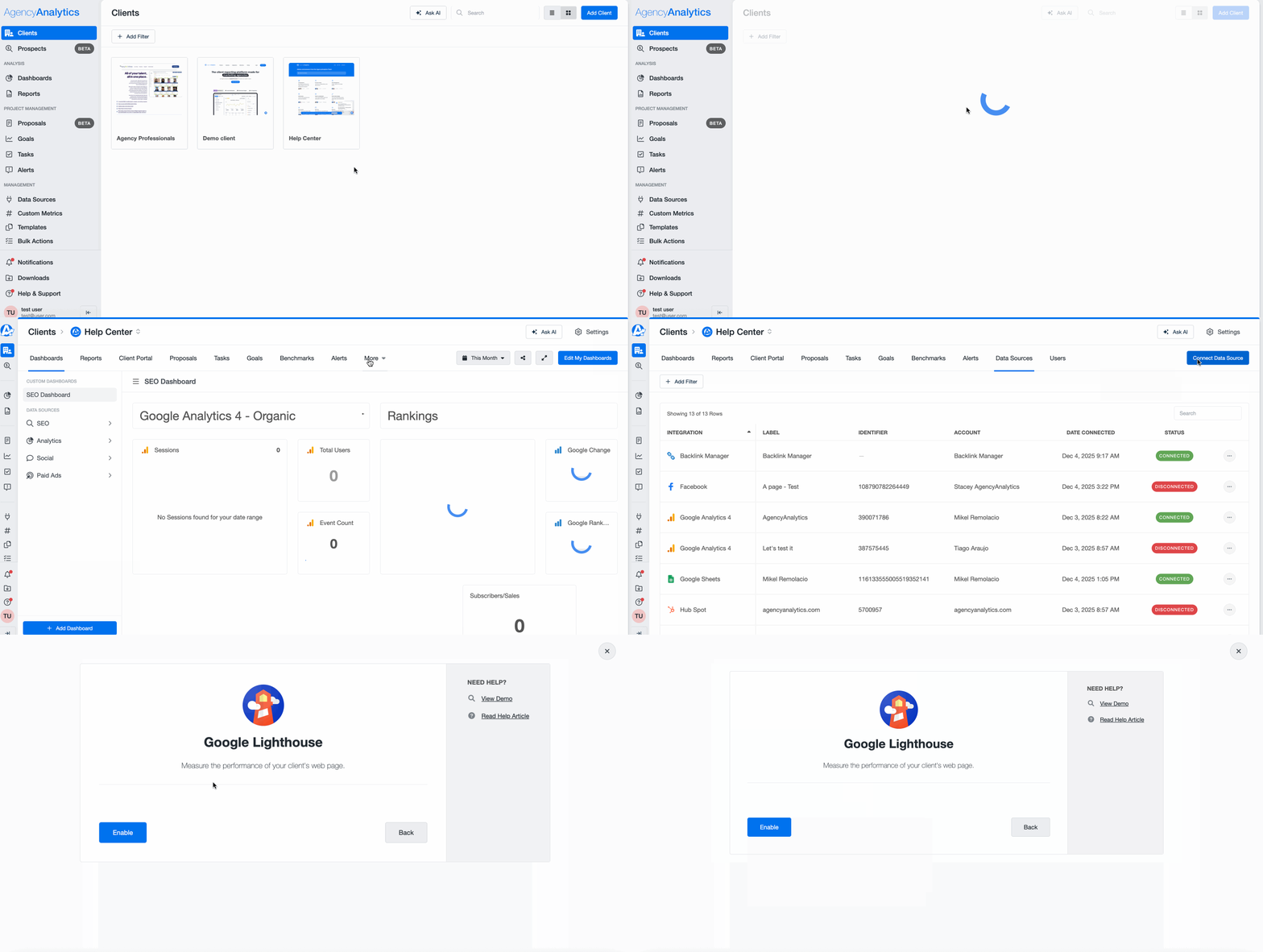
1. In the client section, go to Data Sources → Connect Data Source.
2. Search for Google Lighthouse and click Enable. AgencyAnalytics then scans the client’s URL and generates weekly audits automatically.
3. Add the Lighthouse widgets to your SEO dashboard or report to monitor performance trends and spot problem pages fast.

A core web vitals report shows where performance is holding back rankings and engagement. A fast site keeps visitors on the page longer and improves conversion rates.
8. Mobile traffic
Mobile-first indexing is the standard for Google, so mobile performance is no longer a side report. Tracking mobile traffic tells you three things:
Mobile-friendliness issues: Google prefers mobile-friendly sites in mobile results. If mobile traffic stays static even as overall traffic grows, that points to a mobile-friendliness problem.
Usage patterns: Rising mobile traffic can signal shifting audience behavior, and whether a client should invest more in mobile development such as a mobile-first site or app.
Mobile-only search terms: Users on the go tend to use fewer words than on desktop, so track mobile-only search terms separately.
How to track mobile performance
Two metrics matter here—mobile traffic and mobile rankings. In AgencyAnalytics:
1. For mobile traffic, go to Analytics > Audience > Devices to see total traffic by device plus goal completions from mobile, desktop, and tablet.

2. For mobile rankings, go to SEO > Rankings, then click Google Mobile Rankings in the slide-out window.

3. To track mobile traffic in Google Analytics instead, go to Reports > User > Tech > Tech details and scroll to see mobile, desktop, tablet, and smart TV traffic.

With the Agency Rank Tracker tool, there’s no need to spend hours monitoring keyword rankings across multiple clients. See for yourself with a free 14-day trial.
9. Engagement metrics
Engagement metrics diagnose the quality of content, UX, and conversion performance. They often correlate with SEO outcomes, but they aren’t direct Google ranking signals.
How to track engagement metrics
Google Analytics shows engagement metrics on its opening page, including pages per session, views, and average time per session. Or consolidate them in AgencyAnalytics alongside your other SEO metrics to see the whole picture in one view.

10. Average CTR (click-through rate)
The metrics above measure engagement once visitors are on your client’s site. Organic CTR measures engagement while the user is still on the SERP.
It’s tied to clicks (#2 on this list) but goes deeper, combining impressions and clicks to show whether a user is interested enough to click at all. There’s no engagement if nobody clicks through.
If you’re observing low CTRs, ask:
Is the page title not engaging enough?
Is the content relevant to the search terms?
Is there a keyword intent match between the content and the search term?
Does the meta description entice users to learn more?
What other pages show up for these searches?
How to track organic CTR
Find organic CTR directly in the ‘Performance’ section of Google Search Console.

Or use an AgencyAnalytics dashboard to view CTR alongside your other SEO metrics and analyze your clients’ best-performing pages in one click.

11. Crawl errors
For Google to rank a website, it has to read it first. A site with technical SEO issues such as broken links and missing pages is harder to crawl, and pages Google can’t find are pages it can’t rank. Running an SEO site checker regularly keeps crawl errors visible so you can fix them quickly. Set a cadence for SEO audits, monthly at minimum.
How to track crawl issues
Google Search Console is the fastest way to find and prioritize 404s, server errors, blocked pages, and redirect problems, then validate fixes as you go.
Open Google Search Console → Indexing → Pages. Most crawl and error problems show up here as Not indexed reasons: Not found (404), Soft 404, Server error (5xx), Blocked by robots.txt, Redirect error, and so on.

Click into the biggest Not indexed buckets first, then review the example URLs to confirm the pattern—a single page issue versus a site-wide template or redirect rule.
For any important URL, use URL Inspection (hover over “Not Started” and click the magnifying glass) to see what Google last saw, and to test after fixes.
Check Settings → Crawl stats for site-level health: response codes, spikes in errors, host issues. This is where outages and persistent 5xx errors show up.
Once the root cause is fixed, click Validate fix to confirm Google’s recrawl and resolution.
AI and LLM visibility: the newest layer of SEO performance
Search visibility isn’t just rankings anymore. Your clients are showing up in ChatGPT, Claude, and Perplexity, and that calls for a fresh take on SEO analysis.
AI and LLM-driven traffic
Some users now click through from tools like ChatGPT or Perplexity, and Google’s AI Overviews and AI Mode shift search traffic patterns, often with impressions up while clicks don’t move the same way.
How to track AI and LLM traffic
1. Track AI referrals in GA4. Go to Reports → Acquisition → Traffic acquisition and set the primary dimension to Session source / medium. Search for sources like chatgpt.com / referral and other AI tools, then add a secondary dimension such as Landing page + query string to see which pages those visits land on.
Agency Tip: AI clicks are often undercounted because referrer data can get stripped (mobile apps, copy/paste, privacy settings), so some of this traffic shows up as Direct.
2. Create an “AI traffic” view for ongoing reporting. Build an Exploration or saved report that filters Session source by a regex of AI domains, then trend sessions, conversions, and top landing pages over time.
3. Know what you can and can’t isolate in Search Console. Google includes AI Overviews and AI Mode performance within the Performance → Web totals, and you generally can’t filter out “AI-only” performance as a separate report. The practical workaround is to watch for query-level CTR changes or unusual impression shifts on queries where AI features appear more often.
AI and LLM citations
In 2026, it’s not just about ranking—it’s about getting cited. When ChatGPT, Gemini, and Perplexity answer questions, they often include sources. If your client’s site or brand-controlled profiles are consistently cited, their content is being used as the answer, even when nobody clicks through.
Monitor your client’s AI footprint: brand mentions in generated answers, citations pointing to blogs, guides, or resources, inclusion in “recommended tools” and “best of” lists, and links pulled from their site when a topic gets explained. That tells you whether your client is part of the conversation or whether competitors are taking the spotlight.
How to track AI and LLM citations
1. Create a “prompt set” that matches real buyer questions. Build a list reflecting how people actually ask for recommendations, then check it monthly across the major AI platforms and log whether your client is mentioned, whether their site is cited or linked, and which URL or domain is used as the source. A starter list by intent:
Best: “Best payroll software for small businesses.”
How-to: “How to set up automated SEO reporting for clients.”
Tool: “Agency SEO dashboards for monitoring performance.”
Agency: “Best marketing agencies for SaaS clients.”
2. Track “share of citations,” not just presence. One-off mentions are nice; consistency is the meaningful metric. Track citation rate (how often your client is cited across the prompt set), competitor share-of-voice (who gets cited instead), and which pages earn citations most often, so you know what to update or expand.
3. Watch where AI is pulling information from. AI systems frequently cite sources brands already control—websites and listings—so clients can often improve citations by tightening content clarity, keeping listings consistent, and strengthening key fact pages: services, locations, pricing, comparisons, FAQs.
To improve cite-ability, give AI tools what they favor: clear definitions of industry terms, original frameworks or processes, checklists people can follow step by step, and templates or practical guides their own customers can use.
A few metrics to ignore (mostly)
These are useful diagnostics but weak success KPIs on their own. Page type (blog post vs. landing page), intent (research vs. “buy now”), and tracking setup all skew them—so use them to spot UX and content mismatches, not to prove SEO is working.
Bounce rate. In GA4, bounce rate is the inverse of engagement rate: the share of sessions that didn’t last 10+ seconds, didn’t trigger a key event, and didn’t include a second page or screen. That makes it easy to misread. A high-bounce blog post might be doing its job if users get the answer and leave, while a low bounce rate doesn’t guarantee quality traffic if it isn’t converting. Compare within similar pages (blog vs. blog, landing vs. landing) and pair it with organic conversions, key events, and engagement time before acting.
Exit rate. Every session ends somewhere, so high exits isn’t automatically bad. It can even be good, such as users exiting on a thank-you page after converting. GA4 also makes it awkward: there’s an “Exits” metric in Explorations but no built-in “Exit rate,” so you calculate it externally. Focus instead on funnel and path analysis and conversion rate by landing page.
Dwell time / average session duration. Dwell time gets discussed like an SEO KPI, but you can’t measure it cleanly and Google doesn’t present it as a direct, trackable metric. Average session duration is affected by tab switching, inactivity timeouts, and whether a user views multiple pages. For a more reliable attention signal, use average engagement time—GA4’s replacement for “time on page”—plus organic conversions and page-level outcomes like newsletter signups, demo requests, and purchases.
Common SEO monitoring mistakes to avoid
Even a strong strategy stumbles if the basics slip. Where agencies tend to trip up:
Tracking everything: Too many metrics blur the picture. Focus on the metrics that matter for each client, ideally the ones that also show your results.
Ignoring context: A ranking drop isn’t the finding. You need to know what caused it—content, links, or technical SEO.
Siloed data: Scattered analytics hide the full story. Pull everything into one platform so you see the whole site at a glance.
Overlooking competitors: SERP shifts reveal opportunities and threats. Missing gaps? Layer in more competitor analysis tools to see exactly where your client stands.
Skipping regular checks: Weekly pulses on keyword rankings, CTR, core web vitals, and engagement metrics stop small issues from snowballing.
Best SEO tools for performance monitoring
These SEO tools keep tracking organized, so your team can spot wins and catch issues fast.
Google Analytics: best for understanding SEO traffic and user behavior

Rankings show where pages land. Google Analytics shows whether anyone sticks around and what they do once they get there.
Organic traffic report: Isolate SEO traffic and compare YoY trends to spot drift.
GSC integration: See which keywords drive traffic and how users behave on landing pages.
Engagement rate: Track sessions that last 10+ seconds, visit multiple pages, or convert.
Anomaly detection: Get alerts for unusual traffic drops or conversion dips.
Funnel & path exploration: Map user journeys and spot weak internal linking or missed conversions.
Pricing: Free.
Ahrefs: best for competitor analysis and finding new opportunities

Ahrefs is for agencies that want to understand why competitors rank and where clients can compete. Its strength is backlink analysis and keyword research, which makes gaps easy to spot.
Site explorer: Analyze competitor rankings, backlinks, and estimated organic traffic.
Backlink monitoring: Track new and lost backlinks and evaluate link quality.
Keyword research: Discover opportunities, search volume, and ranking difficulty.
Rank tracking: Monitor keyword performance across multiple locations.
Content gap analysis: Identify keywords competitors rank for that your client does not.
Pricing: Ahrefs offers Lite, Standard, and Advanced plans starting at $129/month.
Automate SEO metrics reporting to save time, retain clients, and scale your agency
As SEO has grown more complex, so has measuring it. No single metric tells the story anymore: you need to track across backlinks, rankings, engagement, and conversions, and do it the same way for every client. Everyone can say they provide search engine optimization services. What sets an agency apart is a systematic, scalable way to show the metrics that matter.
With AgencyAnalytics, there’s no copying and pasting screenshots across platforms. Whether you’re building an SEO dashboard or a white labeled SEO report, the data retrieval is automated and the hours go back into your day. Built-in industry data also lets you benchmark your SEO performance against competitors and find the gaps worth working on.
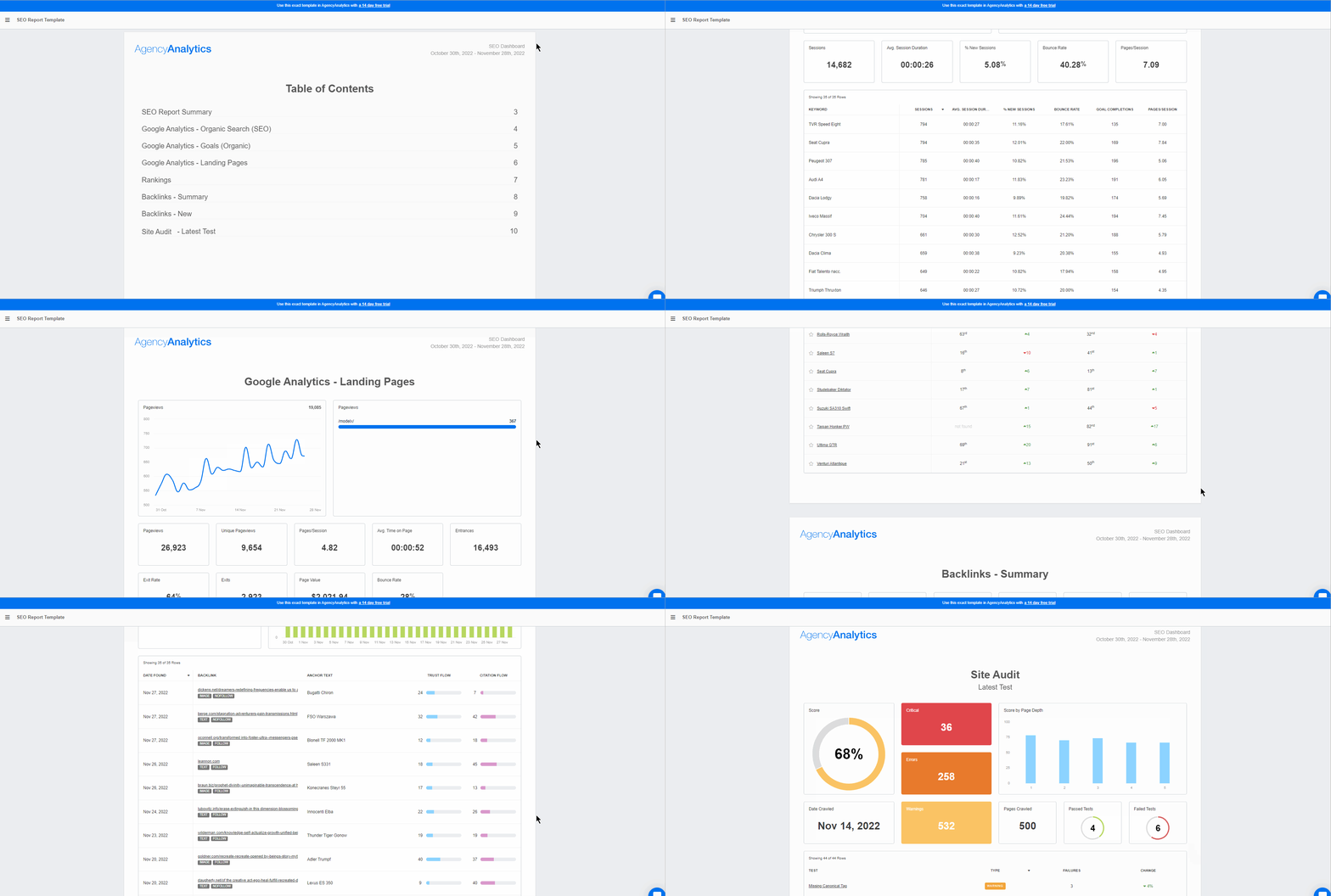
Access a range of time-saving features on AgencyAnalytics and impress your clients with easy-to-understand reporting. Sign up for a free 14-day trial today!
Impress clients and save hours with custom, automated reporting.
Join 7,000+ agencies that create reports in under 30 minutes per client using AgencyAnalytics. Get started for free. No credit card required.

Already have an account?
Log inJoe is the co-founder and CEO of AgencyAnalytics, a marketing reporting platform used by more than 7,000 agencies. With experience creating multiple businesses, he thrives on tackling the challenges of sustainable growth and innovation.
Read more posts by Joe KindnessWhat other agency experts are reading

The Ultimate Google Ads Optimization Checklist [Guide & Tips]
The Google Ads Optimization Guide + Checklist includes everything your agency needs to make sure that your client’s campaigns are running as efficiently as possible.

Boost Your Client’s Website Performance With On-Page SEO Strategies
Craft the perfect on-page optimization strategy to boost your clients’ SERP rankings.

How to create SEO reports for clients that drive real results (+ 2026 template & examples)
Discover how to build client-ready SEO reports that highlight progress, reinforce strategy, and prove your agency’s value.